IT Offboarding Checklist: Free Template for Access, Devices and Shared Contacts

When someone leaves, IT has a short window to close their access before it becomes a risk, and a long tail of smaller jobs that are easy to forget. This checklist puts those jobs in order, with a free template you can copy for every leaver.
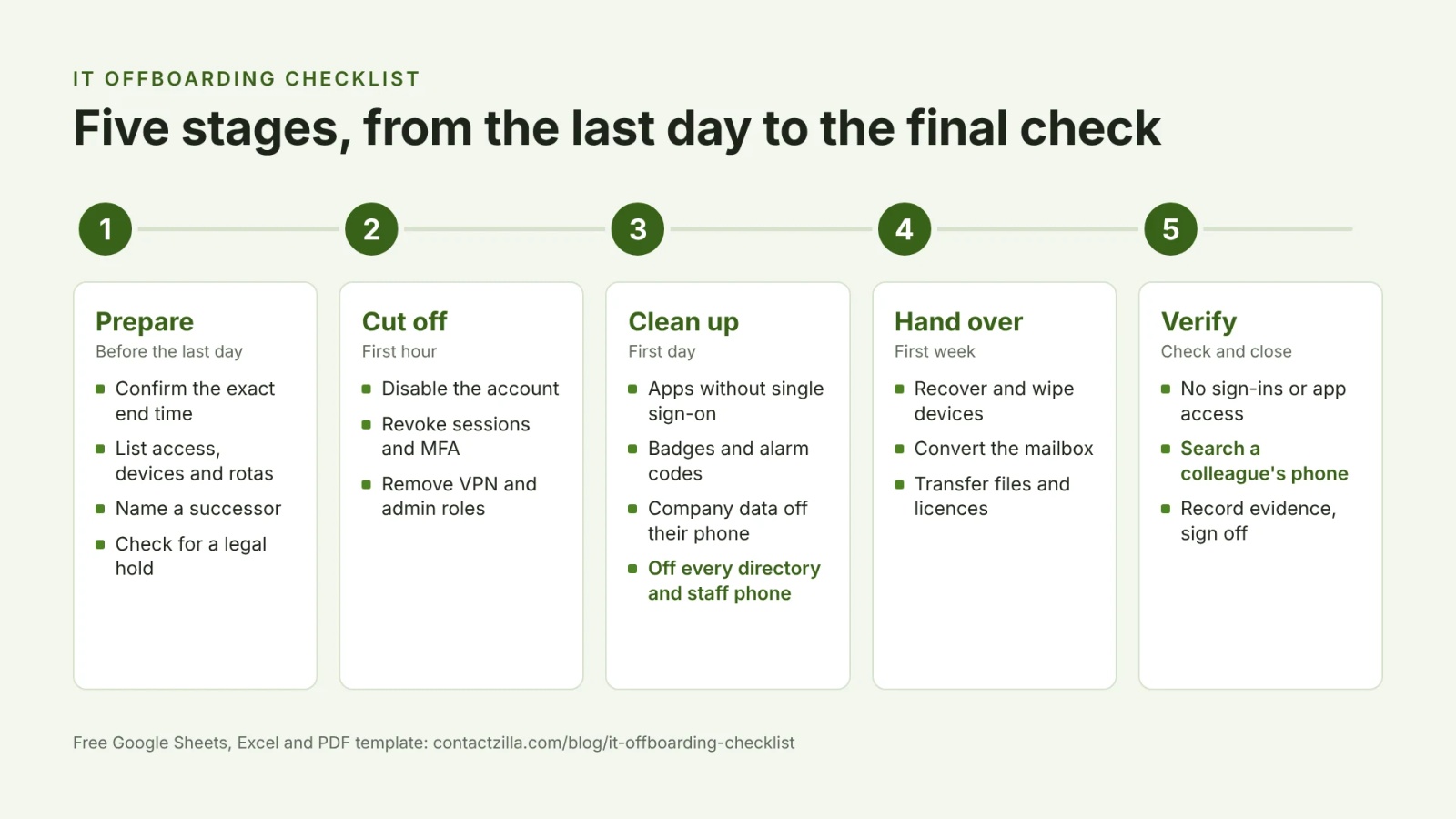
Short answer: An IT offboarding checklist is the timed list of tasks IT completes when someone leaves: revoke their access, secure company data on their devices, hand their files and accounts to a successor, and check that nothing was missed. Work in five stages: before the last day, the first hour, the first day, the first week, and a final check. Most checklists stop at accounts and laptops, so this one also covers phones: company data on the leaver's own phone, and their contact card on everyone else's.
Prefer Excel? Download the Excel version. For a printable copy, download the PDF checklist.
The IT offboarding checklist at a glance
These are the steps every leaver needs, in the order IT should do them. The sections below break each stage into tasks with an owner and the evidence to keep.
- Confirm the leaver, their last day and the exact time access should end.
- List their access, devices and the groups, rotas and call trees they belong to.
- Name a successor for their mailbox, files and any account only they control.
- Disable their directory account, but don't delete it yet.
- Revoke their active sessions, reset the password and remove MFA methods.
- Remove VPN, remote access and admin roles.
- Close accounts in apps that don't use single sign-on, and rotate shared passwords.
- Remove company data from their phone with the right MDM or account action.
- Take them out of every directory: the phone system, staff pages and shared contacts on staff phones.
- Recover and wipe devices, convert the mailbox, transfer files and reclaim licences.
- Check it worked: sign-in logs, app assignments, and a search for them on a colleague's phone.
- Record the evidence and get sign-off.
What IT has to remove when an employee leaves
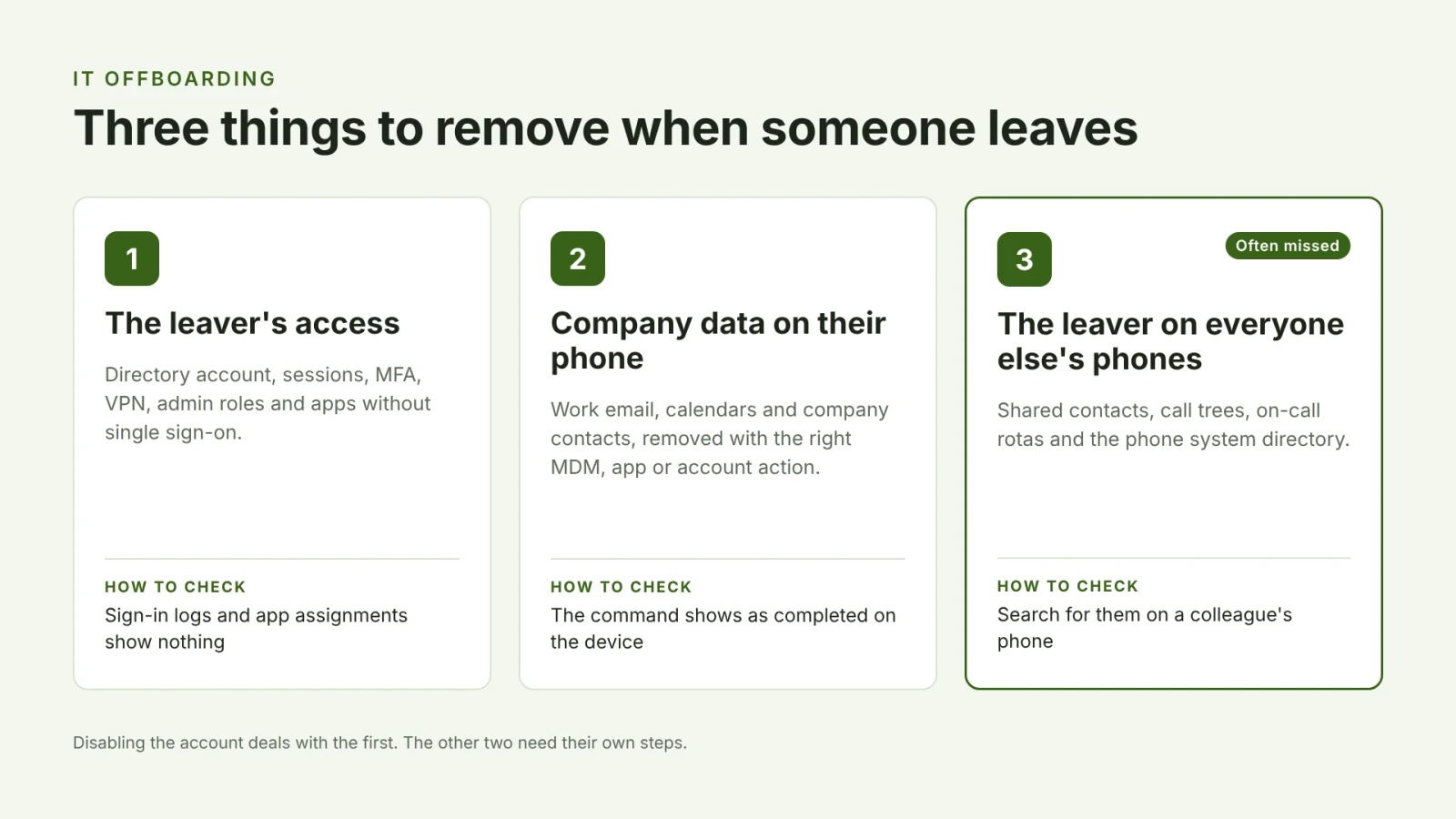
Offboarding is often treated as one job: disable the account. In practice there are three separate things to remove, and each has its own check. Disabling an account deals with the first and does nothing about the other two.
| What to remove | Example of what's left behind | How to check it's gone |
|---|---|---|
| The leaver's access | They can still sign in to Microsoft 365, a SaaS app or the VPN | Sign-in logs, app assignments and group membership |
| Company data on the leaver's phone | Work email, calendars or company contacts are still on their phone | MDM command status, or the account removed from the phone |
| The leaver on everyone else's phones | Colleagues still see and call them from the shared contacts on their phones | Search for the leaver on a colleague's phone |
Before the last day: prepare the IT offboarding
Preparation decides how fast the first hour goes. Build the access list from your identity provider and asset register rather than from memory, because the accounts people forget are the ones that stay open. If the departure is a dismissal, prepare everything here in advance so access can end at the moment the conversation happens.
| Task | Owner | Evidence to keep |
|---|---|---|
| Confirm the leaver, last day, exact time and type of exit (resignation, dismissal, transfer) with HR | HR + IT | Ticket with date and time |
| Pull the person's access list from your identity provider, SSO app list and asset register, not from memory | IT | Exported access list |
| List every device and item assigned to them: laptop, phone, tablet, security keys, badge, keys | IT | Asset list |
| Name a successor for their mailbox, files, and any system or subscription where they are the only admin or billing contact | Manager | Names recorded on ticket |
| Check for a legal hold or records retention rule before anything is deleted | HR or Legal | Hold decision noted |
| Note the groups, shared mailboxes, call trees and on-call rotas they belong to | IT | List on ticket |
First hour: disable sign-in, revoke sessions and remove MFA
Disable the account rather than deleting it, because deleting can take the mailbox and files with it before you've kept what you need. Disabling on its own isn't enough, though: a session that's already open can keep working. Microsoft's guidance for revoking user access in Microsoft Entra ID treats blocking new sign-ins and revoking refresh tokens as two separate steps, so do both.
| Task | Owner | Evidence to keep |
|---|---|---|
| Disable (don't delete) their directory account so it can't sign in | IT | Admin log entry |
| Revoke their active sessions and sign-in tokens | IT | Admin log entry |
| Reset the password to an unknown value and remove their MFA methods | IT | Admin log entry |
| Remove VPN, remote desktop and remote support access | IT | Change record |
| Remove admin and privileged roles | IT | Role change log |
First day: apps, building access, directories and phones
The first day covers everything that doesn't go through your identity provider: apps with their own logins, badges and alarm codes, and the directories people use to reach the leaver. It's also when company data comes off the leaver's phone, which depends on how that phone is managed (see the phone section below).
| Task | Owner | Evidence to keep |
|---|---|---|
| Disable accounts in apps that don't use single sign-on | IT | App list ticked off |
| Turn off building access: badge, keys, alarm codes | Facilities | Access system record |
| Remove them from distribution lists, groups and team chat channels | IT | Group change log |
| Take them out of every directory people use to call them: phone system, staff page, shared contacts on phones | IT | Directory search shows no result |
| Stop company email, contacts and calendars syncing to their phone (see the phone section below) | IT | Command or removal record |
| Set an auto-reply or forwarding that names a successor, with an end date | IT | Rule with end date |
First week: devices, mailbox, files and licences
With access closed, the rest can be done carefully. Check for a legal hold or records retention rule before converting the mailbox or deleting files, and transfer ownership before you remove the licence, not after.
| Task | Owner | Evidence to keep |
|---|---|---|
| Recover devices, then wipe or reimage them and update the asset register | IT | Asset status updated |
| Convert the mailbox to shared or inactive and apply your retention policy | IT | Mailbox type changed |
| Transfer ownership of their files, cloud drive, calendars and forms | IT | Transfer completed |
| Transfer SaaS admin and billing roles, then reclaim licences | IT | Licence count updated |
Check and close: verify the IT offboarding worked
A ticked box records that a command was sent, not that it worked. The final stage checks the end result: no sign-ins, no app assignments, and no sign of the leaver on a colleague's phone. Searching Contacts on one colleague's phone takes a minute and catches a directory that hasn't caught up.
| Task | Owner | Evidence to keep |
|---|---|---|
| Check no access is left: sign-in logs, app assignments, group memberships | IT | Report or screenshot |
| Check a colleague's phone: search Contacts for the leaver and confirm they're gone | IT | Screenshot of empty search |
| Record the evidence for each step and get sign-off from the manager or security lead | IT manager | Signed-off ticket |
| Note anything missed and add it to this checklist | IT | Checklist updated |
Phone offboarding: MDM, BYOD and phones without MDM
Most offboarding checklists say "wipe the phone". What you can actually do depends on who owns the phone and how it's managed, and the right action for a company iPhone is the wrong one for a personal Android.
| Phone | What to do | What to avoid |
|---|---|---|
| Company-owned and managed by MDM | Retire it to remove company data, or wipe it if it's being reissued or wasn't returned | Wiping before you've checked for a legal hold |
| Personal Android with a work profile | Remove or wipe the work profile; personal apps and data stay | Asking for a factory reset of someone's own phone |
| Personal iPhone with User Enrollment | Unenrol it to remove the managed apps and data | Treating it like a supervised company phone |
| Managed by app only (no MDM) | Selective wipe of company data in Outlook, Teams and other protected apps | Assuming you can send device commands |
| Set up by hand, no MDM | Cut the accounts off at the server, remove company contacts where your service supports it, and ask the leaver to delete the profile | Promising you can remove a hand-installed profile remotely |
In Microsoft Intune, Retire removes company data, managed apps and the management profile and leaves personal data in place, while Wipe is a factory reset. For phones managed by app only, Intune's selective wipe removes company data from protected apps the next time the app opens. Jamf Pro's remote commands use different names for similar actions, so check your own MDM's terms before you write them into your checklist.
Personal phones need a lighter touch. An Android work profile keeps work apps and data apart from personal ones, so removing it clears the work side only. On iPhones that aren't supervised, Apple says users can remove configuration profiles they installed by hand, but you can't remove those remotely without MDM. That's why the no-MDM row cuts access off at the server first.
Tip 💡 Still choosing between company-owned and personal phones? BYOD vs COPE covers what each means for managed apps and data.
Removing a leaver from shared contacts on staff phones
Shared contacts are the part of offboarding most checklists miss, and there are two sides to it. The leaver's phone may still hold the company directory, and every colleague's phone may still hold the leaver. A former manager still listed in the site team's contacts, or a school's call tree still ringing someone who left in the summer, is the kind of thing nobody notices until it matters.
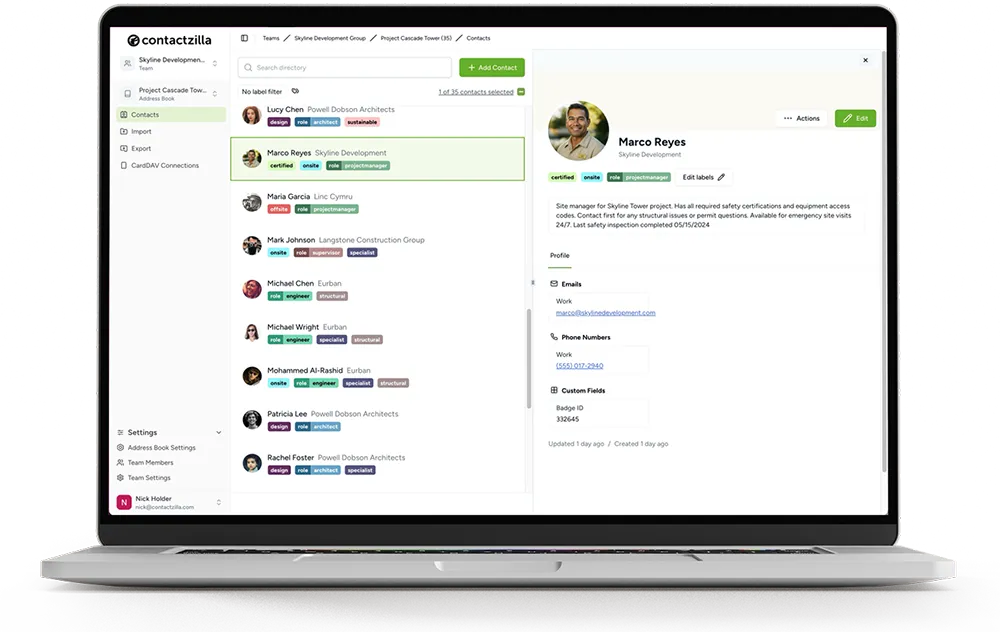
Contactzilla is a shared address book service that syncs company contacts into the native Contacts app on staff iPhones and Android phones, deployed through an MDM or without MDM by QR code. Here's how each side of offboarding works with it.
Take the leaver off everyone else's phones
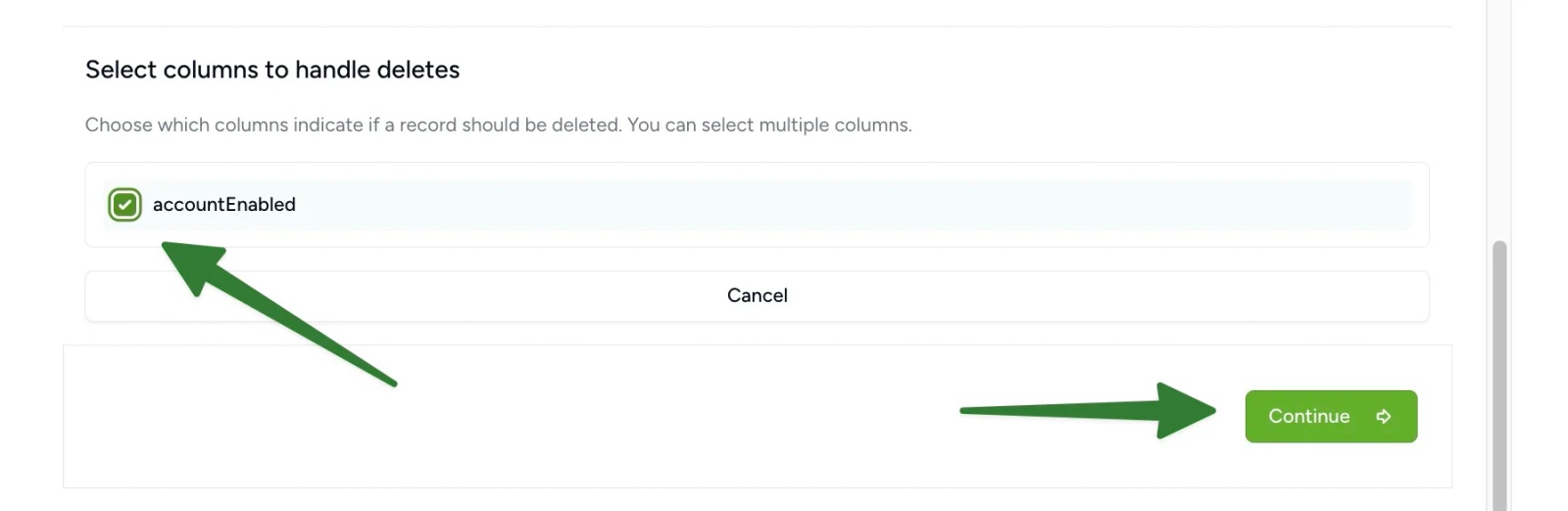
If your address book is synced from Microsoft Entra ID, the Entra ID importer can remove contacts whose Entra account is disabled. You turn this on once, when you set up the import, by choosing to handle deletes and picking the accountEnabled column. From then on, disabling a leaver's account in Entra removes them from the address book at the next scheduled import, and from staff phones at their next sync. If the same address book also holds contacts from other sources, label the import so only directory leavers are removed, as explained in re-importing without duplicates.
An address book webhook can tell another app, such as a Microsoft Teams channel, when contacts change. An Entra sync reports as one bulk change rather than naming each person, so a named leaver alert needs a lookup through the Contactzilla API.
Remove company contacts from the leaver's phone
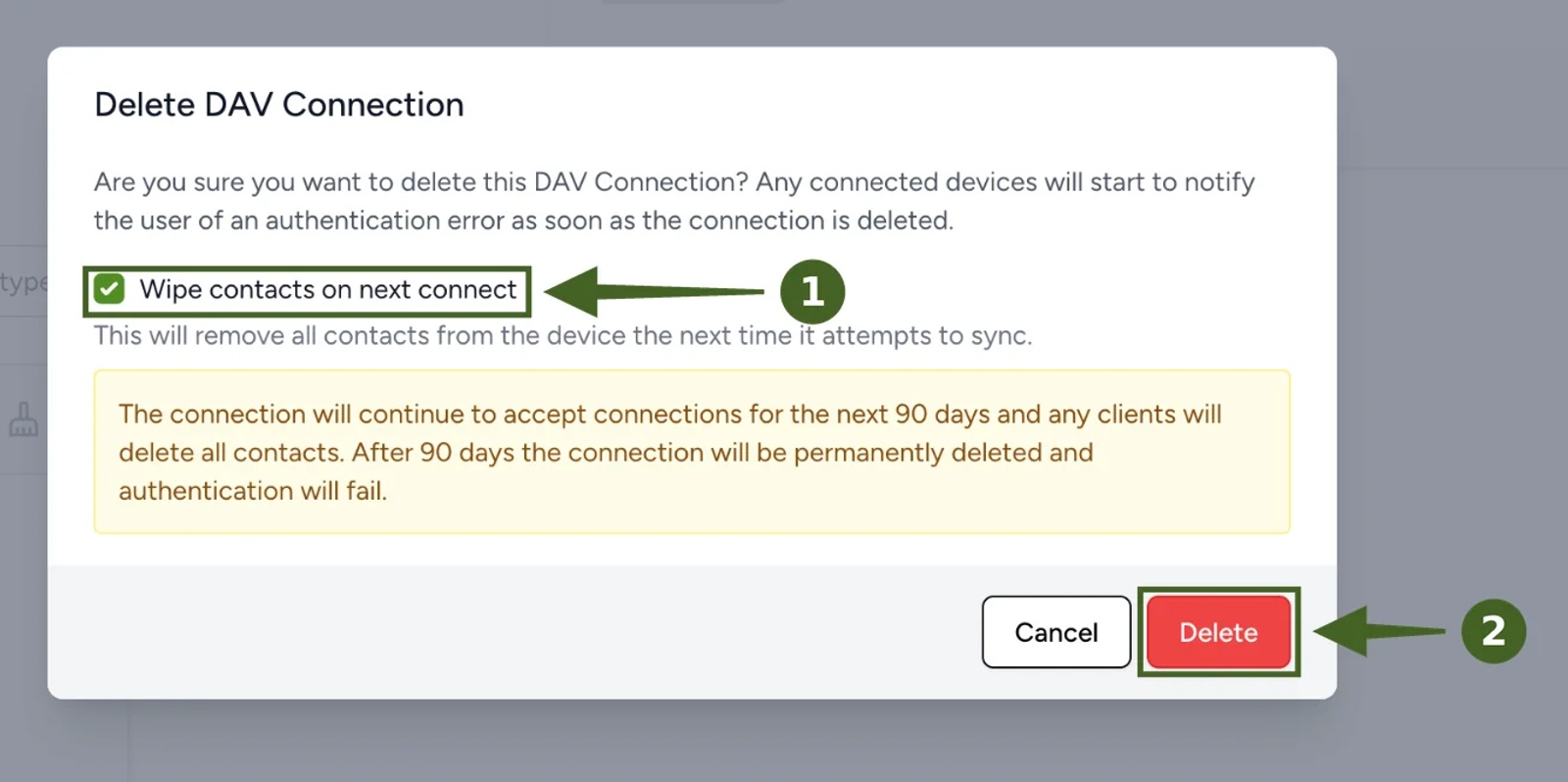
On MDM phones, removing the device or user from the group that receives the contacts profile removes the company contacts with it. On phones set up by QR code without MDM, delete the leaver's device connection and tick Wipe contacts on next connect: the company contacts are removed the next time the phone syncs, as shown in setting up phones without MDM. If several phones share one device connection, deleting it wipes all of them, so give each person their own connection if you'll need to remove people one at a time.
If your team uses single sign-on with SCIM provisioning from Microsoft Entra ID, a leaver who is disabled or unassigned in Entra is removed from the Contactzilla team at the next sync, and their own device connections are deleted with a wipe at the same time.
Whichever way a leaver is removed, the check is the same: search for them on a colleague's phone. In our test, we deleted a leaver from a shared Staff Directory address book, and within about three minutes a search for their name on a colleague's iPhone came back empty. Tested on an iPhone 15 running iOS 27, October 2026.
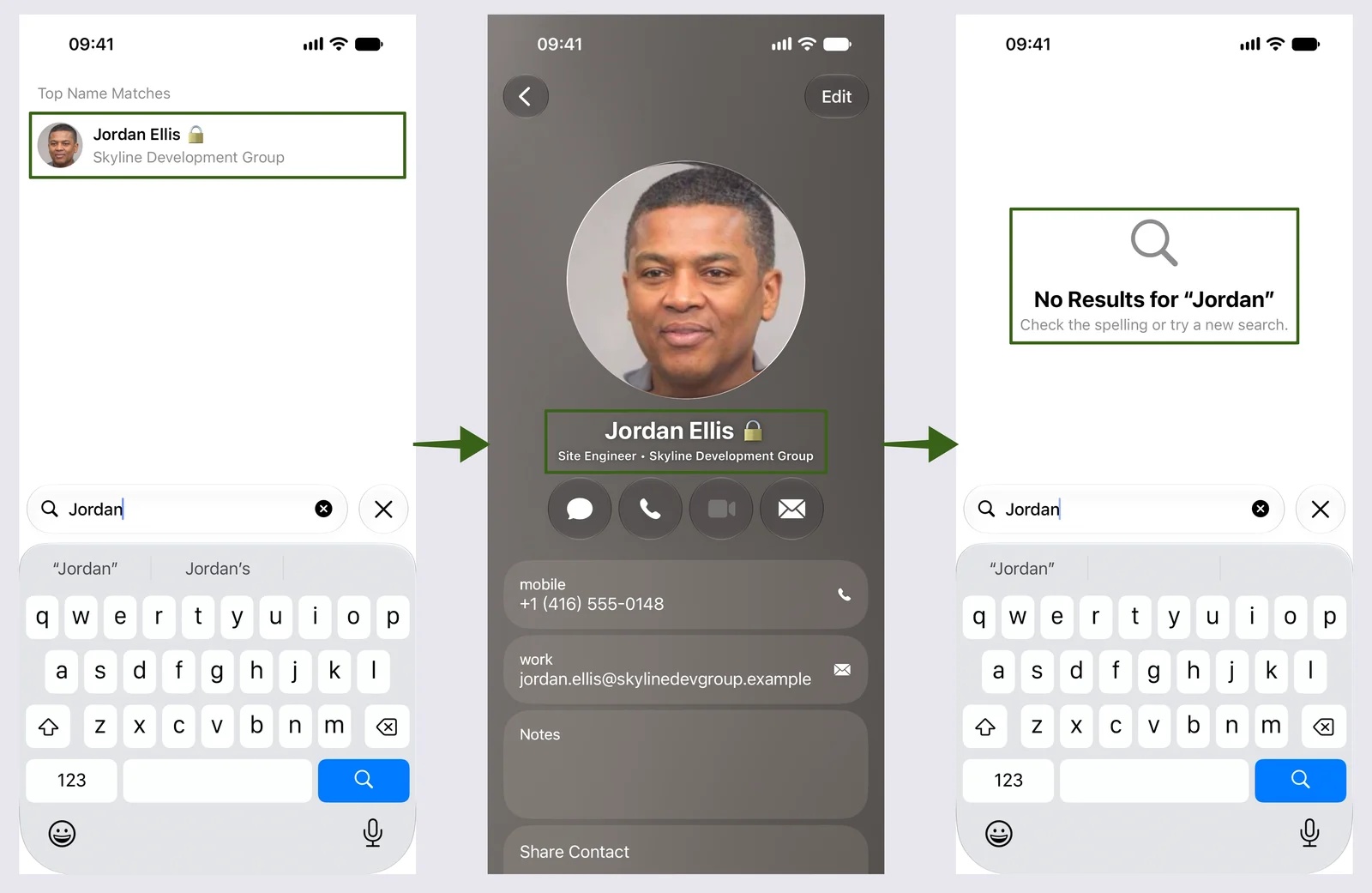
Tip 💡 Want to see it happen? Our video Wipe-On-Next-Connect shows company contacts being removed from a phone when its device connection is deleted.
Microsoft 365 and Google Workspace offboarding: disable, suspend or delete
Microsoft 365 and Google Workspace both separate stopping someone's access from deleting their data, and neither removes data from a phone on its own. The table shows what each common action does.
| Action | Their account and data | Data already on their phone |
|---|---|---|
| Disable the account in Microsoft Entra ID | Kept; new sign-ins are blocked | Not removed; revoke sessions and use your MDM or app protection |
| Revoke sessions in Microsoft Entra ID | Kept; refresh tokens are revoked | Not removed; apps have to sign in again and fail |
| Suspend the user in Google Workspace | Kept, including mail, files and calendars | Not removed; wipe the account from their mobile devices |
| Retire the phone in Microsoft Intune | Not affected | Company data and managed apps removed; personal data stays |
| Delete the account | Deleted after your provider's recovery period | Not removed by deletion alone |
Google says that suspending a user keeps their email, documents and calendars, so suspension is the Google equivalent of disabling. In both systems, transfer the files and convert or keep the mailbox before you delete the account.
Offboarding rules for HIPAA, CJIS, FERPA and public records
Plenty of checklists quote deadlines that the rules don't actually set. Here's what the main US rules say about leavers, and the claims to be careful with.
| Rule | What it requires | Be careful with |
|---|---|---|
| HIPAA (healthcare) | Procedures for ending a workforce member's access to electronic health information when their employment ends | "HIPAA requires removal within 24 hours": the current rule sets no fixed number of hours |
| CJIS (police and public safety) | Access to criminal justice information ends immediately when employment ends | Assuming this only covers the main login; include mobile access and tokens |
| FERPA (schools) | Reasonable methods so staff only access student records they have a legitimate interest in | "FERPA has a same-day deletion rule": it doesn't name a deadline |
| Public records (state and local government) | Keep records under your own retention schedule | Deleting a mailbox before checking the schedule or a legal hold |
| SOC 2 | Operating, and showing evidence of, the access controls you say you have | "SOC 2 requires removal within one hour": the timing is your own control |
Sources: 45 CFR 164.308 for HIPAA, the FBI's CJIS Security Policy, and 34 CFR 99.31 for FERPA. This isn't legal advice: check your own policies and the rules that apply to you.
How to use the free IT offboarding checklist template
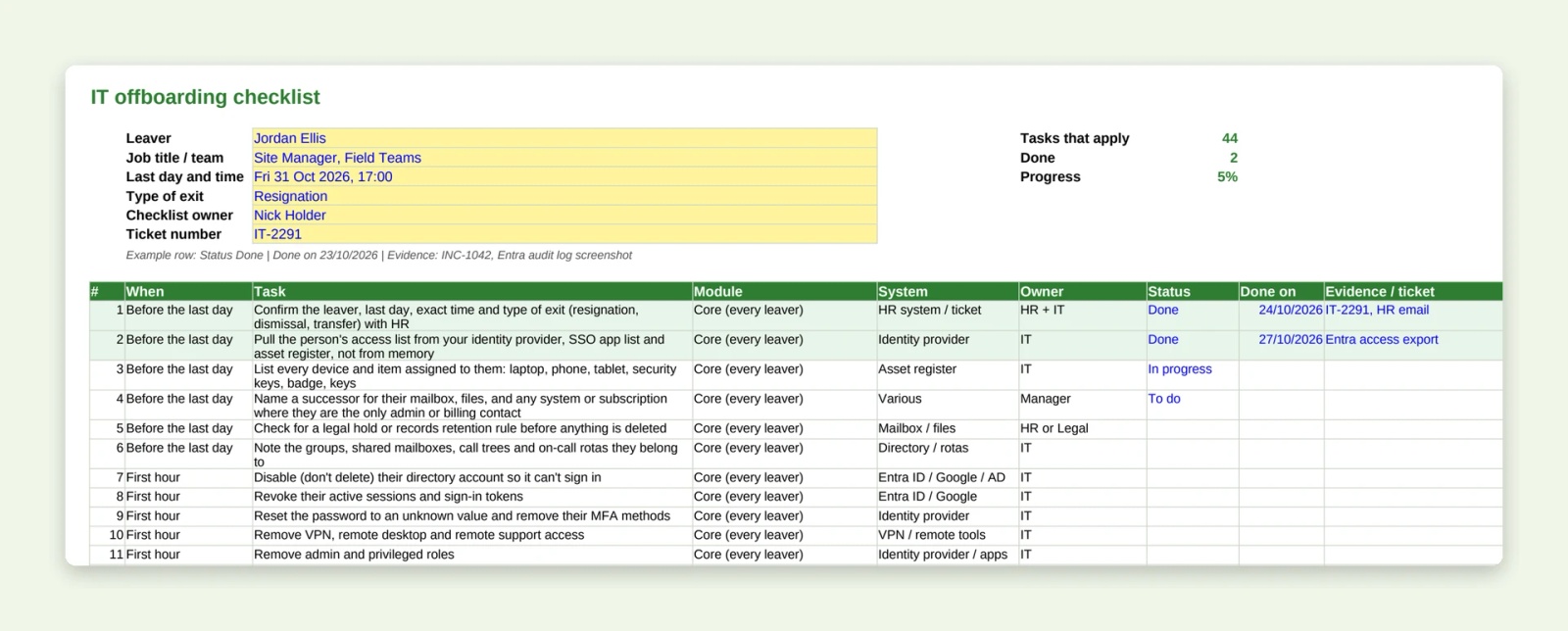
The template holds the same tasks as this page, plus each module, in one Google Sheet. Make a copy, answer the questions on the Setup tab, and the Your checklist tab shows only the tasks that apply, in time order. Then save a copy for each leaver and fill in the status, the date and where the evidence is.
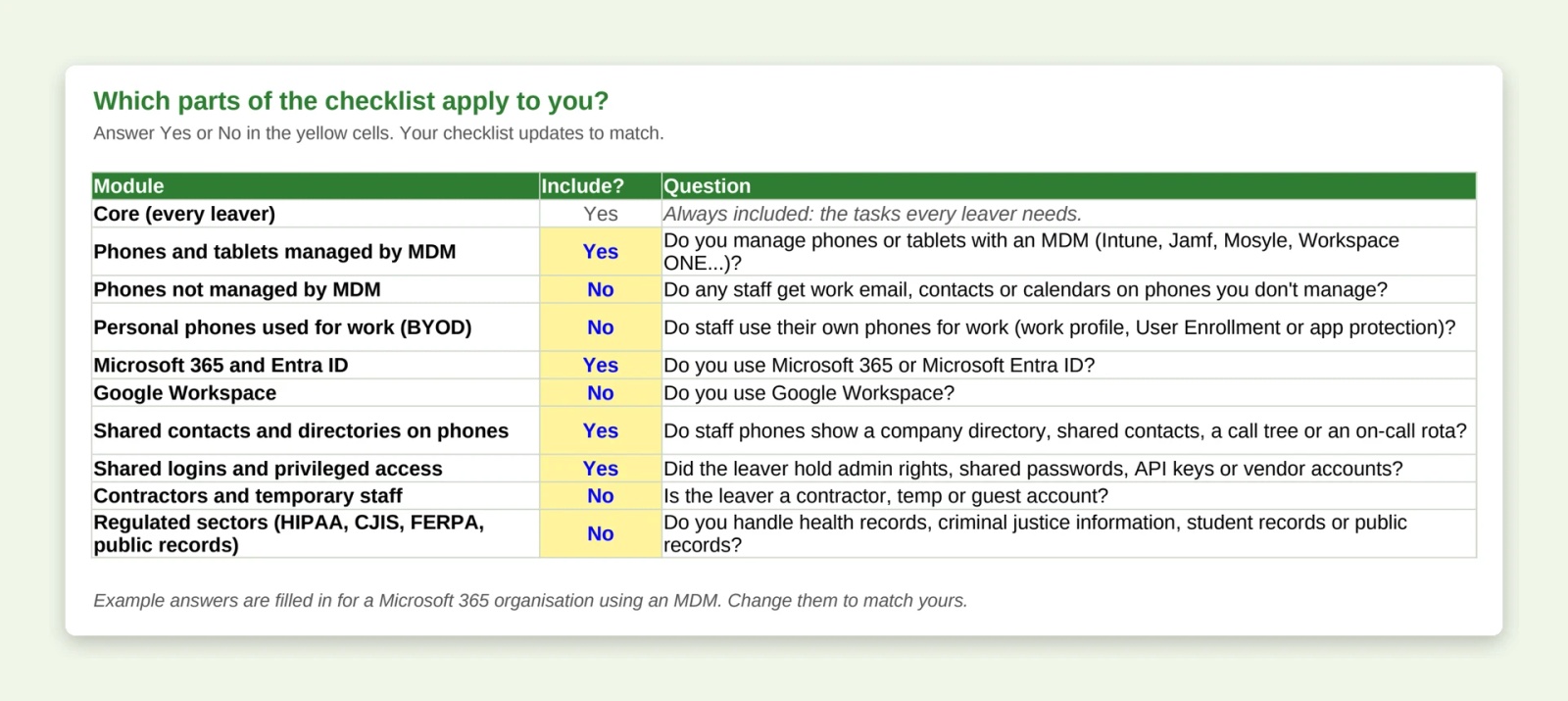
- Modules: phones managed by MDM, phones without MDM, personal phones (BYOD), Microsoft 365 and Entra ID, Google Workspace, shared contacts and directories on phones, shared logins and privileged access, contractors, and regulated sectors.
- Columns: when, task, module, system, owner, status, date done, evidence and notes.
- Evidence: auditors ask for proof, not a tick, so note the ticket number, log entry or screenshot for each task.
- Your own tasks: add rows on the All tasks tab and they flow through to the checklist.
How we built this IT offboarding checklist
We reviewed the IT offboarding checklists ranking in US search in October 2026, listed every task they cover, and checked the device and identity steps against Microsoft, Google, Apple and Jamf documentation. Most cover accounts and laptops well. Few separate retiring a phone from wiping it, and none we found covered taking the leaver off colleagues' phones, which is the part we work on every day. Last reviewed October 2026.
Next steps
- How to put Contactzilla contacts on phones without MDM: set up, and remove, company contacts on phones set up by QR code.
- Import contacts from Microsoft Entra ID: including removing disabled accounts automatically.
- Sync the Global Address List to iPhone Contacts: put your directory on staff phones with caller ID.
- Use webhooks to tell other apps when contacts change: send directory changes to Teams or another app.
Frequently Asked Questions
Should you disable or delete a leaver's account?
Disable it first. Deleting an account can remove the mailbox and files before you've transferred or kept them, and it destroys the trail you may need later. Disable the account, revoke sessions, transfer the data, check for a legal hold, then delete it under your retention policy.
How quickly should IT remove a leaver's access?
At the moment employment ends, and for a dismissal at the same time as the conversation. Most rules don't set a number of hours, but CJIS says access to criminal justice information must end immediately. Record the time access ended so you can show it later.
Does disabling a Microsoft 365 account remove email from their phone?
No. Disabling the account blocks new sign-ins, but mail, calendars and contacts already on the phone stay until you remove them. Revoke sessions, then use your MDM to retire or wipe the phone, or app protection to wipe company data from Outlook.
How do I remove an ex-employee from the contacts on staff phones?
Remove them from the shared contact list that syncs to staff phones, and the phones drop them at their next sync. If your shared contacts are synced from your directory, set the sync to remove disabled accounts so leavers go automatically. Then search for them on a colleague's phone to check.
What's the difference between retire and wipe in Intune?
Retire removes company data, managed apps and the management profile, and leaves personal data on the phone. Wipe is a factory reset that removes everything. Use retire for personal phones and company phones that stay with the user, and wipe for company phones being reissued, lost or not returned.
Is there a free IT offboarding checklist template in Excel?
Yes. Our template comes as a Google Sheet you can copy, an Excel file and a printable PDF, with no sign-up. Its Setup tab hides the modules you don't need, such as BYOD or Google Workspace, so each leaver gets a shorter list.
Who owns offboarding, HR or IT?
Both. HR starts the process and owns the employment side, such as the last day, pay and the exit interview. IT owns access, devices and data. Name one person to close the checklist, because the tasks that get missed are usually the ones between the two teams.