Microsoft Shared Contacts That Just Work
Sync Microsoft 365 and GAL contacts to iPhone with full caller ID. Read-only, automatic updates, no user setup required.
Microsoft 365 Global Address List on Every Device
Sync Microsoft 365 & Outlook contacts to iOS and Android
Secure Read-Only Shared Contacts
Prevent unwanted edits to Microsoft 365 contact data
Built for MDM Deployment at Scale
Deploy via your favourite MDM, or QR — no end-user training
Built for Microsoft 365 IT teams who need reliable contact sync
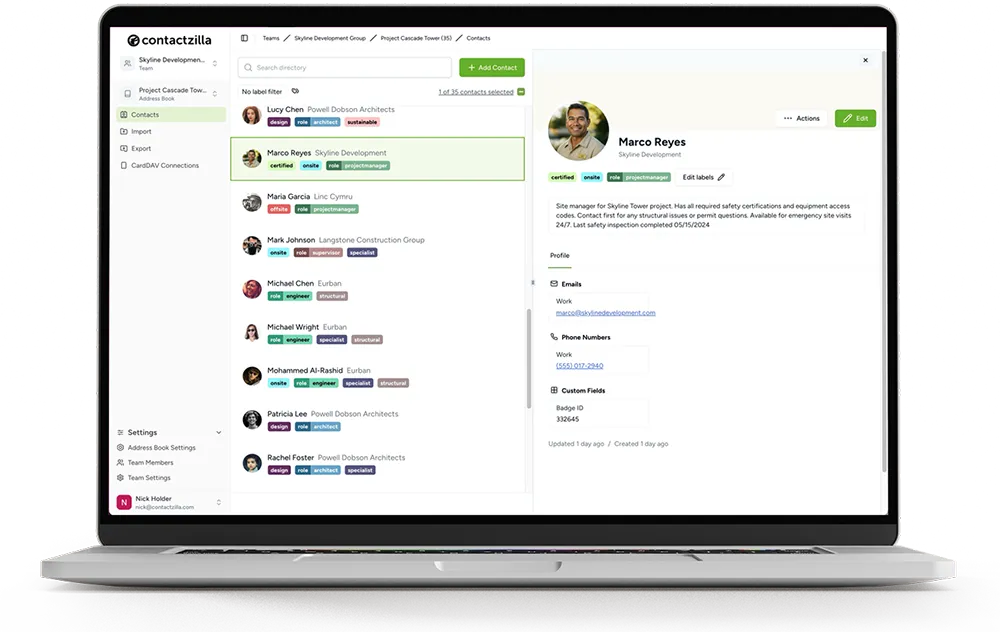
One setup pulls your Microsoft 365 Global Address List into Contactzilla and syncs a secure, read-only contact list to staff iPhones — via MDM or QR.
Syncs to the native Contacts app on iPhone
Works with caller ID, search, messaging, and every built-in iOS feature — no Outlook app required
Deploy via MDM or QR code
Push configuration profiles through your MDM, or set up individual devices instantly.
Lock down lists with read-only access
Keep Microsoft 365 contact lists accurate by preventing accidental edits or deletions.
What Is a Microsoft 365 Shared Contact List?
A single, centrally managed address book that stays instantly updated on every staff phone.
A Microsoft 365 shared contact list (often built from your Outlook or Global Address List) gives your organisation one reliable source of truth for company contact details.
Instead of storing contacts separately on each device — or relying on manual exports from Outlook — the list is managed once and automatically synced to staff iPhones and Android devices.
With a Microsoft 365 shared contact list, every team member sees the same accurate contact information — always up to date on iOS and Android.
This helps prevent:
- • Outdated company contacts stuck on individual phones
- • Staff creating their own inconsistent contact lists
- • Missing or duplicated contacts during onboarding or offboarding
- • Security issues caused by contacts being edited or deleted on devices
Why Teams Sync Microsoft 365 Contacts
Consistent information
Every device pulls from the same Microsoft 365 contact source
Faster workflows
Staff always have the right numbers without searching or guessing
No manual updates
Changes made in Microsoft 365 sync automatically to every phone
Stronger security
Read-only contact lists prevent accidental edits or deletions
Simpler onboarding
New staff get the full company contact list on day one
Instant offboarding
Remove access to company contacts in seconds
Sync Microsoft 365 / GAL Contacts in 3 Simple Steps
Import your GAL contacts directly from Microsoft 365
Import your contacts directly from Microsoft 365 and Entra ID into Contactzilla
Create the device connection
Choose which contacts and devices, configure permissions. One dashboard, all the control you need.
Sync to staff iPhones automatically
Push profiles via MDM or QR. Contacts appear in the native Contacts app with full caller ID.
From field staff to head office, everyone gets the right contacts securely
“Contactzilla has made it super easy for us to deploy and update critical team contacts automatically via MDM or manually via email — and locking the lists means crews in the field always have the right information without risk of accidental changes.”
Sam Simanjuntak
Central Pierce Fire & Rescue
“Contactzilla has added the ability to synchronize and share critical contacts across our field devices — ensuring consistent access for those delivering care in fast-moving situations. It's been a perfect addition to our MDM setup.”
Sean Skaugen
North Hayes County EMS
SOC 2
Certified
HIPAA
Compliant
EU Data Privacy
GDPR
Simple, Transparent Pricing
Volume pricing that scales with your team. Unlimited users, address books, and contacts.
MDM 1
MDM 2
MDM 3
For 2000+ devices please contact us for enterprise pricing.
Frequently Asked Questions
Does it sync from Microsoft 365 automatically?
Yes. Contactzilla connects to your Microsoft 365 tenant and imports your Global Address List. Changes sync automatically.
Do users need the Outlook app?
No. Contacts sync to the native iOS and Android contacts apps via CardDAV. No Outlook app required.
Can I set contacts to read-only?
Yes. Lock address books so staff can view and call but cannot edit or delete company contacts.
Which MDM platforms work?
Microsoft Intune, Jamf, Kandji, VMware Workspace ONE, and any MDM that supports iOS configuration profiles.
How quickly do changes sync?
Changes in Microsoft 365 typically sync to devices within minutes.
Is there a free trial?
Yes — 14 days, full access, no credit card required.