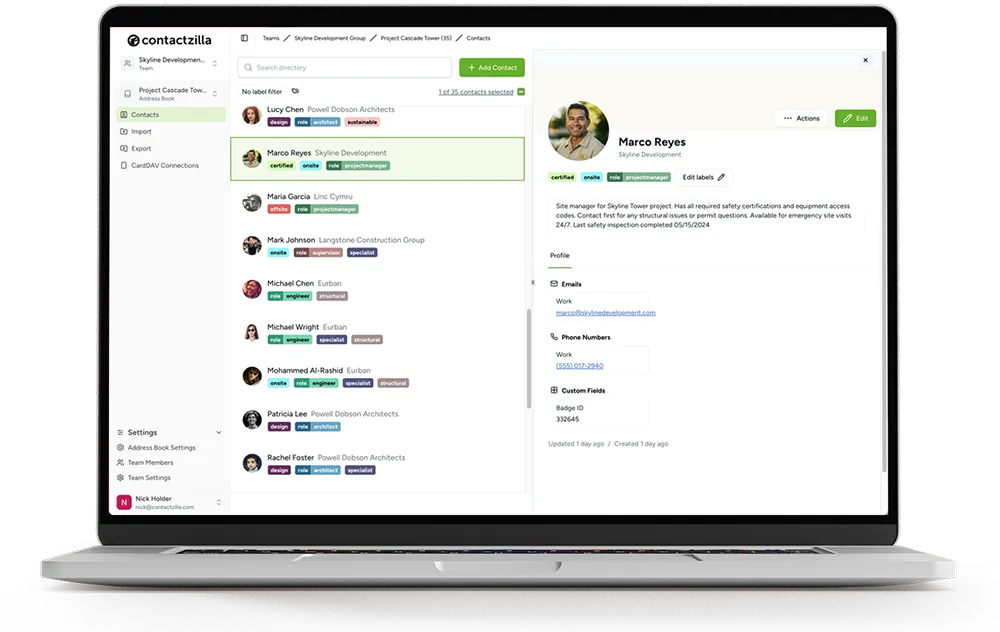
Employee Directory App: The Staff Directory in Every Phone's Contacts

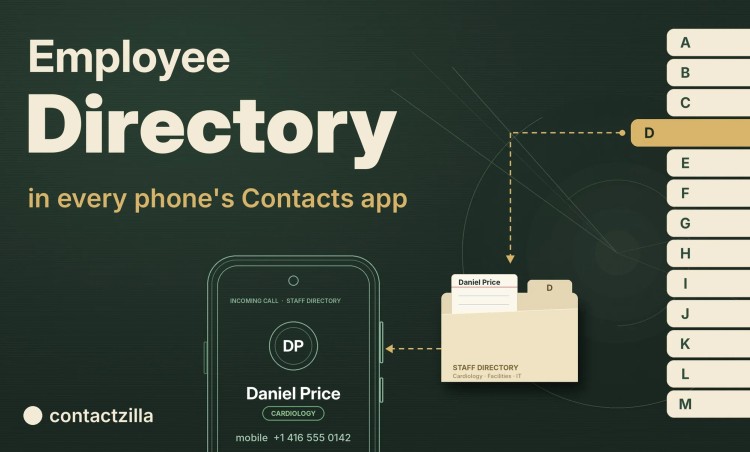
"Employee directory app" can mean two different things. Some teams want a people directory: employee profiles, photos, an org chart, who knows what. Others want the staff list in every work phone, so colleagues can call each other and see who's ringing.
Short answer: If you need employee profiles and an org chart, you want employee directory software, such as an intranet or HR platform.
If staff need to call each other and see who's ringing, put the directory in each phone's own Contacts app as a read-only address book, delivered by your MDM, such as Intune or Jamf. The Global Address List and Google Workspace Directory can only be searched, so they don't do this.
Contactzilla is a phone-contacts staff directory that does the second job: it imports staff from Microsoft Entra ID, Google Workspace or a CSV, keeps the list current, removes leavers, and gives each department only its own contacts.
Which employee directory app do you need: people search or the phone's Contacts?
Here's how the two compare, with a search of the GAL or Google Workspace Directory alongside, since that's what many teams try first.
| What staff get | Employee directory software (intranet or HR platform) | GAL or Google Workspace Directory search | Directory synced into the phone's Contacts |
|---|---|---|---|
| Where it lives on the phone | Its own app or a web page | Outlook, Gmail, or a search in Contacts | The built-in Contacts and Phone apps |
| Names on incoming calls (caller ID) | Not usually | No | Yes |
| Browse a list, use offline | Depends on the app | No: search only, online | Yes |
| Employee profiles, org chart, skills | Yes, its main strength | Basic fields | Contact details only |
| Kept current | Synced from the HR system | Always current | Synced on a schedule from the source |
| New app for staff to learn | Yes | No | No |
Employee directory software, such as a SharePoint employee directory, org chart software or an HR platform, is the better tool when HR teams want searchable profiles, an organisational hierarchy, or employee engagement and a better employee experience for hybrid teams and large organisations. A directory in the phone's Contacts is the better tool when staff need to call each other: caller ID, offline use and nothing new to open. The two can run side by side, and the rest of this guide covers the second job.
Key definitions: employee directory, phone-contacts staff directory, GAL and CardDAV
Employee directory: an organisation's list of its people and their contact information, usually drawn from the HR system or identity provider, and also called a staff directory, company directory or internal employee directory.
Phone-contacts staff directory: a phone-contacts staff directory, such as Contactzilla, is an employee directory delivered into each work phone's built-in Contacts app as a managed, read-only address book, by MDM or QR code, so calls from colleagues show their names.
Global Address List (GAL): the directory of everyone with an Exchange or Microsoft 365 mailbox, searchable from Outlook and from Exchange accounts on phones. It's built from Microsoft Entra ID, Microsoft's identity provider, formerly Azure Active Directory (Azure AD).
CardDAV: the standard protocol iPhones use to sync a contacts account from a server. Our guide to what CardDAV is explains how it works.
Why don't the GAL and Google Workspace Directory show in iPhone and Android Contacts?
Both directories are built for looking people up, and neither stores them on the phone. Apple's deployment guide says iPhones retrieve contact information from the Exchange Global Address List when you search Contacts. The GAL isn't copied into the phone's Contacts. Google Workspace behaves the same way: a Workspace account on a phone syncs each person's own contacts, and the Directory has to be searched.
Outlook's contact sync doesn't fill the gap. Microsoft's page on saving Outlook contacts to the iOS Contacts app covers the contacts in your own Outlook account and doesn't mention the GAL. On Android, our own test found Outlook can also sync a shared mailbox's contacts that a user has added in Outlook, but still not the organisation's directory. On Intune-managed phones, the Sync policy managed app data with native apps setting can stop Outlook writing contacts at all. So when a colleague who isn't saved on the phone calls, the screen shows only their phone number.
What should an employee directory app do on managed staff phones?
When the requirement is "staff can reach each other from their work phones", this is the checklist we'd use, whatever tool you pick:
- Caller ID: a colleague's name shows on the incoming call instead of a bare phone number.
- Search where staff already look: name, job title and department, from Contacts and the Phone app, with mobile access offline.
- Current without manual updates: new employees appear and leavers disappear without anyone editing a contact list by hand.
- Read-only: staff can call, text and email colleagues but can't change or delete them.
- The right people and the right fields: departments, device groups and office locations each get only their own contact details, and personal mobiles and other sensitive information from the HR record stay off the phones.
- Shared and role phones, iPhone and Android: it works on phones nobody signs in to, on both platforms.
How does a staff directory get from Entra ID, Google Workspace or a CSV into iPhone and Android Contacts?
A staff directory reaches the phones in four parts:
1) Source: the HR system or identity provider (Microsoft Entra ID, Google Workspace), or a CSV export, holds the employee data.
2) Address book: a central address book imports that employee information on a schedule, with labels for departments or roles.
3) Device connection: your MDM, or a QR code, puts a read-only contacts account on each phone.
4) Phone: staff find colleagues in Contacts and the Phone app, and see their names on incoming calls.
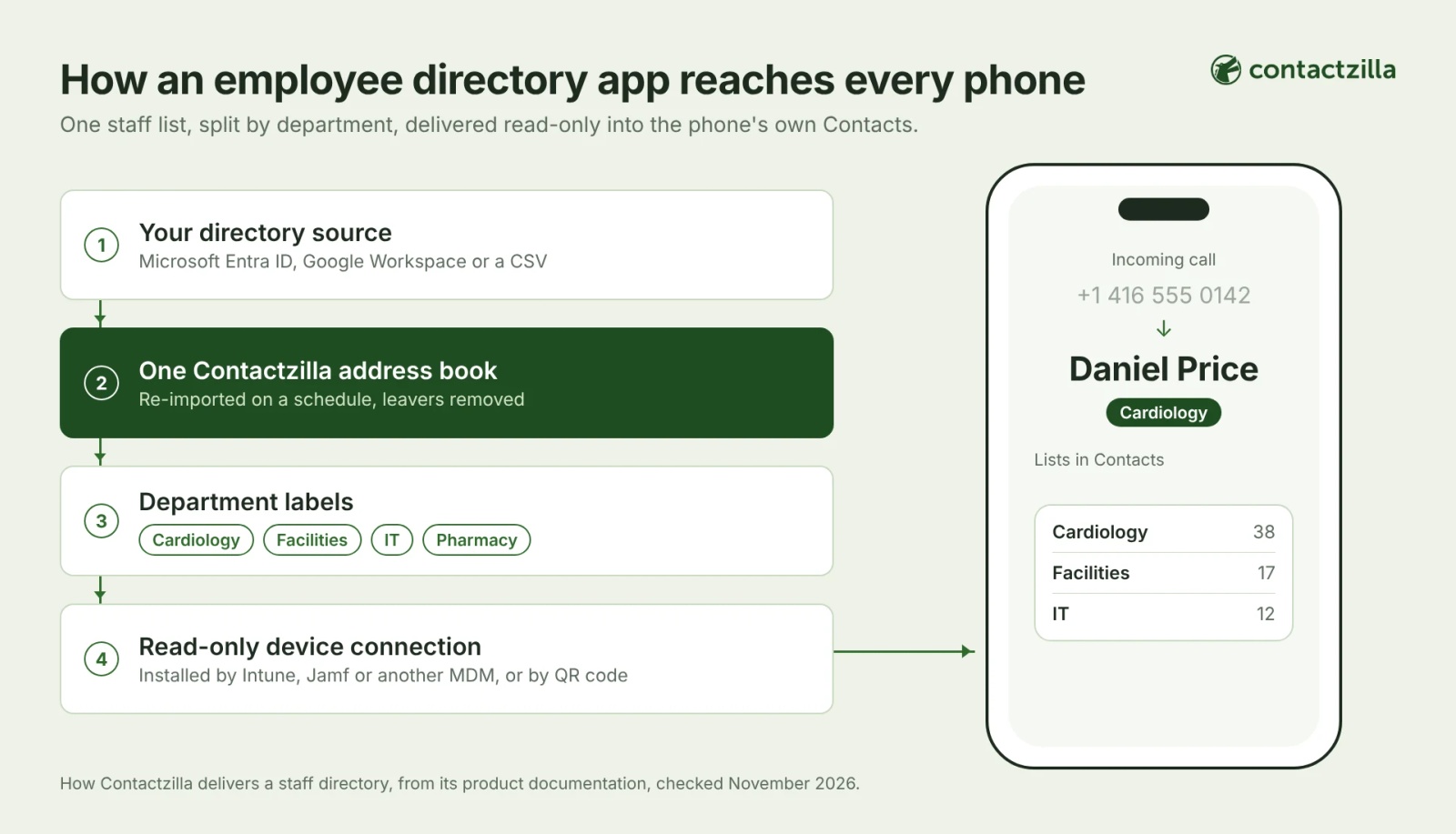
Contactzilla's importers for Microsoft Entra ID and the Google Workspace Directory pull your users into one address book, the centralised database the phones read from, and re-run on a schedule such as daily. Entra groups and roles can become labels as they import. A CSV works too, for an HR export or a list that lives in neither system.
Next, decide what each phone gets. Full Read Only sends the whole address book. Selective Read Only sends only the contacts carrying the labels you pick, which is how one directory serves several departments. For data privacy, read-only connections can also be set to send fewer fields, and Hidden Custom fields never reach phones.
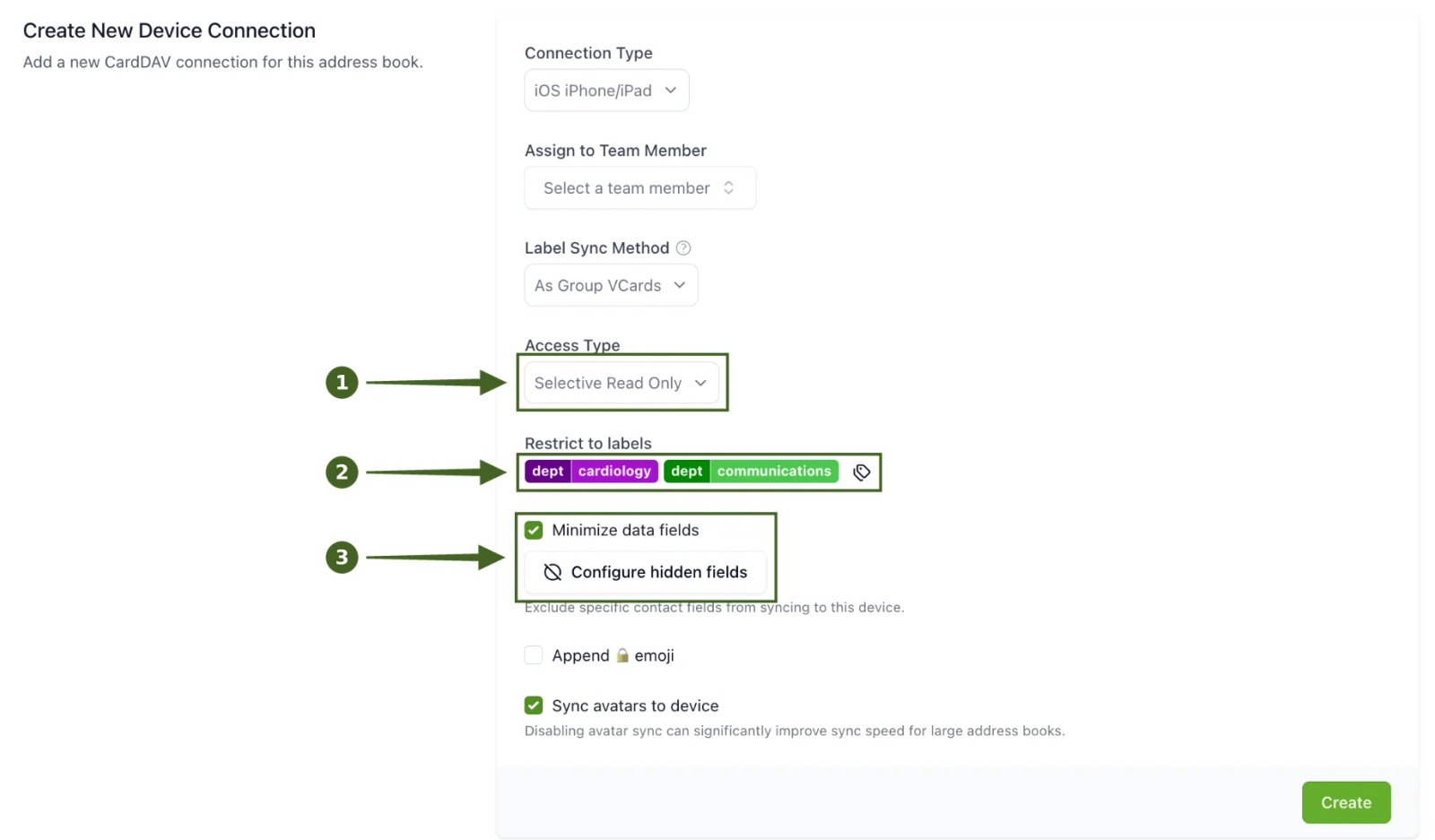
Your MDM then installs the read-only contacts account, with no sign-in for staff. On Android, the Contactzilla Sync app goes on alongside it and has to be opened once on each phone. Teams without an MDM can scan a QR code instead.
Tip 💡 Step-by-step guides for each platform: Intune for iPhone, Intune for Android, Jamf Pro, Mosyle, and phones without MDM by QR code.
On the phone, the directory appears as its own account in Contacts, each label shows as a list staff can open, and calls from colleagues show their names.
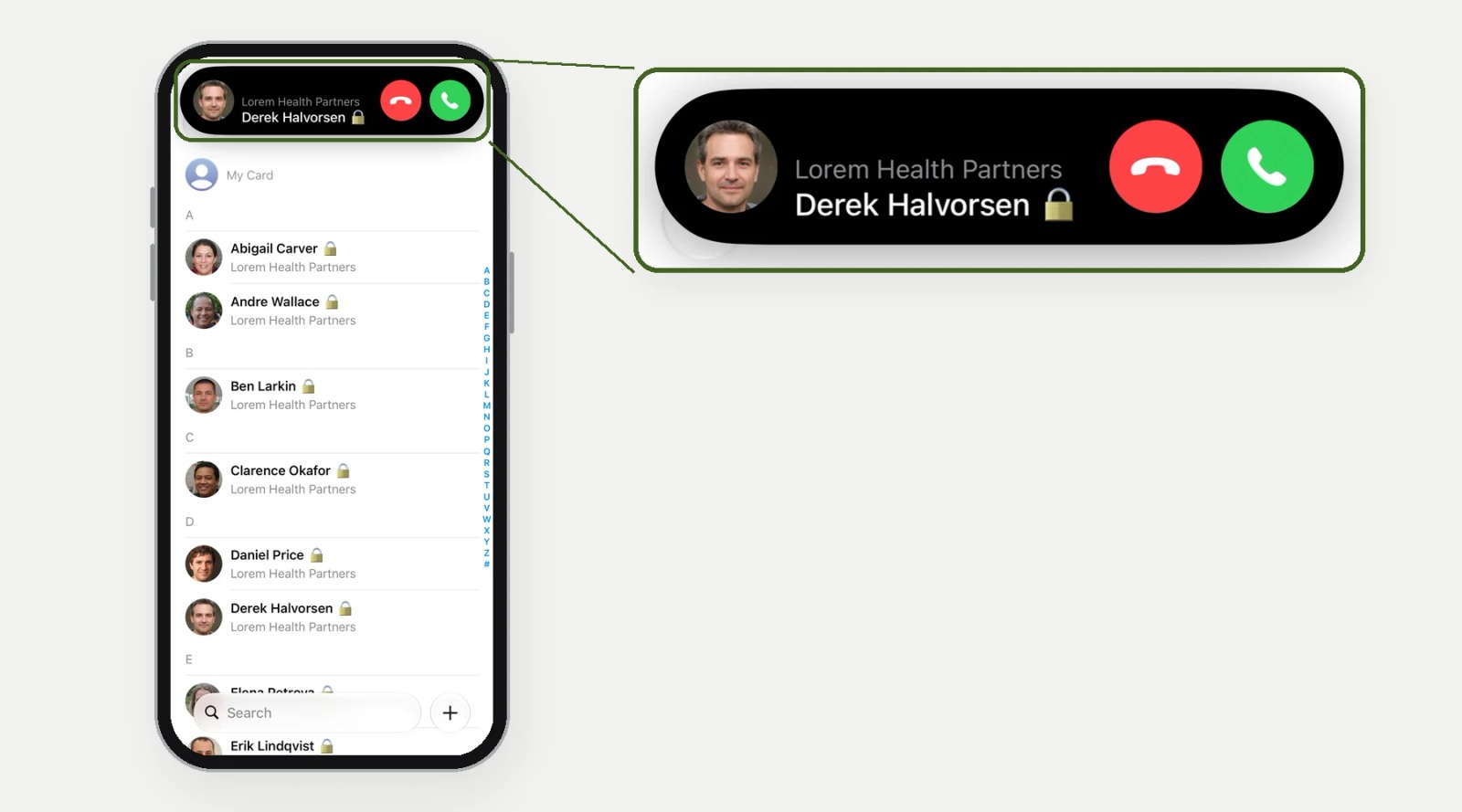
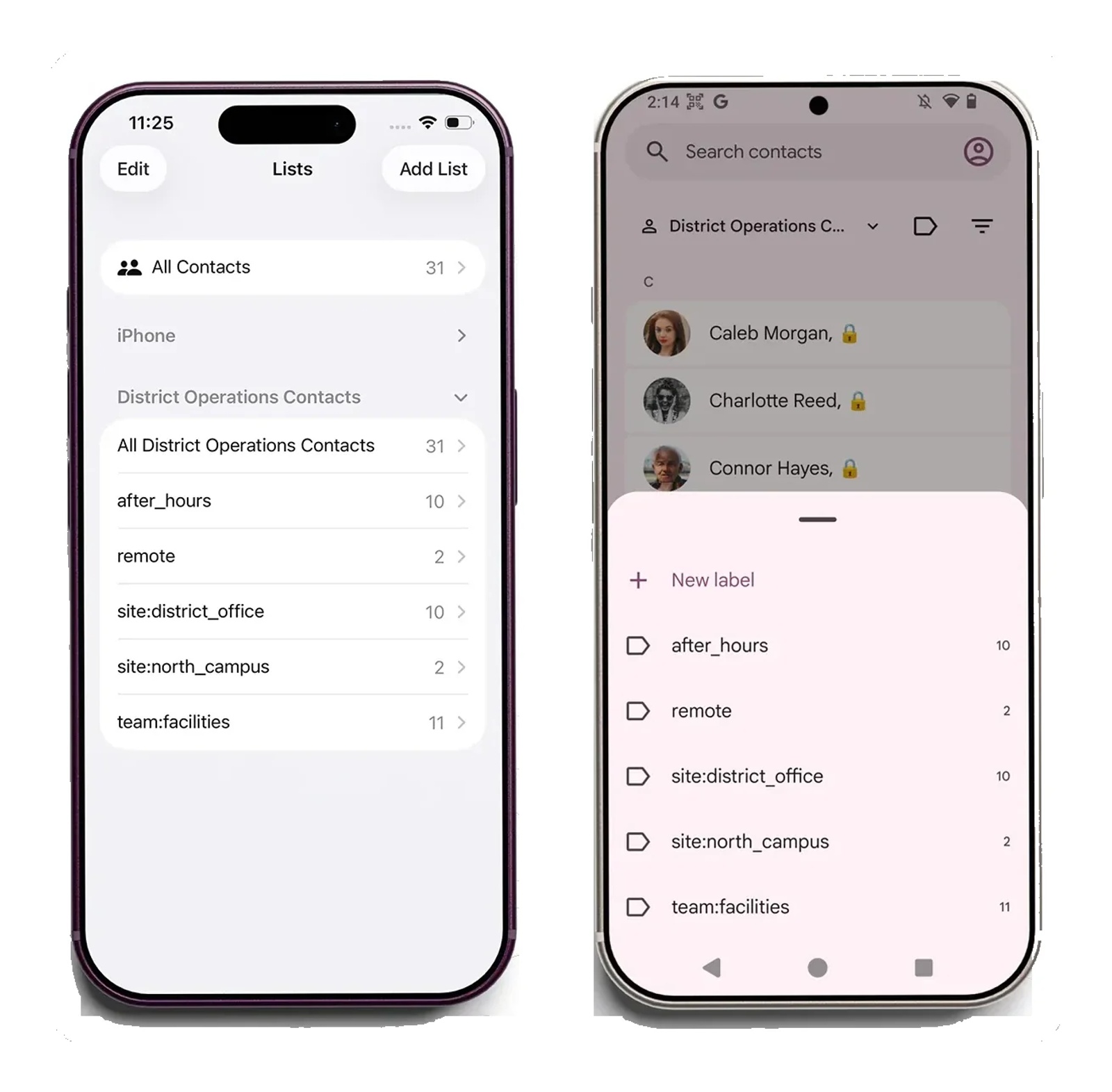
Tested on an iPhone 15 running iOS 27.0.1, November 2026.
How does a phone staff directory handle new starters, leavers and staff with the same name?
If a leaver's number still rings with their name, or a new hire is missing, staff stop relying on the list. Three settings keep it right.
Leavers. Turn on the importer's delete option. The Entra ID importer then removes a contact when the account is disabled (it checks accountEnabled); left off, disabled accounts keep importing. Pair it with Replace duplicates and "Delete any contacts not replaced", so anyone no longer in the import is removed too. The Google Workspace importer's Handle Deletes option removes users who are archived, suspended or excluded from the directory. A leaver drops off phones after the next import and the phone's next check-in, so with a daily import expect the same day, not the same minute. Our Handle Contact Deletes in Microsoft Entra Imports video shows the setting.
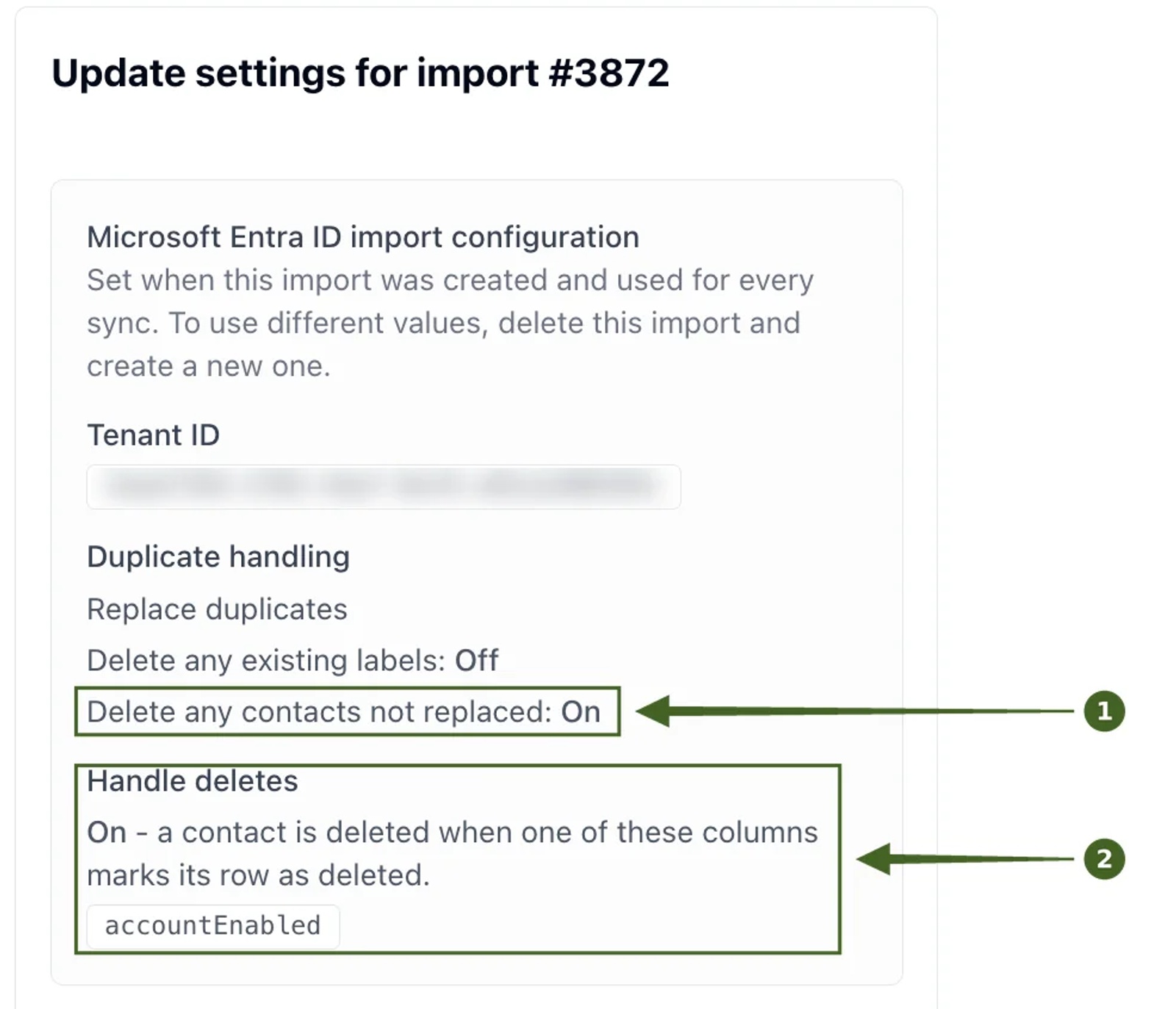
One record per person. Map each user's Microsoft ID to a Hidden Custom Unique field, so the importer still finds the right contact when someone's email address changes from matt@ to matthew@.
Same-name staff. Staff often share names. In a directory-synced address book, match duplicates on that unique field alone, because a rule that matches on name plus phone can skip a real person on every import. Duplicate checks also look only inside the address book, not at contacts staff have saved on their phones themselves. Our guide on deduplicating contacts before they reach staff phones covers the matching rules in full.
Tip 💡 Removing a leaver from phones is one line on a longer list. Our IT offboarding checklist covers access, devices and shared contacts together.
What IT teams tell us about putting the staff directory on phones
We often hear from IT teams asking how to get the company directory onto managed phones, and healthcare organisations make up most of those conversations. Most already have the directory in Entra ID or Google Workspace and no way to see it on the phones. A US manufacturer wanted its company phone directory on about 650 company iPhones in Jamf. A city IT team needed different phone lists for different groups of staff, and planned its rollout around labels, with one Selective Read Only connection per Intune group.
Not everyone takes the same route. A county highway patrol with about 200 phones chose CSV imports over the Entra importer and maintains the file itself. A construction firm wanted staff's own edits kept on synced contacts, which a read-only directory deliberately doesn't do.
Hospital staff directory on clinicians' phones: departments, units and on-call roles
Hospitals bring three extra questions: how to split a large directory by department, how to handle phones that belong to a role, and what HIPAA means for a staff directory.
Separate address books or labels for hospital departments?
Both work, and the choice comes down to how much the lists overlap.
| Structure | Best when | How phones get the right list |
|---|---|---|
| One address book per hospital or site | Sites have mostly separate staff and separate admins | Each site's phones get that site's address book |
| Labels for departments inside one address book | Departments overlap, or one person belongs to several | Selective Read Only sends only the chosen labels to each device group |
| Both together | A hospital system with several sites and many departments | One address book per hospital, department labels inside each |
We had an inquiry from a large US hospital system with a directory of more than 30,000 contacts that planned the third option: an address book per hospital, with labels to narrow each one to departments. With Selective Read Only, each label shows as its own list in Contacts on iPhone and Android, so a nurse can open the ICU list instead of scrolling the whole hospital. Splitting by label also keeps each phone's list to the people it needs.
Staff directory on role-based hospital iPhones: charge nurse and on-call phones
Many hospitals assign phones to a role: the charge nurse phone stays on the unit and passes between shifts. We had an inquiry from a US hospital system that assigns iPhones this way, with Outlook intentionally blocked on them, so the GAL route was never an option. The directory had to live in the native Contacts app, read-only, with no sign-in. A device connection isn't tied to a person's account, so it suits these phones well.
A contact list knows who works in a department, but it doesn't know who is on call right now. On-call scheduling belongs in your clinical communication or rota system.
Is a staff directory on hospital phones covered by HIPAA?
The HIPAA rules protect patients' health information. A staff directory holds workforce contact details rather than patient records, but whether any field in yours could reveal patient information is a question for your compliance team. Contactzilla is HIPAA compliant, as well as SOC 2 and GDPR compliant, and you can see the details in our trust centre.
Next steps
- Import your directory: from Microsoft Entra ID or from Google Workspace.
- Watch it end to end: Sync Microsoft Global Address List to iPhone & Android or Sync Google Workspace Directory to iPhone & Android.
- Split it by department: understanding group labels, and our video Organize Business Contacts with Labels in Contactzilla.
- Source-specific guides: sync the GAL to iPhone Contacts, sync the GAL to Android, and get the Google Workspace Directory on work phones.
How we built this guide
This guide draws on our own support conversations and sales demos with IT teams in healthcare, local government, manufacturing and construction, Contactzilla's help documentation, a review of the pages that currently rank for "employee directory app", and a caller ID test on an iPhone 15.
Frequently Asked Questions
Is there an employee directory app that works in the iPhone Contacts app?
Yes. A directory synced as a read-only contacts account appears in the iPhone's own Contacts app, with no extra app for staff. Contactzilla does this for iPhone and Android: it imports staff from Entra ID, Google Workspace or a CSV and delivers the list through your MDM or a QR code.
Can an employee directory show caller ID on iPhone and Android?
Yes, when the directory is stored in the phone's Contacts. Caller ID comes from contacts on the phone, so a directory that is only searched online isn't checked when a call comes in. That works on iPhone and Android alike. In our iPhone test, a colleague in a read-only shared address book rang with their name.
Does the staff directory work offline on the phone?
Yes. A synced directory is stored in the phone's Contacts, so staff can search it and call from it with no data signal, unlike a GAL search, which needs a connection. Changes reach the phone the next time it syncs.
Can staff edit or delete directory contacts on their phones?
No, not with a read-only connection. Staff can call, text and email colleagues, but the contacts can't be changed or deleted on the phone, so corrections are made once, at the source.
What happens to the directory when a phone is retired?
On MDM-managed phones, remove the contacts account through your MDM, for example by unassigning the profile or retiring the device. Phones set up by QR code can be wiped instead: the device connection's wipe option removes the contacts the next time the phone connects.
Do we need Intune to put the employee directory on phones?
No. Intune is one option, and Jamf Pro, Mosyle and other MDMs can deliver the same connection. Teams without an MDM can set each phone up by scanning a QR code.
Does an employee directory app replace the GAL?
No. The GAL stays your email directory in Outlook. A phone-contacts directory is a copy of the people staff need to call, built from the same source and kept in step with it, so it adds caller ID and offline access without changing how email works.