What Is CardDAV? Contact Sync Explained

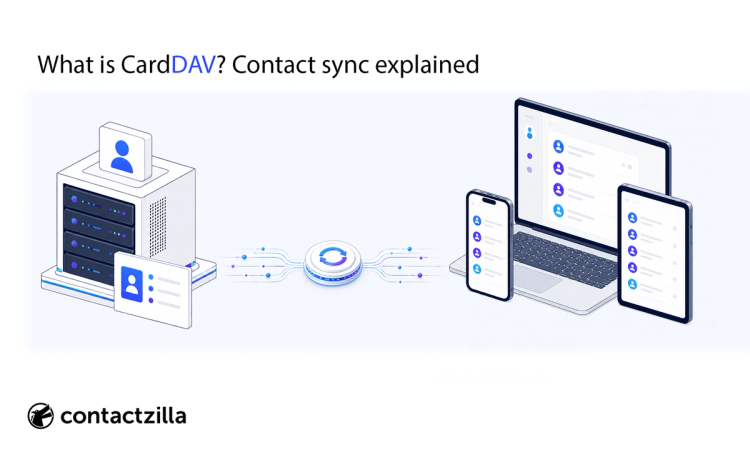
The CardDAV protocol is an open-standard protocol for syncing, storing, and managing contact data across devices and platforms. It is based on WebDAV and uses vCard to store contact records. CardDAV lets phones, computers, and apps keep address books updated from a shared server instead of relying on one-time contact imports.
In practice, CardDAV is used to sync personal or corporate contacts to devices such as iPhones, Android phones, desktop contact apps, and web-based contact services. For businesses, it can help shared address books stay consistent across managed phones, staff devices, and other systems where accurate contact information matters.
Key aspects of CardDAV
CardDAV is easiest to understand as a contact-sync layer between a server and the apps or devices that need those contacts.
| Aspect | What It means |
|---|---|
| Protocol basis | CardDAV is based on WebDAV, which works over HTTP/HTTPS. |
| Data format | CardDAV uses the vCard format to represent contact records. |
| Sync model | Changes can sync between the server and connected clients. |
| Platform use | CardDAV can work across different devices, apps, and services. |
| Main purpose | It keeps address books consistent across systems. |
A simple way to think about CardDAV is this: the address book lives on a server, and each connected device or app keeps its local contacts updated from that server.
That makes CardDAV different from simply importing a CSV or vCard file. An import gives you a snapshot of contacts at one point in time. CardDAV creates an ongoing sync relationship, so updates can continue after the initial setup.
What does CardDAV stand for?
CardDAV is the protocol name. More precisely, RFC 6352 defines it as “vCard Extensions to WebDAV”.
In plain English, that means CardDAV combines two existing ideas:
- vCard, the standard vCard format used to represent contact records such as names, phone numbers, email addresses, and other contact details.
- WebDAV, a web-based extension of HTTP used to access and manage resources on a server.
CardDAV uses those foundations to let clients access, manage, and sync contact information stored in address books on a server.
It is often mentioned alongside CalDAV, but they are not the same thing. CardDAV is for contacts. CalDAV is for calendars.
How does CardDAV work?
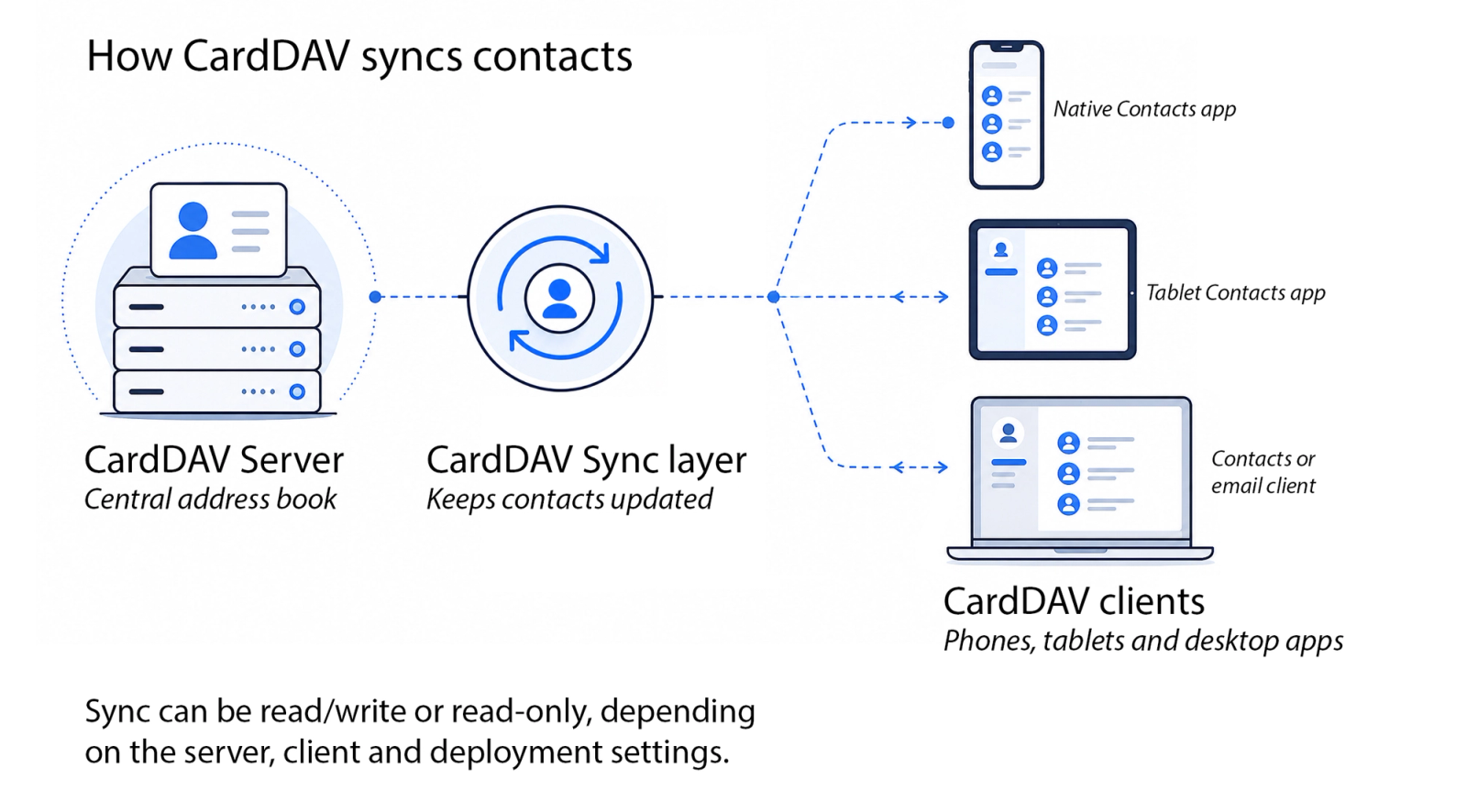
CardDAV works by connecting a client, such as a phone or contact app, to a server-based address book. The server stores contacts as vCards, and the client syncs contact changes over time.
At a high level, the process looks like this:
- A CardDAV server stores one or more address books.
- A CardDAV client connects to the server.
- The client authenticates with the server.
- The client discovers which address books are available.
- Contacts are downloaded as vCard records.
- Additions, edits, and deletions can sync between the server and client.
For example, if a contact is added or updated in the server address book, a connected client can sync that change so the updated contact appears on the user’s device. Depending on the setup and permissions, changes made on a client may also sync back to the server.
The exact sync behaviour depends on the server, client, authentication method, and permissions. Some CardDAV setups allow two-way editing. Others are configured so users can only read contacts from the server.
Tip 💡 Want contacts that users cannot edit? See how read-only CardDAV synchronization works.
For a practical implementation example, Google’s CardDAV documentation shows how one major contact service handles discovery, authentication, contact retrieval, updates, and sync tracking.
What is a CardDAV server?
A CardDAV server is the system that stores address books and makes them available to CardDAV clients.
The server acts as the source of truth for the contact data. A CardDAV server stores contact records, exposes them through CardDAV, and allows compatible devices or apps to retrieve and sync those contacts.
CardDAV servers can be run in different ways:
- Self-hosted CardDAV servers, where an organisation runs or maintains the server itself. Examples include Radicale, Baïkal, SabreDAV, or Nextcloud.
- Hosted contact services, where a third-party provider stores the contact data and provides CardDAV access. Examples include Google Contacts linked to a Google account, iCloud Contacts, Fastmail, or other hosted address book services.
- Managed business CardDAV services, where CardDAV is part of a wider platform for shared contacts, admin control, device deployment, and ongoing updates.
Contactzilla is an example of a managed business CardDAV service. It provides hosted shared address books for organisations and uses CardDAV as part of the sync layer that makes those contacts available on iOS and Android devices.
For a personal user, the CardDAV server might simply be the service that stores their own contacts. For a business, the CardDAV server is usually part of a broader contact-management setup, where admins need to control which contacts are shared, who can edit them, and which devices receive them.
For a deeper explanation of server options, self-hosting, and contact management systems built on CardDAV, read our CardDAV server and contact synchronisation guide
What is a CardDAV client?
A CardDAV client is the device, app, or sync service that connects to a CardDAV server and brings contacts into a local address book or contacts app.
The server stores the address book. The client makes that address book usable on the device.
Examples of CardDAV clients include:
- Apple Contacts on iPhone;
- desktop contacts or email apps with CardDAV support, such as Thunderbird CardDav
- Android CardDAV sync apps, such as DavX5 or Contactzilla Sync
- managed devices where MDM has installed CardDAV account settings.
On iPhone, the native Contacts account system can connect to CardDAV directly. On Android, CardDAV usually needs a sync app or connector that connects to the server and adds contacts to Android’s contacts system.
The client is what turns a server-based address book into something users can actually use. Without a CardDAV client, contacts may exist on the server, but they will not appear where users search, call, message, or manage contacts.
What is CardDAV used for?
CardDAV is used to sync address books between a server and the devices or apps that need those contacts. It is most useful when contact data needs to stay updated over time, rather than being copied once through a CSV or vCard import.
| Use case | What CardDAV helps with |
|---|---|
| Mobile contact synchronisation | Keeps contacts available in the phone’s normal contacts app |
| Shared address books | Shared address books |
| Cross-platform sync | Helps contacts work across phones, desktop apps, and web services |
| Business contact management | Supports centrally managed contact lists for staff devices |
Mobile contact synchronisation
CardDAV is commonly used to sync address books to mobile devices, including iPhones and Android devices.
For personal users, this might mean syncing contacts between a hosted contact service and a phone. For businesses, it might mean making a company address book available on staff phones without asking each user to import contacts manually.
Shared address books
CardDAV can support shared address books where multiple users or devices need access to the same contact list.
This is useful when a team needs a consistent list of customers, suppliers, colleagues, contractors, sites, departments, or emergency contacts. Instead of each person maintaining a separate copy, the organisation can maintain one central list and make it available to the right clients.
For a deeper look at this use case, read our guide to shared address book apps and solutions
Cross-platform contact sync
CardDAV helps contacts work across different systems, such as Apple devices, Google Contacts, desktop clients, compatible web apps, and services connected to a Google account.
That cross-platform role is one reason CardDAV is still used. It is not tied to one vendor’s app or operating system.
Business contact management
Businesses can use CardDAV as one part of a central contact management setup.
In this context, CardDAV is usually the sync layer. It helps deliver contacts from a managed address book to the devices or apps that need them. The wider contact management platform still handles the business rules, such as who can edit contacts, which devices receive them, and whether the contacts are read-only.
CardDAV on iPhone, Android and desktop apps
CardDAV can work across phones, desktop apps, and web-based contact systems, but support varies by platform. iPhone has built-in CardDAV account support, Android usually needs a sync app or connector, and desktop clients may support CardDAV through their contacts or address book features.
CardDAV and iPhone
iPhone supports CardDAV contact accounts, so compatible address books can appear in the native Apple Contacts app.
A user can add a CardDAV account manually in iPhone settings. In managed environments, IT teams can also deploy CardDAV account settings through Apple device management payloads or configuration profiles.
Tip 💡 If your iPhone keeps asking for a CardDAV password, here is why it happens and how to fix it.
This matters because contacts in the native iPhone contact store can be used by the normal phone experience, including Contacts search, the Phone app, and other apps that have permission to access contacts.
CardDAV and Android
Android can use CardDAV, but it usually needs a sync app or connector. Unlike iPhone, Android does not generally provide the same consistent built-in “Add CardDAV account” flow across devices.
In practice, a CardDAV sync app connects to the server and adds contacts to Android’s contacts system. Those contacts can then appear in the normal Contacts app and other apps that have permission to use contacts.
Tip 💡 Setting up CardDAV on an Android phone? Our Android CardDAV setup guide walks through it for teams and shared contacts.
For business deployments, IT teams can often deploy the sync app and its settings through an MDM or UEM platform.
For more detail on the Android deployment model, see our guide to native Android contact management with Contactzilla Sync
CardDAV and desktop apps
CardDAV is also used by desktop contacts, email, and groupware apps.
A desktop client can connect to a CardDAV server so the same address book is available on a laptop or desktop computer as well as on a phone.
For Mac users comparing desktop contact tools, our guide to the best contacts apps for Mac covers options such as BusyContacts and other contact-management apps.
CardDAV vs CalDAV
CardDAV syncs contacts, while CalDAV syncs calendars. They are often mentioned together because both are open standards built on WebDAV, but they manage different types of data.
| Protocol | Main purpose | Data type |
|---|---|---|
| CardDAV | Contact sync | Address books and vCards |
| CalDAV | Calendar sync | Calendars, events and scheduling data |
Use CardDAV when you need to sync contacts or address books. Use CalDAV when you need to sync calendars, events, or schedules.
CardDAV vs LDAP
LDAP is mainly used for directory lookup, authentication, and directory services. CardDAV is used for address book access and contact synchronisation.
In business terms, LDAP is often about finding people or controlling access to systems. CardDAV is about keeping contacts available on phones, desktops, and apps.
That distinction matters. A directory lookup can help a user find someone, but it does not always put that contact into the native contacts app on a phone. CardDAV is more relevant when the goal is to sync address-book style contacts to devices and keep them updated over time.
LDAP and CardDAV can work together, but they are not interchangeable. LDAP is a directory access protocol. CardDAV is a contact sync protocol.
For a deeper breakdown, read our full guide to CardDAV vs LDAP for contact management.
CardDAV vs Exchange ActiveSync
CardDAV and Exchange ActiveSync can both be used to get contacts onto mobile devices, but they usually start from different places.
CardDAV syncs contacts from a CardDAV address book. Exchange ActiveSync syncs mobile data from an Exchange or Microsoft 365 mailbox, which can include email, calendars, contacts, and tasks.
| Technology | Main purpose | Contact sync model | Typical fit |
|---|---|---|---|
| CardDAV | Standards-based contact sync | Syncs contacts from a CardDAV address book or contact server | Shared address books, cross-platform contact access, CardDAV-based contact deployment |
| Exchange ActiveSync | Broader Microsoft mobile sync | Syncs mailbox data from Exchange or Microsoft 365, including mailbox contacts | Microsoft Exchange or Microsoft 365 users syncing mail, calendar, contacts, and tasks |
The difference is partly scope and partly source of truth. Exchange ActiveSync is useful when a user’s Exchange or Microsoft 365 mailbox is the source for their mobile contacts. CardDAV is useful when the source is a separate address book or contact management system.
For many organisations, Exchange ActiveSync already handles a user’s own mailbox contacts. The gap appears when IT needs to distribute a shared company address book, role-based contact list, or centrally managed contact source across many devices. In that scenario, CardDAV can still be relevant because it is designed around address book sync rather than the wider mailbox.
This is why the question is not always “CardDAV or Exchange ActiveSync?” In practice, some organisations use Exchange ActiveSync for mailbox data and CardDAV for shared or centrally managed business contacts.
CardDAV vs importing CSV or vCard files
The difference between CardDAV and a CSV or vCard import is that CardDAV keeps contacts synced, while an import only copies contacts once.
| Method | How it works | Best for | Main limitation |
|---|---|---|---|
| CSV import | Copies contact data from a spreadsheet-style file | One-time migrations or bulk uploads | Contacts become stale unless imported again |
| vCard import | Copies contacts from a .vcf file | Moving contacts between address books or apps | Still a one-time copy |
| CardDAV | Syncs contacts between a server and connected clients | Address books that need ongoing updates | Requires a compatible server and client |
CSV and vCard imports are useful for one-off transfers. They become harder to manage when contacts change regularly, because each update requires another export, import, or manual correction.
CardDAV is better suited to address books that need to stay current. The contact list remains on the server, and connected devices or apps can sync updates from that source.
Why CardDAV matters for business contacts
For business contact management, CardDAV is useful because it lets contacts be managed centrally but used locally on devices.
Many organisations already store contact data somewhere: Microsoft 365, Google Workspace, a CRM, a spreadsheet, a directory, or another internal system. The harder problem is getting the right version of those contacts onto the right devices, in a way that stays current.
CardDAV can help with the sync layer. It can make a central address book available to phones, desktop apps, and other compatible clients without relying on repeated CSV or vCard imports.
That becomes useful when organisations need to control:
- which contacts are shared;
- which users or devices receive them;
- whether contacts are read-only or editable;
- whether different teams receive different contact lists;
- how updates are rolled out when contact details change.
This is especially relevant for shared phones, field teams, frontline devices, and organisations where caller ID depends on business contacts being available in the device’s normal contacts store.
CardDAV does not solve the whole business contact management problem by itself. IT teams still need a system for importing, organising, permissioning, segmenting, and deploying contacts. CardDAV is the protocol layer that helps deliver those contacts to the devices and apps where people use them.
CardDAV and MDM deployment
For a full guide on deploying contacts via CardDAV at scale via MDM see our Enterprise Contact Management blog post. MDM lets IT teams deploy CardDAV contact settings to managed devices instead of asking each user to add a CardDAV account manually.
On Apple devices, this is commonly handled through configuration profiles or contacts payloads. The profile adds the CardDAV account to the device so contacts can sync into the native contacts framework. On Android, deployment usually involves a managed sync app or connector, with the app configuration pushed through MDM or UEM.
This is especially useful for shared phones, frontline devices, and large mobile fleets where contact setup needs to be consistent. IT can define the contact source once, then deploy the required settings to the right devices or groups.
For business deployments, CardDAV usually works best as part of a wider contact management system. Admins still need to decide which contacts are shared, which devices receive them, whether users can edit them, and how updates are rolled out.
Contactzilla is a business contact management platform for deploying shared contacts to managed iOS and Android devices using CardDAV and MDM.
Need step-by-step MDM deployment instructions?
Contactzilla has help guides for deploying shared contacts with several MDM and UEM platforms, including Microsoft Intune, Jamf, ManageEngine, Hexnode, and NinjaOne. These guides walk through the practical setup steps for getting Contactzilla address books onto managed devices.
Benefits and limitations of CardDAV
CardDAV is useful when contacts need to stay synced across devices and apps. Its main limitation is that it only handles the contact sync layer. It does not, by itself, manage how business contacts are imported, organised, permissioned, segmented, or deployed.
| Benefits | Limitations |
|---|---|
| Open standard | Contacts only, not email or calendars |
| Works across different ecosystems | Client support varies by platform |
| Supports ongoing contact sync | Android often needs a sync app or connector |
| Reduces manual CSV or vCard imports | Does not clean or organise contact data by itself |
| Useful for shared address books | Admin controls depend on the platform around it |
| Can support native contact availability | Read-only behaviour depends on server, client, and deployment setup |
The main benefit of CardDAV is that a server-based address book can stay in sync with compatible phones, desktop apps, and contact clients.
The main limitation is that CardDAV is not a complete business contact management system. Organisations still need a way to manage the source contact data, decide who can edit it, control which devices receive it, and handle different contact lists for different teams or locations.
For personal contacts, that may be simple. For business contacts, the platform around CardDAV matters as much as the protocol itself.
Where Contactzilla fits
Contactzilla is a business contact management platform for deploying shared contacts to managed iOS and Android devices using CardDAV and MDM.
CardDAV provides the sync layer. Contactzilla provides the management layer around it: shared address books, admin controls, read-only deployment, selective sync, and device rollout workflows.
For example, IT teams can use Contactzilla to:
- manage shared business address books centrally;
- deploy contacts to native iOS and Android Contacts apps;
- use CardDAV-based device connections;
- roll out contacts through MDM tools;
- make contacts read-only on managed devices;
- sync selected contacts using labels;
- support caller ID when contacts are available in the device contact store.
This does not make Contactzilla the definition of CardDAV. CardDAV is the open standard. Contactzilla is one example of how a business can use CardDAV as part of a managed shared-contact deployment.
FAQs about CardDAV
What is CardDAV used for?
CardDAV is used to sync contacts between a server and compatible devices or apps. It is commonly used for personal address books, shared contacts, and business contact deployment.
Is CardDAV still used?
Yes. CardDAV is still used by Apple devices, Google Contacts, desktop clients, open-source groupware systems, and managed device deployment workflows.
Is CardDAV the same as CalDAV?
No. CardDAV is for contacts, while CalDAV is for calendars.
Does iPhone support CardDAV?
Yes. iPhone supports CardDAV contact accounts, and CardDAV settings can also be deployed to managed Apple devices through configuration profiles.
Does Android support CardDAV?
Android can use CardDAV, but many setups rely on a sync app or managed connector to bring CardDAV contacts into the Android contacts store.
What is a CardDAV server?
A CardDAV server stores address books and makes them available to CardDAV clients for contact access and synchronisation.
What is a CardDAV account?
A CardDAV account is the account a device or app uses to connect to a CardDAV server and sync contacts from an address book.
Can CardDAV sync shared contacts?
Yes. CardDAV can be used for shared address books where multiple users or devices need access to the same contact list.
Is CardDAV secure?
CardDAV can be secure when it is deployed with HTTPS/TLS, strong authentication, and appropriate server controls. Security depends on the specific provider, client, and configuration.
Is CardDAV better than importing contacts?
CardDAV is better when contacts need to stay updated over time. Importing a CSV or vCard file is usually better for a one-time transfer or migration.
Can businesses use CardDAV?
Yes. Businesses can use CardDAV to sync shared address books to phones, desktops, and managed devices, often as part of a wider contact management system.
Can MDM deploy CardDAV contacts?
Yes, especially on Apple devices where MDM can deploy CardDAV account settings through configuration profiles. Android deployments usually depend on a managed sync app or connector.