How to Sync Outlook Contacts with Android (Microsoft 365), Including Shared Company Contacts

Outlook's own switch puts your contacts on an Android phone. Giving a whole team one shared list is a different job.
Short answer: To sync Outlook contacts with an Android phone, open the Outlook app, go to Settings > Contacts and switch on Sync contacts to save them to the phone's Contacts app.
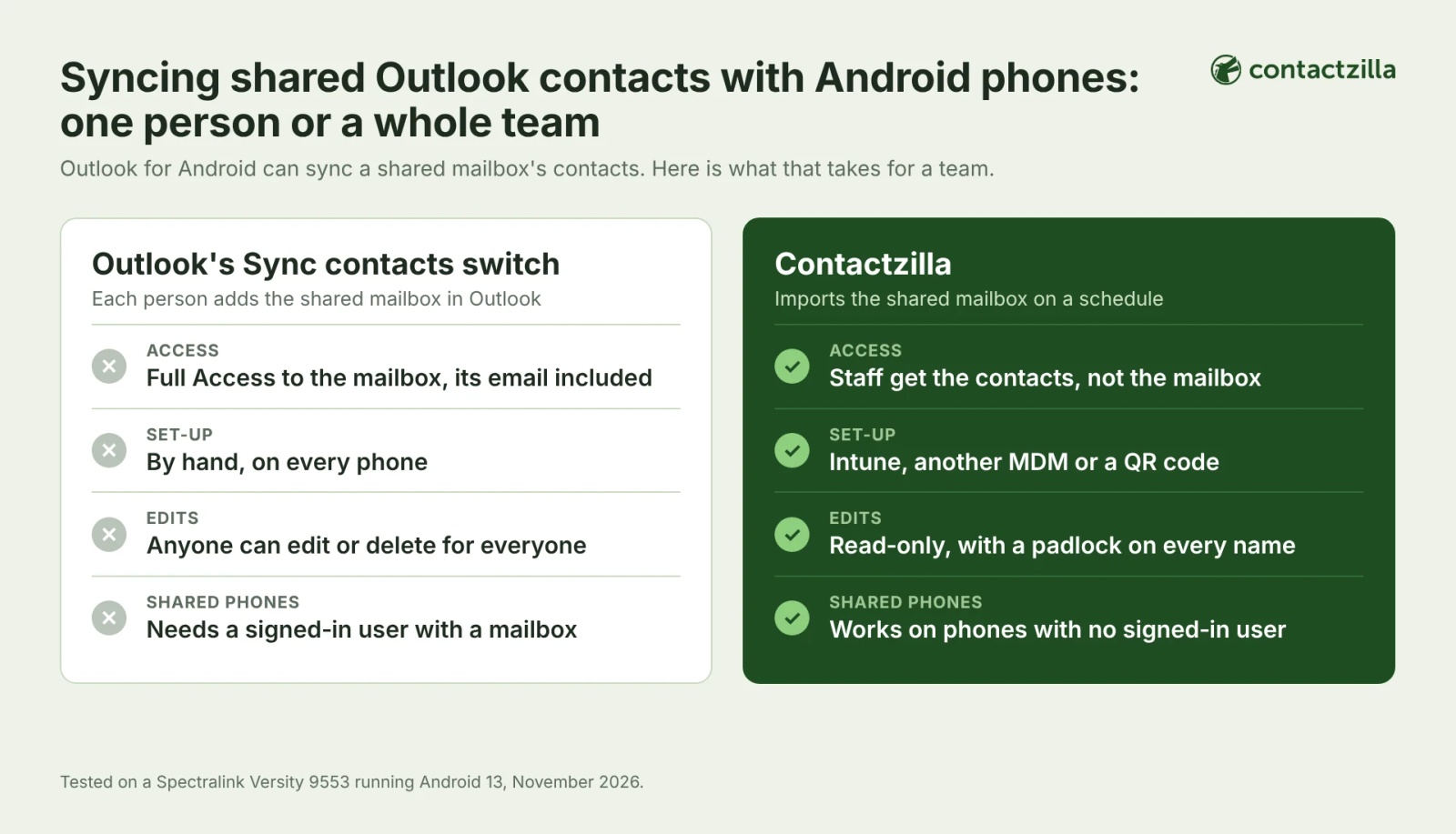
That works one person at a time. A shared mailbox only follows for someone with Full Access who adds it in Outlook, and edits made on the phone change the list for everyone.
Contactzilla gives a team one read-only list: it imports the shared mailbox or Entra ID directory on a schedule, and Contactzilla Sync puts it on every staff phone through Intune, another MDM or a QR code.
Which Outlook contacts do you want on the Android phone: your own, a shared mailbox or the directory?
Your own contacts: use Sync contacts in the Outlook app, next section. No other app is needed. A shared mailbox's contacts on your own phone: Outlook can do that if you have Full Access to the mailbox, covered after that. One shared list on every staff phone, or the company directory: the Contactzilla steps further down. Sync contacts greyed out or empty on a company phone: the symptom table says which setting or policy is responsible.
How to sync Outlook contacts with Android: turn on Sync contacts in the Outlook app
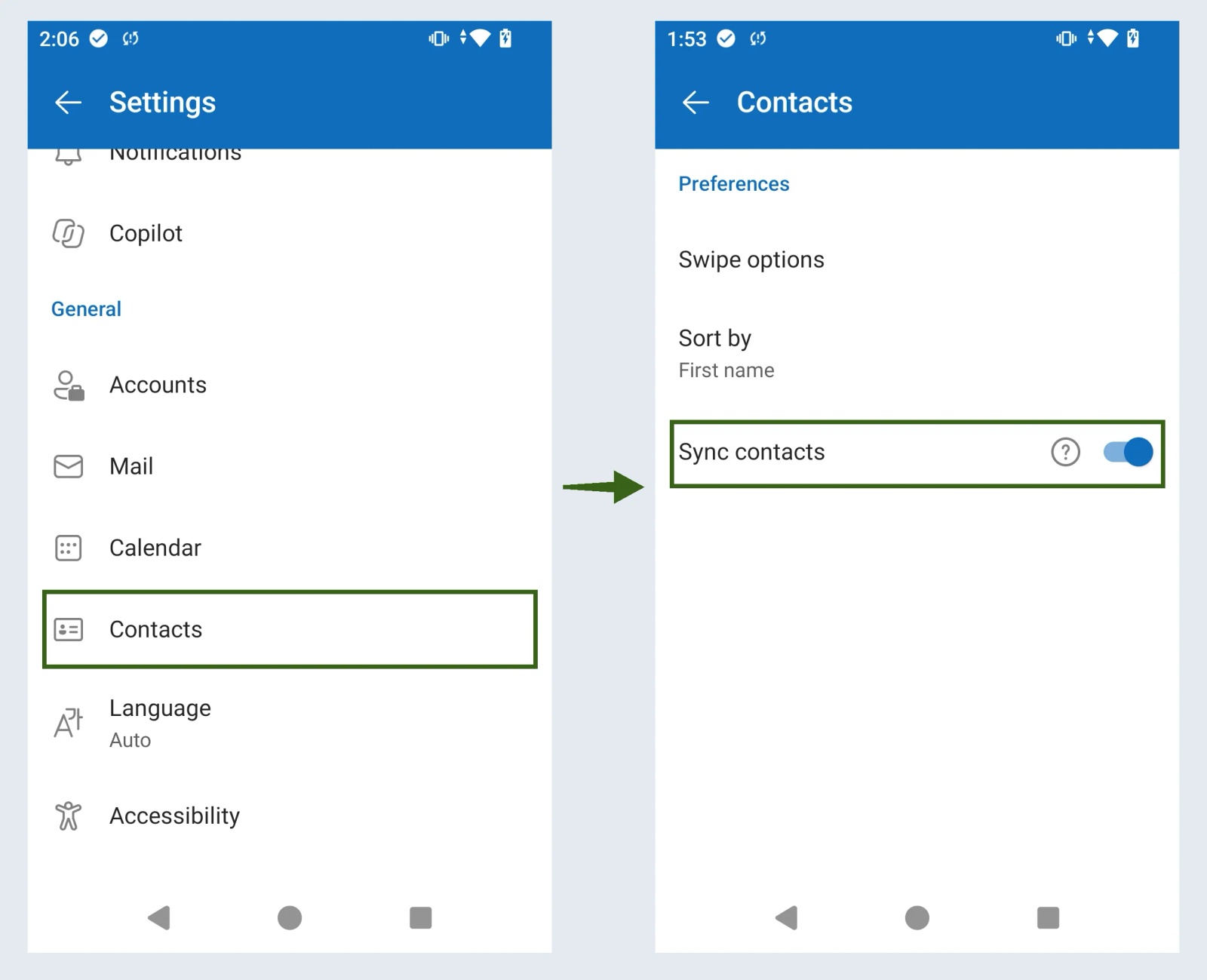
Install the Outlook app and sign in with your Microsoft 365 account. Tap your profile picture, then the Settings gear, and under General tap Contacts. Switch on Sync contacts and allow contacts access when Android asks; if you dismissed that prompt, allow it in Android's settings under the Outlook app's permissions. The contacts appear in the phone's Contacts app as an Outlook account alongside your Google account. With more than one account in Outlook, Sync contacts opens a page with a switch for each account.
The sync runs both ways: in our test, a name changed in the Android Contacts app was back in Outlook within a few minutes. New contacts you save on the phone go to the Contacts app's default account, so pick the Outlook account there if you want them in Microsoft 365. Switching Sync contacts off removes the contacts from the phone, and they stay in Microsoft 365. The same switch moves them to a new Android phone: sign in to Outlook there and turn it on.
Can Outlook for Android sync a shared mailbox's contacts?
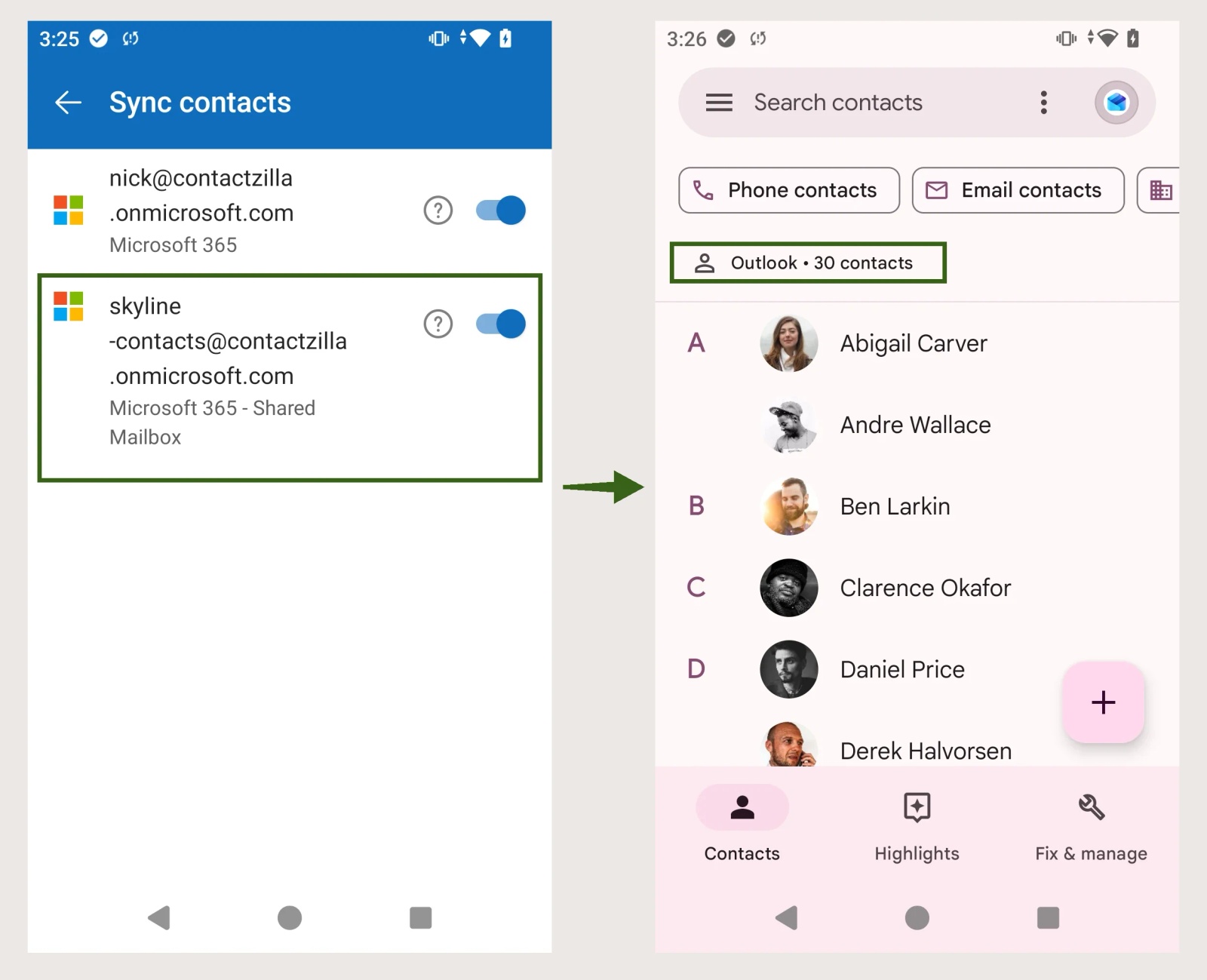
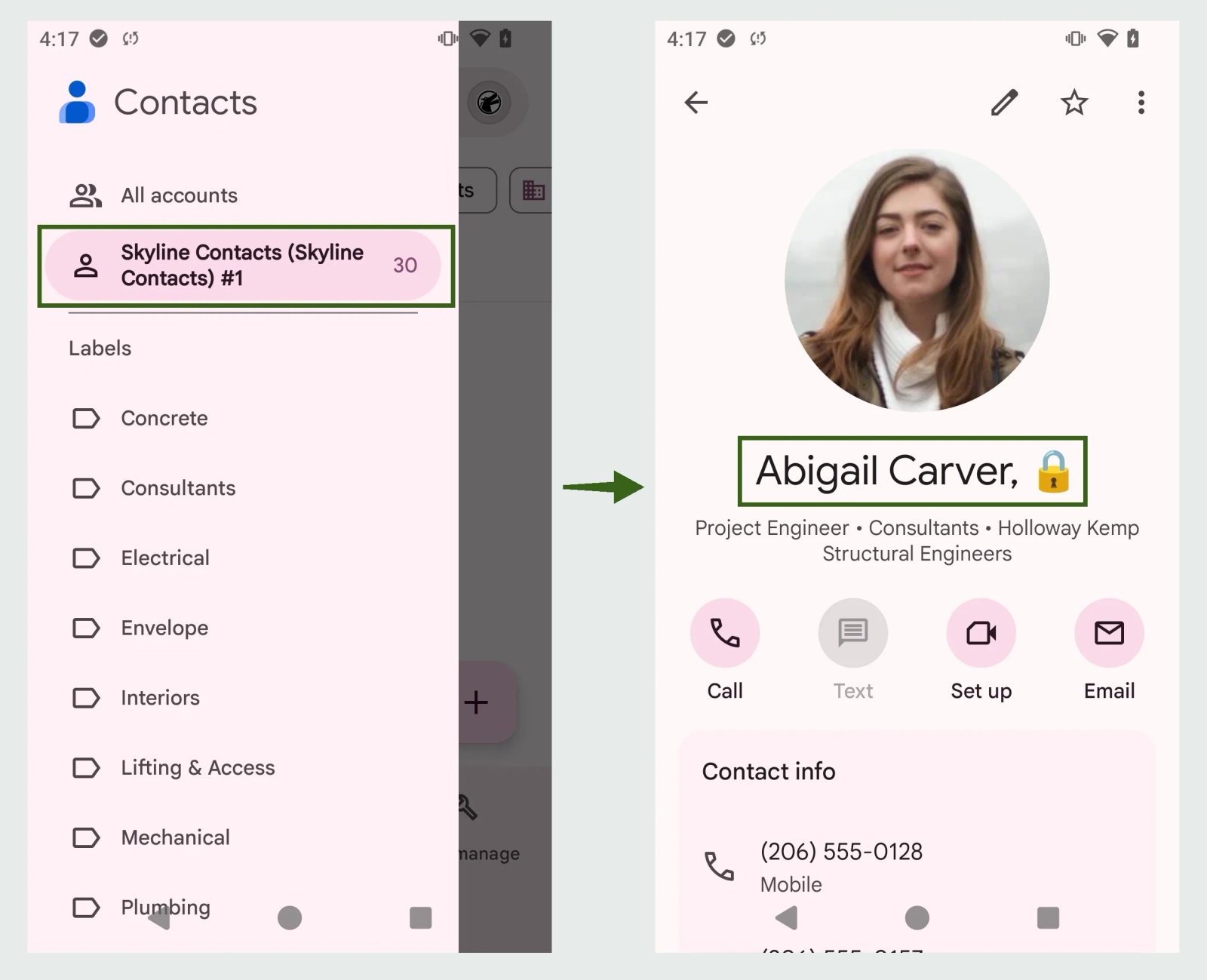
Yes, for someone with Full Access to it. In our test, adding the shared mailbox in Outlook (the + in the side menu, then Add shared mailbox) gave it its own switch on the Sync contacts page, and all 30 of its contacts arrived in the Contacts app with their photos. Without adding the mailbox in Outlook, none of them came through. For one person that works well. For a team it means:
- Full Access for everyone. Each person needs Full Access to the mailbox, which opens its email to them as well as its contacts.
- Every phone set up by hand. Each person installs Outlook, adds the mailbox and turns on its switch.
- Anyone can change the list. Edits and deletions made on one phone go back to the mailbox and on to everyone else.
- No signed-in user, no list. Shared and frontline phones without a user's mailbox can't use this route.
Other ways to put Outlook contacts on Android: an Exchange account or a CSV copy
An Exchange account in Android's settings. Adding your Microsoft 365 account to the phone's own account settings or to Samsung Email can also sync your contacts. Many organisations allow only the Outlook app on phones, in which case this sign-in is refused, and running both routes on one phone shows every contact twice.
A one-off copy through Google Contacts. In Outlook on the web, open People, choose Manage contacts > Export contacts and save the CSV file (Microsoft's export steps). Then import it at contacts.google.com, which takes CSV or vCard files of up to 3,000 contacts at a time (Google's import steps), and the contacts reach every Android phone signed in to that Google account. It is a copy: nothing you change in Outlook afterwards follows it, and it puts work contacts in a personal Google account, which most IT teams would rather avoid.
Outlook contacts not syncing with Android: symptoms, causes and fixes
| What you see | Likely cause | What to check |
|---|---|---|
| Sync contacts is greyed out and says contacts sync isn't turned on in system settings | Android's Auto sync data setting is off | Turn it on under Accounts in Android's settings. Microsoft notes the menu location varies by device and Android version, so search Settings for "Accounts" |
| The switch is on but the Contacts app looks empty | Outlook has no Contacts permission, or the Contacts app is showing another account | Check Outlook's app permissions, then switch the account the Contacts app shows. In Google Contacts, tap the round account icon at the top right and choose the Outlook account |
| A shared mailbox's contacts are missing | The mailbox isn't added in Outlook, its own switch is off, or you don't have Full Access | Add it with + > Add shared mailbox, then switch it on under Settings > Contacts > Sync contacts. Full Access is granted by IT |
| No Sync contacts switch for one of your accounts | The account was added to Outlook as IMAP or POP, which carries mail only | Contacts sync needs a Microsoft 365, Exchange or Outlook.com account. Remove the account and add it again with its Microsoft sign-in |
| Every contact shows twice | The same people reach the phone by two routes: your own contacts and a shared mailbox both holding them, the Outlook app and an Exchange account both on, or an old copy in your Google account | Keep one route switched on, delete the old copy, and use Fix & manage > Merge & fix in Google Contacts for any left over |
| Contacts arrived once, then stopped updating | Battery saving stops Outlook syncing in the background, or the app's stored data is stale | Take Outlook out of battery optimisation, update the app, then clear its cache under Apps > Outlook > Storage |
| Sync contacts is missing or can't be changed on a company phone | An Intune policy blocks it | Only IT can change it. The app protection setting Sync policy managed app data with native apps or add-ins set to Block disables it, and Microsoft says the Outlook app configuration setting is then ignored |
| The Outlook configuration key com.microsoft.outlook.Contacts.LocalSyncEnabled is false | Its default is false. A second key, UserChangeAllowed, decides whether users can change it | |
| The Outlook app isn't in the Play Store on a company phone | The phone is managed, and its work Play Store lists only apps IT has approved | Ask IT to approve Microsoft Outlook in Managed Google Play and assign it to the phone |
| A colleague's call shows a bare number | A device restriction, or a dialler app that doesn't read work profile contacts | Microsoft says the personal dialler can read work contacts by default, so look for a restriction, then test your dialler (work profile section below) |
Tip 💡 If Sync contacts is blocked on a company phone, read our post on Sync policy managed app data with native apps and what it means for Outlook contacts before asking IT to change the setting.
What IT teams tell us about shared Outlook contacts on staff phones
25 organisations raised this with us themselves in the last 12 months: 15 wanted contacts held in Outlook, Exchange or Microsoft 365 on their phones, and 10 wanted the company directory there. Six wanted the contacts in Outlook as well, which Contactzilla doesn't do. One environmental-services firm preferred Outlook's own sync to installing anything, a fair choice for one person's contacts and no help to a team.
How to get a team's shared Outlook contacts onto Android phones with Contactzilla
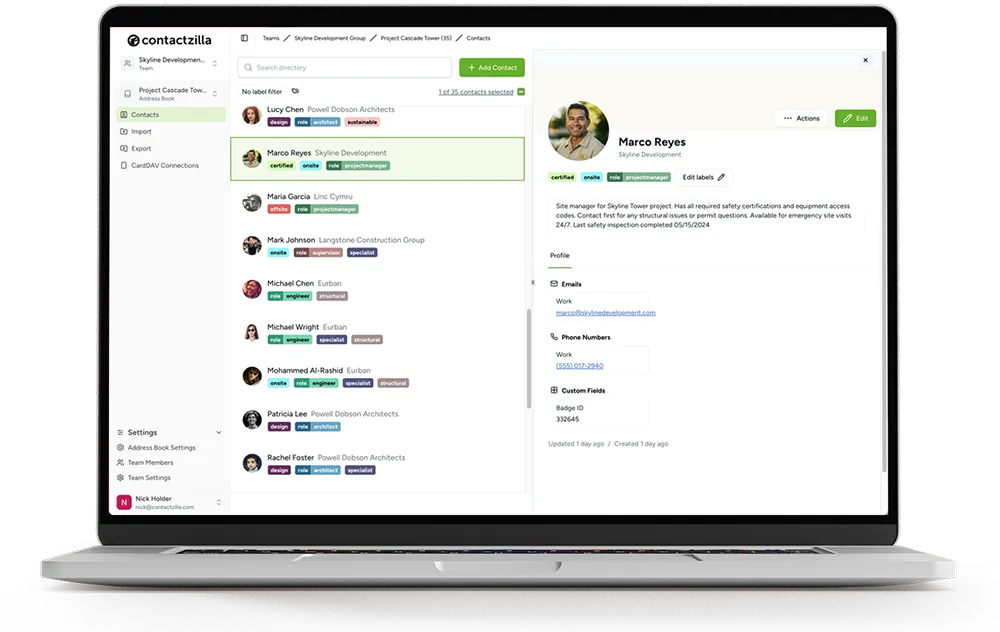
Contactzilla is a shared address book that organisations fill from the systems they already use and publish to staff phones' Contacts app. Staff get the list without access to the mailbox behind it, the list can be read-only, and an MDM sets every phone up, including shared phones with no signed-in user. For Microsoft 365 that means the Microsoft Outlook Contacts importer for a shared mailbox and the Microsoft Entra ID importer for the directory. Android has never offered CardDAV support out of the box, so the free Contactzilla Sync app on Google Play connects to the address book, writes it into the Contacts app and keeps it updated.
Step 1: Import a shared mailbox's Outlook contacts into a Contactzilla address book
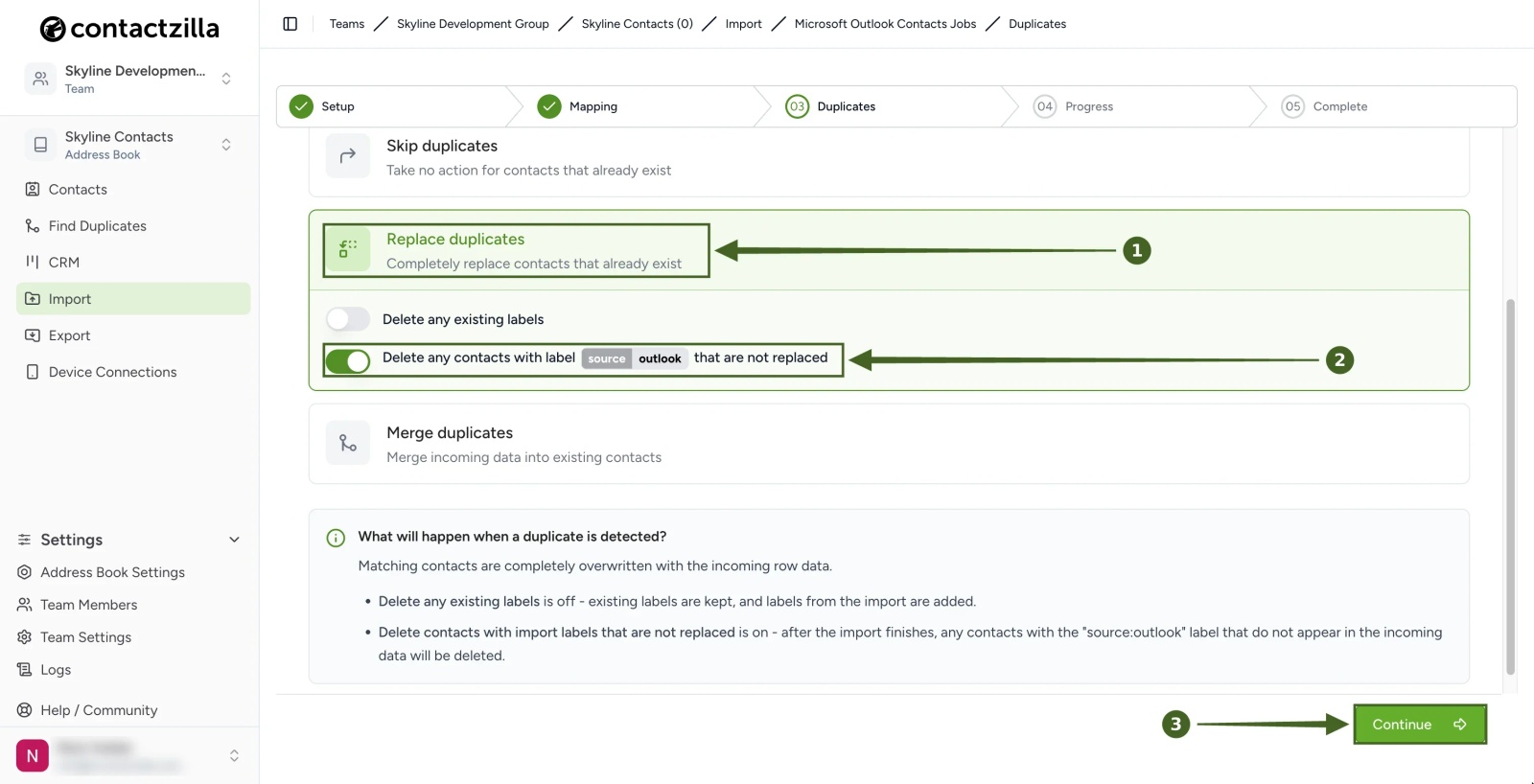
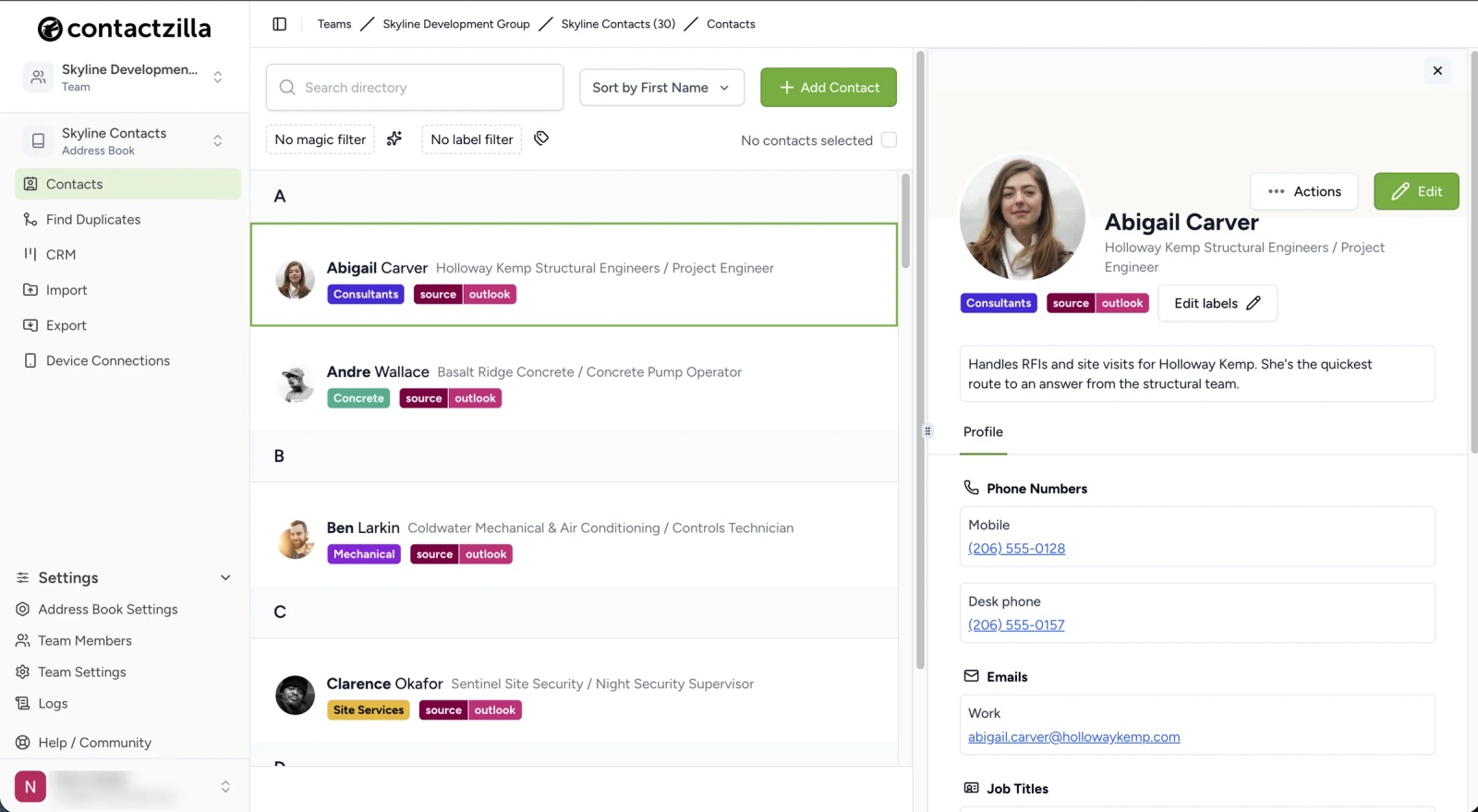
Add a Microsoft Outlook Contacts import that points at the shared mailbox. Each import reads one mailbox's default Contacts folder, so it suits a handful of team mailboxes, not hundreds of personal ones. Outlook categories can become labels, which Android shows as lists in the Contacts app, and every imported contact also gets the import's own label, such as source:outlook, so contacts added from a CSV or by hand are never touched by it. The import runs on a schedule, and its Duplicates step decides what a repeat run does: Replace overwrites existing contacts with the mailbox's version, and the switch below it deletes contacts carrying the import label that no longer exist in the mailbox, so the book mirrors the mailbox exactly. A Microsoft 365 admin must approve Contactzilla the first time, and Microsoft can take a while to apply that. Every click is in our help article on importing contacts from a Microsoft 365 shared mailbox.
Step 2: Create a read-only Android device connection in Contactzilla
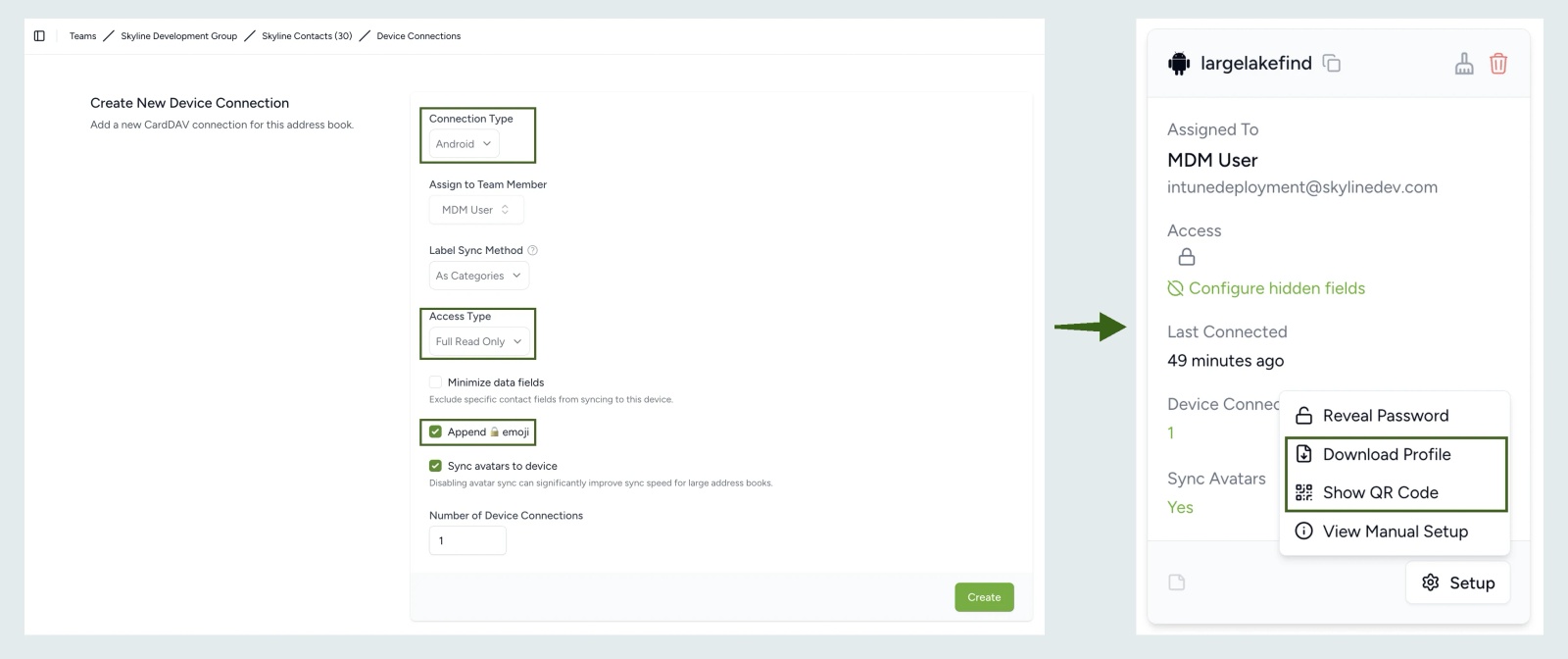
Add a device connection with Android as the type. Full Read Only with the padlock emoji keeps the shared list clean and shows staff which contacts are managed; Selective Read Only sends only chosen labels, such as one team's, to one group of phones. The finished connection's Setup menu offers Download Profile, the JSON for an MDM rollout, and Show QR Code for a few phones without one. Our help article on syncing your Contactzilla address book with Android devices has the clicks.
Step 3: Install Contactzilla Sync on Android with Intune, another MDM or a QR code
Contactzilla Sync is on Managed Google Play, so an MDM that supports Android Enterprise managed configuration, such as Intune, Workspace ONE or Hexnode, can install it and push the JSON. In Intune that is an app configuration policy with Contacts read and write set to auto-grant. For phones with no signed-in user, assign it to a device group: one US city government's user-less phones reported the policy as applied but only synced once it went to a device group. If you later swap the JSON in an existing policy, a phone that already has an account keeps the old one; in our test, clearing Contactzilla Sync's storage on the phone made it pick up the new address book. The sync interval is in seconds, defaults to 900 and can't go below 15 minutes. Battery optimisation can throttle background sync, and an ambulance service in Europe added the app to its allowlists through Intune and the Samsung Knox Service Plugin. Without an MDM, install from Google Play and scan the QR code.
This short demo video shows the Intune route for Android from the Contactzilla device connection to the app on the phone.
Tip 💡 Platform guides: Intune, Workspace ONE and Hexnode, or, with no MDM at all, putting contacts on phones by scanning a QR code.
Step 4: Open Contactzilla Sync once and check the shared contacts in the Android Contacts app
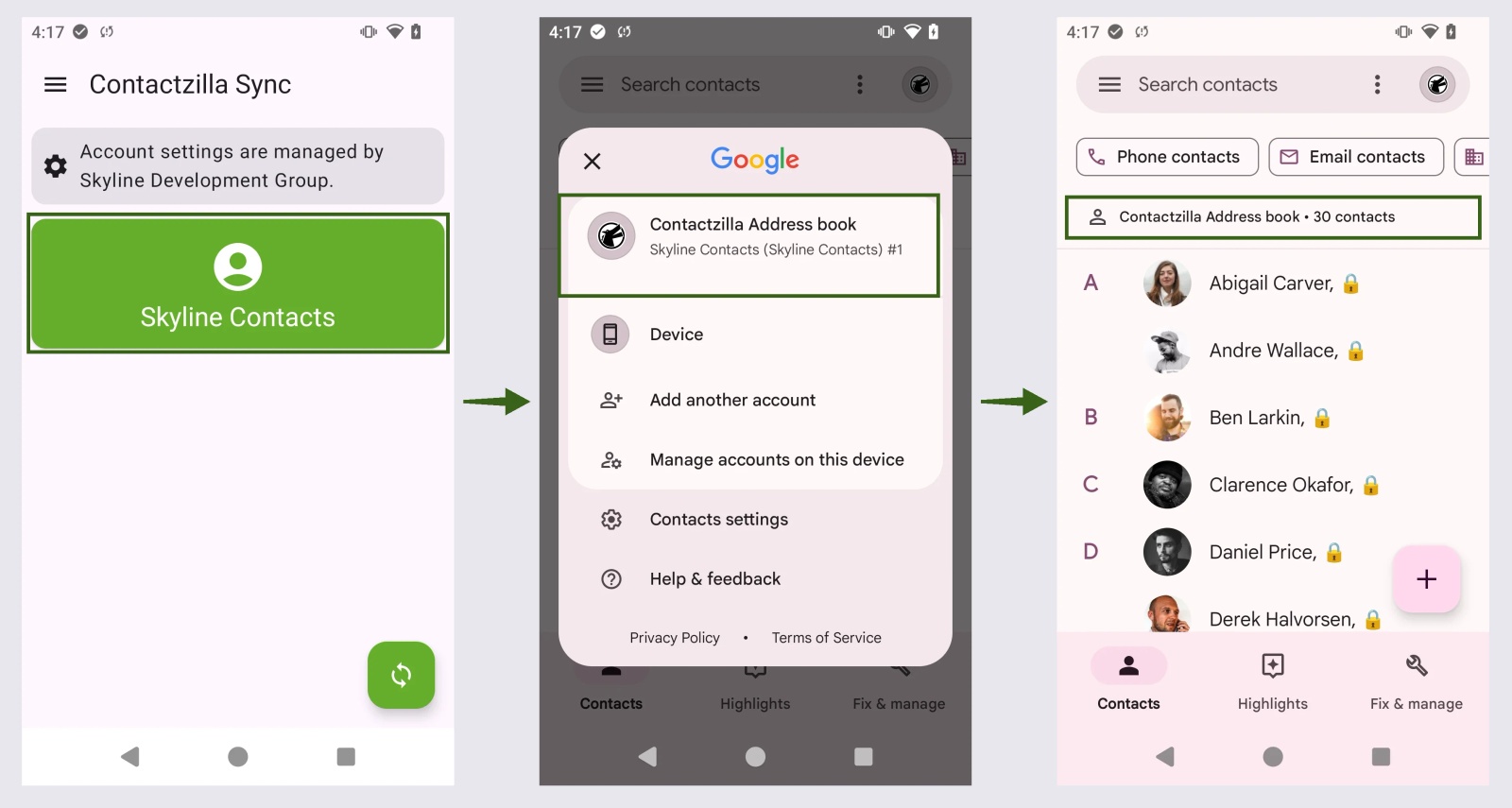
Open Contactzilla Sync once on each phone, even when an MDM installed it. In our Intune tests, the Contactzilla account didn't exist in the Contacts app until the app was first opened, and after that it synced in the background. If the Contacts app then looks empty, it is showing the phone's own account, so switch to the Contactzilla address book. On read-only deployments, set a different default account for new contacts, or contacts staff add themselves can disappear at the next sync. Tested on a Spectralink Versity 9553 running Android 13, November 2026.
Do shared Outlook contacts and caller ID work on Android work profile phones?
Android keeps work and personal data apart on a phone with a work profile. Microsoft's guide says Outlook in the work profile reaches only work profile contacts, and that by default the personal dialler and messaging apps can read work contacts unless a device restriction stops them. It adds that some of those apps may not support this properly, so test caller ID on each phone model and enrolment type you manage. Contactzilla Sync installs inside the work profile, so the shared list sits in the work Contacts app, the one with the briefcase badge. Our guide to syncing the Global Address List to Android phones covers the Intune setting that controls it.
Next steps
- The company directory instead: Import contacts from Microsoft Entra ID, and our video Sync Shared Contacts to Android with Microsoft Intune for the Android rollout.
- The same job on iPhone: How to sync Outlook contacts with iPhone (Microsoft 365).
- Outlook itself: Contact management for Outlook: how teams share contacts, and how to deduplicate contacts before they reach staff phones.
Frequently Asked Questions
Do I need an app to sync Outlook contacts with Android?
Only the Outlook app, for your own contacts, and it can add a shared mailbox's contacts for someone with Full Access to it. To give a whole team one read-only list without opening the mailbox to them, Contactzilla Sync is the app that does that job here.
Where are my Outlook contacts on my Android phone?
In the phone's Contacts app, under an Outlook account, once Sync contacts is on. Each synced mailbox appears as its own account. If the list looks empty, the Contacts app is showing another account, such as your Google account, so tap the account icon and switch. Contacts delivered by Contactzilla appear under the Contactzilla address book in the same app.
Does Outlook for Android sync contacts both ways?
Yes. In our test, a change made in the Android Contacts app reached Outlook within a few minutes, and that held for a shared mailbox too, so anyone syncing it can change or delete its contacts for everyone.
What happens if I turn off Sync contacts?
The Outlook contacts are removed from the phone's Contacts app, and they stay in Microsoft 365.
How do I transfer Outlook contacts to a new Android phone?
Sign in to the Outlook app on the new phone and turn on Sync contacts. The contacts live in Microsoft 365, so nothing needs exporting from the old phone. A CSV export into Google Contacts also works, as described above, but it never updates.
Does adding an Exchange account to an Android phone sync the Global Address List?
No. Gmail or Samsung Email can search the directory live, but nothing from it is saved to the Contacts app, so a colleague's call still shows a number. Importing Entra ID into a shared address book and delivering it with Contactzilla Sync does save them, as in our GAL to Android guide.
Will shared Outlook contacts show caller ID on an Android phone?
Yes, once they are in the Contacts app, because Android matches an incoming number against contacts stored on the phone. On a work profile phone, the work Contacts app holds them and the dialler needs permission to read it.
Can I import contacts from more than one shared mailbox?
Yes, with one import per mailbox. They can feed one address book, labelled by mailbox, so Selective Read Only can send each team only its own list, or separate address books for separate teams.
Can Contactzilla sync contacts back into Outlook?
No. Contactzilla takes contacts from Microsoft 365 and puts them on phones; it does not write into anyone's mailbox. Keep edits in the shared mailbox and the next import carries them to every phone.
Do I need Intune or another MDM to get shared Outlook contacts onto Android phones?
No. Without an MDM, each phone installs Contactzilla Sync from Google Play and scans a QR code, which suits a small team. An MDM saves visiting each phone, though the app still needs opening once. Our post on syncing the GAL to iPhone and Android without Intune walks through the QR route.