Vendor List Template: Free Vendor and Supplier Contact List

Most free vendor list templates track payment terms and tax IDs and leave out the 24-hour line someone needs at 2am.
Short answer: Give each number staff ring its own column, such as the main line and the 24-hour line, then add the account number, when to call, and who reviews the row.
Most free templates are built for accounts payable, so keep payment terms and tax IDs on a separate procurement tab.
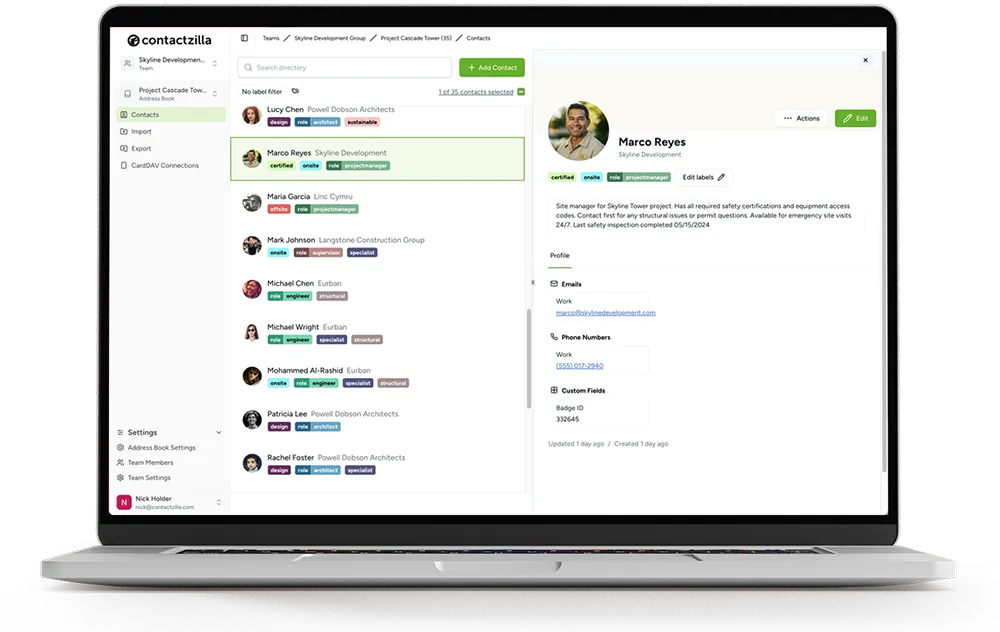
Contactzilla imports the CSV into a shared address book and syncs it read-only to staff iPhones and Android phones through an MDM or a QR code, so a changed number is fixed once and reaches every phone.
Free vendor list template: Google Sheets and CSV download
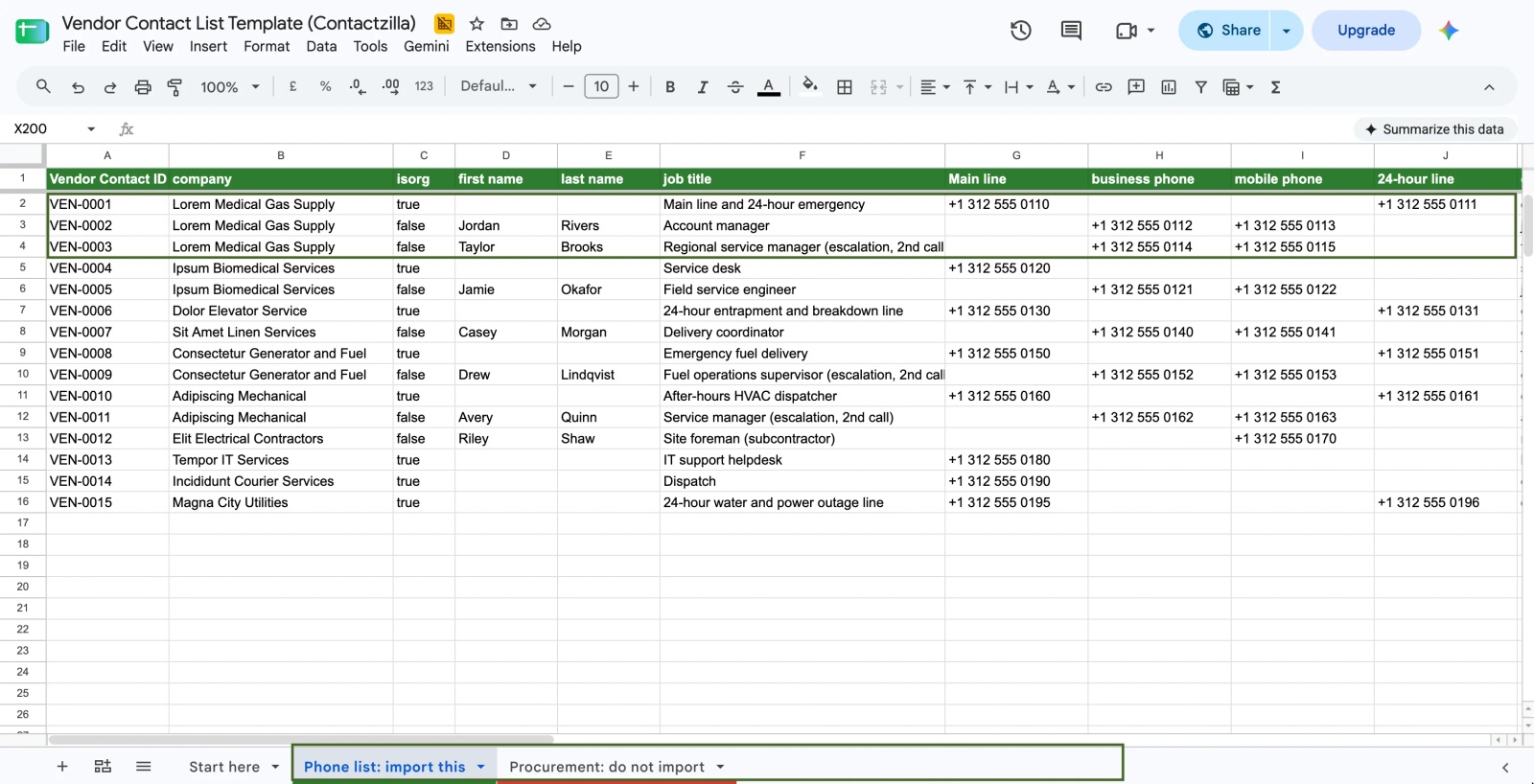
The template is a Google Sheet you can copy and a CSV you can download, with no sign-up. It has 25 columns and 15 example rows for invented suppliers (medical gas, biomedical service, elevators, linen, generator fuel, HVAC, an electrical subcontractor, IT support, a courier and a city utility), so you can see how a company line, an account manager and an escalation contact sit together before you add your own. Ten of the 25 headers are ones Contactzilla's CSV importer recognises by name; you map the rest once and the importer remembers them. A second tab, "Procurement: do not import", holds the payment and contract columns.
Make a copy in Google Sheets, or download it as a CSV.
What should a vendor contact list template include?
A vendor contact list template should include the vendor name, every number staff might ring, the account number they'll be asked for, when each line is answered, a note on when to call, and who keeps the row up to date. Most free templates stop at vendor name, primary contact, phone, email, address and payment terms. Here's what each column is for and the Contactzilla field it maps to.
| Column | What to put in it | Contactzilla field |
|---|---|---|
| Vendor Contact ID | A code that never changes or repeats, such as VEN-0001 | Hidden Custom Unique (dashboard only) |
| company | The vendor's name, on every row, people included | Company Name |
| isorg | true on the vendor's own lines, false on a named person | Is Company (a true row shows the company name as the card title on iPhone) |
| first name, last name | The named person; blank on company rows | First name, Last name |
| job title | The role or line: Account manager, After-hours dispatcher, Escalation (2nd call) | Job title |
| Main line | The office or switchboard | Phone, labelled Work |
| business phone, mobile phone | A person's direct line and mobile | Phone (Work), Phone (Mobile) |
| 24-hour line | The 24-hour or after-hours line | Phone, with a custom label such as "24-hour line" |
| e-mail address, web page | Service email and the service request portal | Email, URL/Website |
| business street to business country | Depot or service address (optional) | Address, labelled Work (the five columns combine into one address) |
| Account Number, Service Hours | The number staff quote when they call; when each line is answered | Custom fields, named as you like (on an iPhone they show as +Account Number) |
| Label 1, Label 2 | Group labels such as category:hvac and site:main-campus | Label (with a selective connection, each label shows as a list in the phone's Contacts app) |
| Emergency Bypass | true for lines that call your on-call staff back | Emergency Bypass (true sets Ring on, false leaves it off) |
| notes | When to call and what to have ready | Bio (shown as Notes on phones) |
| Internal Owner, Last Reviewed | The team that keeps the row right; the date it was last checked | Hidden Custom, not sent to phones |
On the mapping screen, Contactzilla recommends a field for the columns it recognises by name, ten of the 25 here, and you pick the rest once from its field list. The importer remembers your choices for the next upload. Two rules keep the import clean: every row needs a company name or a first name, or the importer skips it, so the vendor's name goes on every row; and give numbers their country code (+1 312 555 0110). Contactzilla can also format numbers to a default country under Team Settings > Address Book.

Vendor contact list vs vendor master list: what stays in procurement?
A vendor master list is the procurement record: legal name, tax ID, bank details, payment terms, contract start and end dates, annual spend and status. A vendor contact list is the operational one: who to ring, on which number, and what to tell them. Most templates mix the two, which suits a bookkeeper and not a phone. Nobody fixing a burst pipe needs payment terms, and tax IDs don't belong on 60 staff phones.
Keep the two apart and join them with the Vendor Contact ID. An approved vendor list (AVL) and a preferred vendor list both stay in procurement; if a team should only call preferred suppliers, a label such as status:preferred can send just those to its phones. Anything needed in the dashboard but not on a phone goes in a Hidden Custom field, which isn't sent to phones.
Should a vendor contact list have one row per vendor or per person?
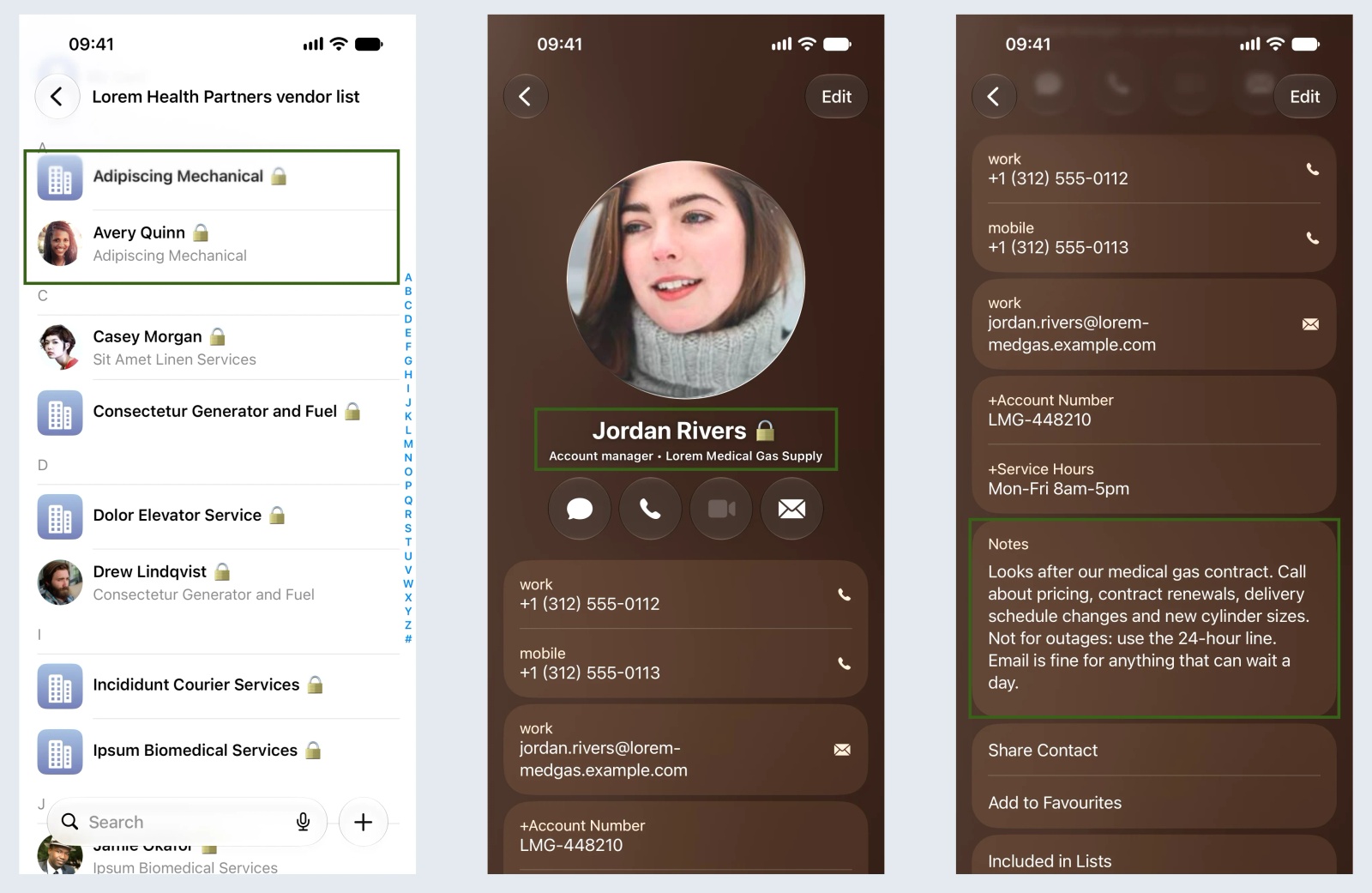
The main line and the 24-hour line belong to the company; the account manager and the service manager are people who change jobs. So the vendor's own lines get one company row (isorg set to true), and each named person gets their own row with the company name on it. In the example, Lorem Medical Gas Supply has three rows: the company card with its office and 24-hour emergency lines, the account manager, and the regional service manager marked "Escalation (2nd call)".
That works better on a phone than one card with everything in its notes. Searching "Lorem" brings up all three, a call from the 24-hour line shows the supplier's name, and when the account manager leaves you delete one row without losing the emergency line. Give the 24-hour column its own phone label when you import it, and staff see "24-hour line" next to the number instead of a generic "other".
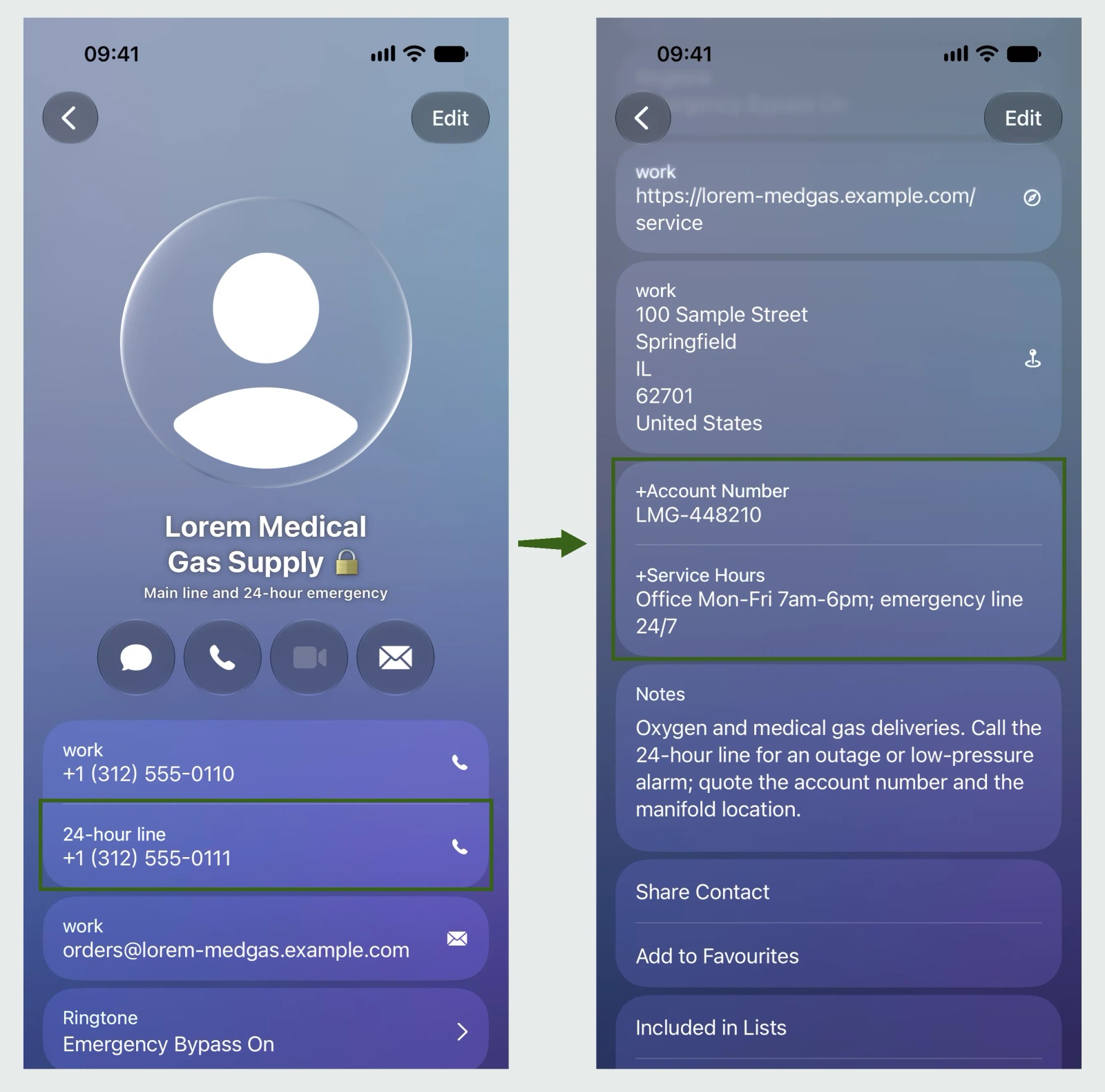
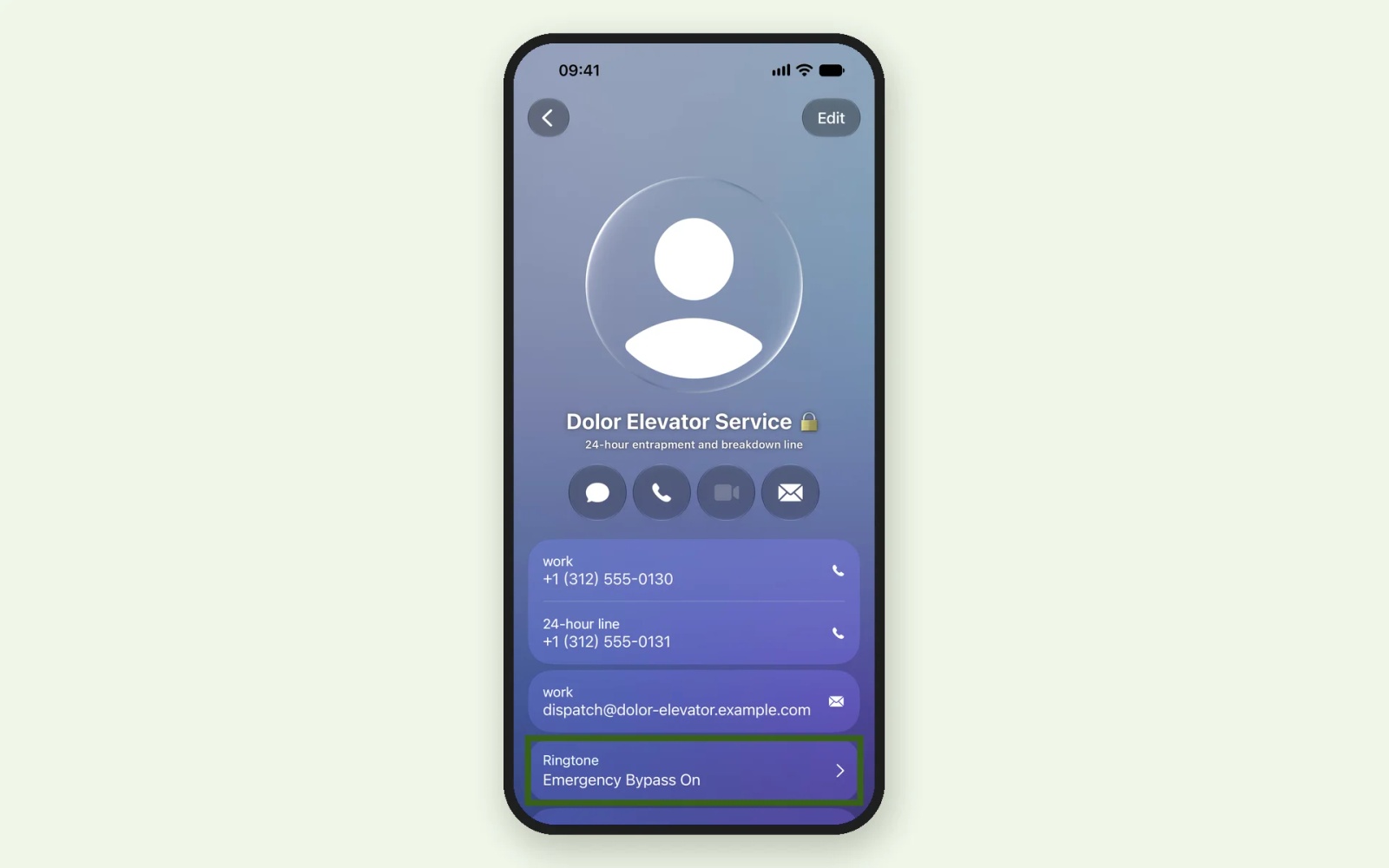
For lines that call your on-call staff back, such as an elevator entrapment service or emergency fuel, set the Emergency Bypass column to true. Emergency Bypass lets that contact's calls ring on an iPhone even when it's on silent or a Focus is on, as long as they call from a number on the card. On our test iPhone, the imported elevator contact showed Emergency Bypass switched on, with no change made on the phone. Our guide to Emergency Bypass for your team's contacts explains what the setting does on staff phones.
Vendor contact list examples by industry
Hospitals and clinics
The suppliers that matter at night are medical gas, biomedical equipment service, elevators, generator fuel, linen, specimen couriers and IT support, rung by facilities engineers and on-call managers. US hospitals also have a regulatory reason to keep these numbers current. Under 42 CFR 482.15(c), a hospital's emergency preparedness communication plan must include names and contact information for "entities providing services under arrangement", among others, and the plan must be reviewed and updated at least every 2 years. CMS lists the communication plan as one of its core emergency preparedness rule elements. A current vendor contact list on staff phones is one practical way to hold that part of the plan; it isn't the plan itself.
Partner organisations (pharmacies, nursing homes, referral practices and other hospitals) can sit in the same list under their own label, such as partner:pharmacy.
HVAC and trades
Parts counters, manufacturers' technical support lines, equipment rental and your after-hours dispatcher.
Property management vendor list
A property management vendor list is mostly 24-hour lines (elevators, locksmiths, plumbers, water damage restoration, pest control), labelled by building.
Local government and law firms
Councils and agencies ring fleet repair, towing, water treatment chemicals, radio and IT vendors, and snow clearance contractors. Law firms ring court reporters, process servers, couriers and the IT support line.
Tip 💡 Prefer a walkthrough? Watch Organizing your business contacts with labels to see how group labels are set up and how a selective read-only connection sends only labelled contacts to team devices.
Contractor list template for construction subcontractors
The same columns work as a contractor list template for construction projects. Give each subcontractor's site foreman a row, a trade label (category:electrical) and a project label (site:project-west-wing), and note when the subcontract ends. At handover, delete the row from the sheet and re-import; with the delete switch described below, the contact leaves every phone.
How to keep a vendor contact list current
A supplier contact list goes stale one number at a time, so give every row an owner and a date. Internal Owner names the team that deals with the vendor (facilities, supply chain, IT), and Last Reviewed holds the date it was last checked. Sort by date once a quarter and ask each owner to confirm their rows.
To push changes out, edit the sheet and upload it again to the same address book; the importer remembers your column mapping when the next file has the same columns. With the Vendor Contact ID mapped to Hidden Custom Unique, Replace duplicates overwrites each matching contact instead of adding it twice, so make every edit in the sheet, not in Contactzilla. Because the vendor list has its own address book, the sheet is the complete list for it, and you can switch on Delete any contacts not replaced: a supplier you take out of the sheet is deleted from the address book and from every connected phone. That switch also removes anything added by hand in Contactzilla, so the sheet stays the one place suppliers are added.
Tip 💡 Importing from more than one source? See how to deduplicate contacts before they reach staff phones, matching each import on a permanent ID.
What IT teams tell us about supplier and contractor lists on phones
Four organisations raised vendor, supplier or contractor contacts with us themselves in the last year. A US managed service provider that was testing Contactzilla for its clients asked whether the Microsoft Entra ID importer would bring in vendors and subcontractors. It doesn't, unless those people are in your Entra ID tenant, so suppliers come in by CSV. The IT team at a global enterprise software support company wanted vendor numbers kept out of staff's personal iCloud accounts, and a family office wanted them only on the phones of the people who need them. A separate vendor address book covers both: it arrives on the phone as its own account, apart from personal contacts, and a selective connection decides whose phones get it.
One of our customers, a plumbing, heating and cooling contractor, runs three lists on about 60 technicians' iPhones through Mosyle: an all-company list from Microsoft Entra ID, a managers' list, and a vendor list imported from a CSV into its own address book. In a shared address book, a CSV import's delete switch covers the whole book and would remove the Entra staff too, so a separate vendor address book means a re-import never touches the staff directory.
How to get a vendor contact list onto staff iPhones and Android phones
Contactzilla keeps shared business contacts in central address books and syncs them to each phone's own Contacts app, where they show in search and as caller ID. Here's the gist; the help article has every click.
1) Export the phone list tab as a CSV: keep the phone numbers as text so the + survives.
2) Import it into its own address book: map the columns as in the table above, and give the 24-hour line its own phone label.
3) Create a read-only device connection: the padlock emoji option shows staff the list is managed centrally, and Selective Read Only can send just one site's or category's suppliers to a team.
4) Sync it to phones: through your MDM, or a QR code on unmanaged phones. iPhones and Android phones need separate device connections.
Tested on: iPhone 15, iOS 27.0.1, November 2026.
The full walkthrough, including what to do with skipped rows, is in Import contacts from a CSV to a Contactzilla address book, and for later updates, How to Re-import Contacts Without Creating Duplicates. To watch it instead, see How to Import Contacts into Contactzilla: CSV, vCards & Manual Entry.
Tip 💡 Ready to send the list to phones? Follow our step-by-step guides for Intune on iPhone, Intune on Android, Jamf Pro and Mosyle, or put the list on unmanaged phones with a QR code.
How we built this vendor contact list template
We reviewed the top US results for "vendor list template", "supplier list template" and "vendor contact list template" on 2 November 2026. None had an after-hours line or an account number, only one had an escalation contact, and none mentioned staff phones. We added the columns staff need when they call, then imported the file into a test address book and checked the result on an iPhone in November 2026. The post also draws on our own support conversations and demos.
Next steps
- Get the template: make a copy of the vendor contact list template in Google Sheets.
- Import it with Import contacts from a CSV to a Contactzilla address book, or watch How to Import Contacts into Contactzilla: CSV, vCards & Manual Entry.
- Learn how group labels sort suppliers by category and site.
Frequently Asked Questions
Is there a free vendor list template for Google Sheets or Excel?
Yes. This one is a Google Sheet you can copy and a CSV you can download, with no sign-up; the CSV opens in Excel. It covers vendor name, main, 24-hour and direct numbers, account number, service hours, labels, notes and a review date, with headers ready to import into a shared address book.
What's the difference between a vendor contact list and an approved or preferred vendor list?
A vendor contact list says who to call and on which number. An approved vendor list (AVL) records which suppliers have passed your purchasing or quality checks, and a preferred vendor list says who to buy from first. Keep approval status in procurement; if a team should only see preferred suppliers, a label such as status:preferred can send just those to its phones.
How do I get a vendor list onto staff iPhones and Android phones?
Import the vendor list CSV into a shared address book, then sync that address book to the phones read-only through your MDM (such as Intune, Jamf or Mosyle) or a QR code. The contacts land in each phone's own Contacts app, show as caller ID, and update when you re-import the list.
Can pharmacies, nursing homes and referral partners go in the same vendor contact list?
Yes. Give each partner type its own label, such as partner:pharmacy or partner:referral, in one of the label columns. With Selective Read Only you can then send partner contacts only to the phones that need them, such as discharge planners, while facilities staff get just the suppliers.