Global Address List (GAL): What It Is, Where It Is in Outlook

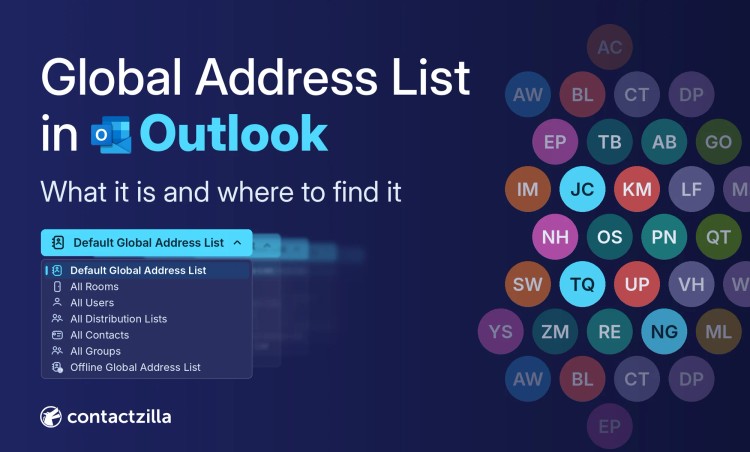
Every version of Outlook puts the company directory in a slightly different place, and none of them puts it in your phone's Contacts app.
Short answer: The Global Address List (GAL) is the company directory you see in Outlook. Exchange Online builds it automatically from every mail-enabled user, group, room and external mail contact in a Microsoft 365 organisation.
Open it from To, Cc or Bcc in a new email. Classic and new Outlook for Windows also have an Address book button for browsing it; Outlook on the web and Outlook for Mac only let you search it.
The GAL never reaches the iPhone or Android Contacts app. Contactzilla imports your staff from Microsoft Entra ID on a schedule and syncs them to phones as read-only contacts with names on incoming calls.
Checked against Microsoft's documentation and in new Outlook for Windows, Outlook on the web and Outlook for Mac, November 2026.
What is in the Global Address List?
The Global Address List, sometimes called the global address book, is Exchange Online's list of everyone people can email inside the organisation. Microsoft's page on address lists in Exchange Online says the Default Global Address List includes all mail-enabled users, contacts, groups, dynamic distribution groups and public folders, and updates automatically as recipients are created or changed.
Each recipient type also sits in a built-in address list, shown in classic Outlook's address book drop-down. The table follows Microsoft's list of recipients in Exchange Online.
| Recipient type in the GAL | Who or what it is | Built-in address list |
|---|---|---|
| User mailbox | Licensed staff member | All Users |
| Shared mailbox | Team address such as accounts@, unlicensed | All Users |
| Mail user | Account whose email lives elsewhere | All Users |
| Room and equipment mailboxes | Meeting rooms and bookable equipment | All Users; rooms also in All Rooms |
| Mail contact | External person, such as a supplier | All Contacts |
| Distribution and mail-enabled security groups | People emailed through one address | All Distribution Lists |
| Microsoft 365 groups and dynamic distribution groups | Team groups and rule-based groups | Default Global Address List |
| Mail-enabled public folder | Folder with its own address | Public Folders |
Mail contacts: external people in your Global Address List
Mail contacts are people outside the organisation, such as suppliers, that an Exchange admin adds so everyone can find them in the Global Address List. They aren't user accounts in Microsoft Entra ID, and Microsoft Graph treats them as read-only organisational contacts, so a tool that reads users from Entra ID won't see them. Our guide to how teams share contacts in Outlook, including mail contacts covers adding them.
Where is the Global Address List in Outlook?
Checked in November 2026, every Outlook app reaches the same Global Address List, but the way in differs, and so does whether you can scroll it. Microsoft changes these screens often.
| Outlook client | Where to find the GAL | Browse or search | Offline copy | Save to my contacts |
|---|---|---|---|---|
| New Outlook for Windows | Address book on a new email's Message tab, or type in To, Cc or Bcc | Browse (Default Global Address List and other lists) and search | Listed as Offline Global Address List | From the contact card |
| Classic Outlook for Windows | Home > Address Book | Browse (in full from the Offline Global Address List) and search | Yes, the Offline Global Address List | Yes, Add to Contacts |
| Outlook on the web | The People search box (filter results to Directory), or To, Cc or Bcc | Search only | None documented | Yes |
| Outlook for Mac | The To field or the search bar | Search only | None documented | Not documented |
| Outlook for iPhone and Android | Search Directory when addressing an email | Search only | None documented | Not to the phone: Save Contacts copies only your own Outlook contacts |
Browsing got harder in early 2024 with Microsoft's change MC706449. Microsoft's address lists page says Outlook on the web shows no list above 450 users and asks for a search instead, and a search matching more than 5,000 entries returns nothing. Offline address books can still be browsed in full.
Where is the Global Address List in new Outlook for Windows?
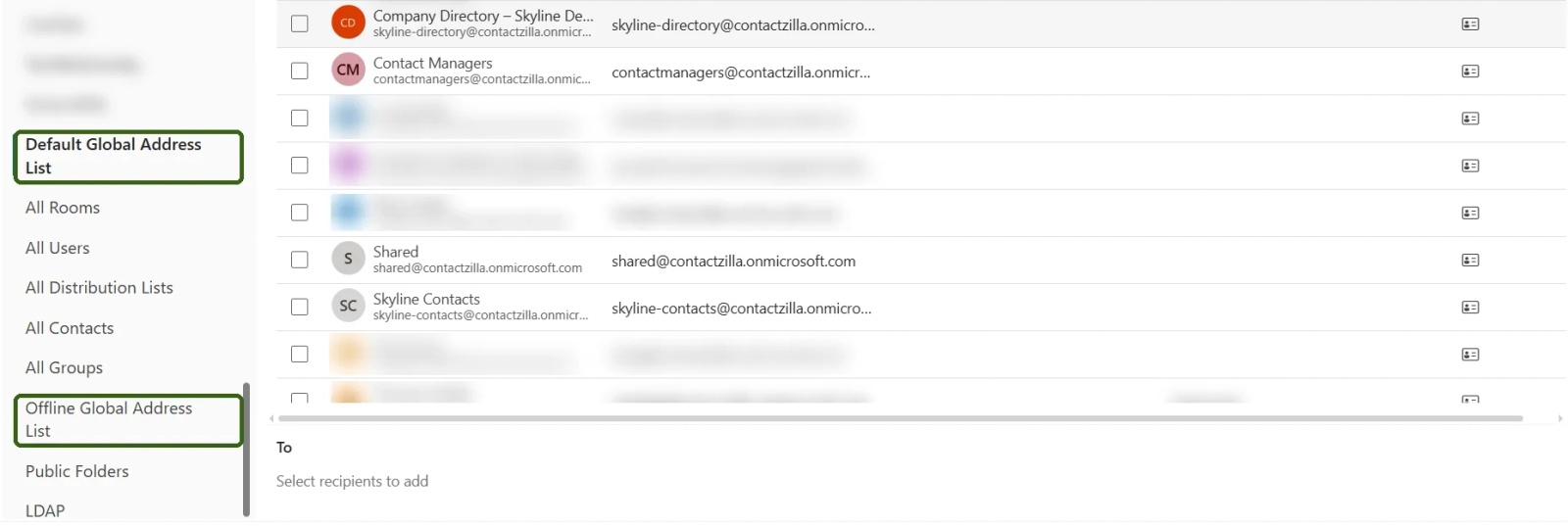
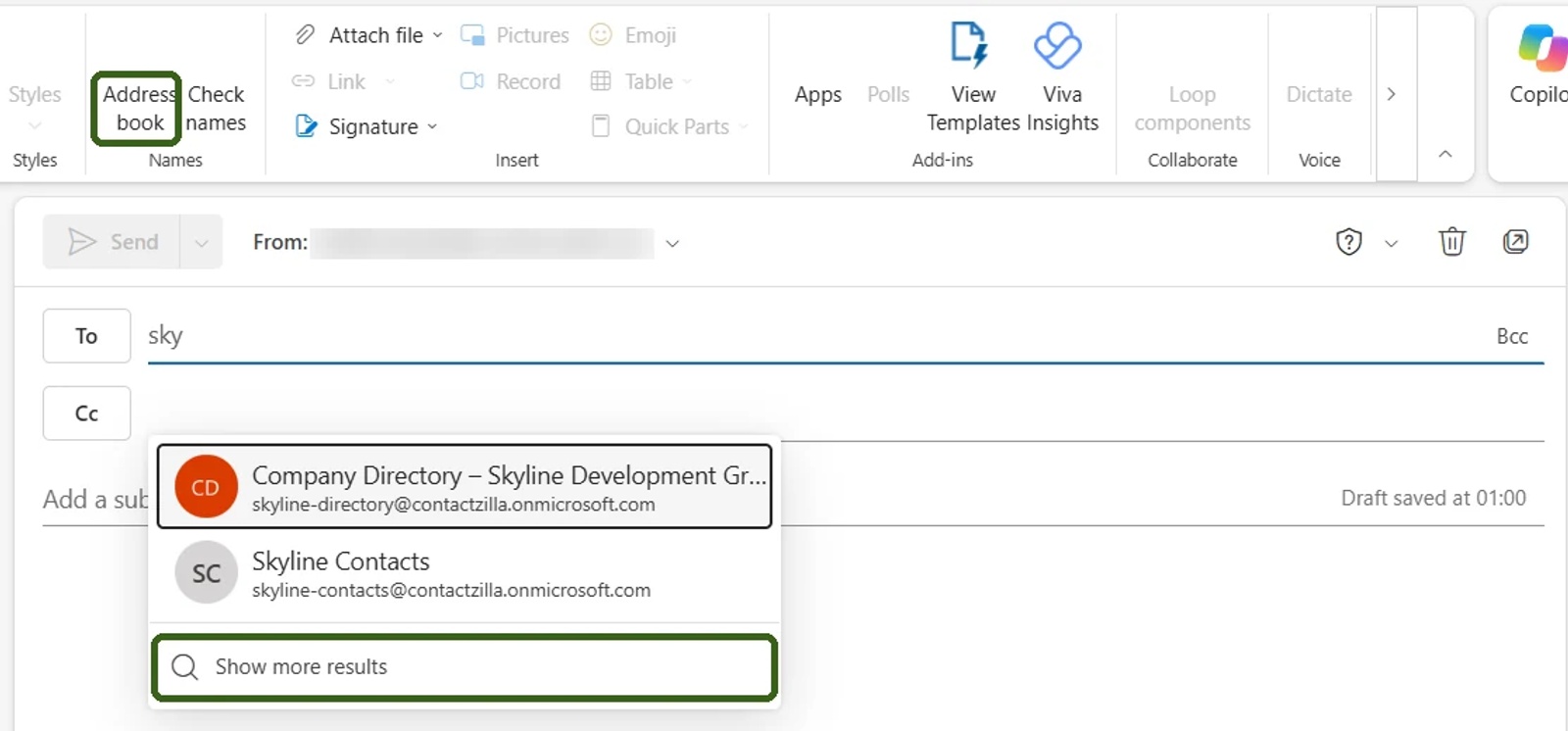
In new Outlook for Windows, open a new email and select Address book on the Message tab. When we checked in November 2026, it opened an Add Recipients window with the address lists down the left: Default Global Address List, All Users, All Rooms, All Contacts, All Distribution Lists, All Groups, Offline Global Address List, Public Folders and LDAP. Selecting Default Global Address List listed everyone without typing a name, in an organisation small enough to stay under Microsoft's 500-entry browsing limit. Typing in To, Cc or Bcc searches the GAL directly and offers Show more results. Microsoft's guide to opening the address book in Outlook covers adding people with the plus sign next to their name.
Where is the Global Address List in classic Outlook for Windows?
In classic Outlook for Windows, Microsoft's guide to opening and using all contacts puts the address book on the Home tab: select Address Book, or open People and choose Address Book in the Find group. The Address Book drop-down lists the Global Address List, the Offline Global Address List and the other address lists. Online lists over 500 entries show only the first 500, but the Offline Global Address List can be browsed in full. We checked new Outlook for Windows first-hand; this section follows Microsoft's documentation for classic Outlook.
Where is the Global Address List in Outlook on the web?
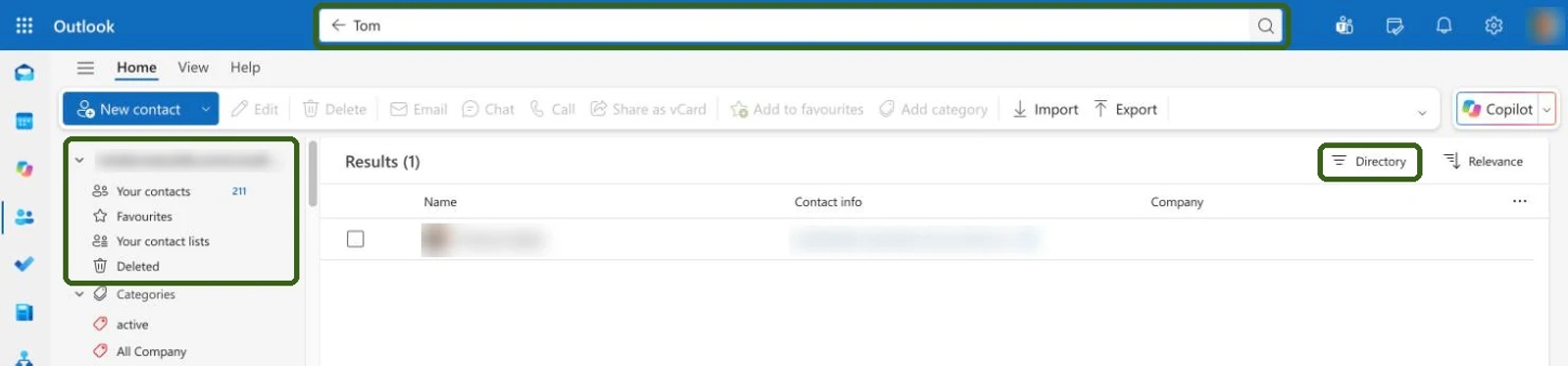
When we checked Outlook on the web in November 2026, the People page's left panel had no Directory node, only Your contacts, Favourites, Your contact lists, Deleted and Categories. You reach the Global Address List through the Search contacts and directory box or the To, Cc and Bcc picker. After a search, the filter above the results switches between All, Contacts and Directory, and Directory shows only people from the Global Address List. You can still save a colleague to your own contacts, as Microsoft's People in Outlook on the web guide explains.
Where is the Global Address List in Outlook for Mac?
When we checked Outlook for Mac in November 2026, its People area showed only Contacts, Contact Lists and Categories, with no Directory. You find colleagues in the Global Address List by typing a name in the To field: Outlook suggests matches and offers Search Directory, which searches the whole Global Address List. Microsoft's mid-2024 search update for the GAL (MC800848) shows each person's details and organisation chart, so you can pick the right one.

Where is the Global Address List in Outlook for iPhone and Android?
In Outlook for iPhone and Android, a work account shows Search Directory when you address an email. The iPhone app's Save Contacts setting copies your own Outlook contacts to the phone, and Microsoft's Save Contacts guide doesn't mention the directory. Android's equivalent is Sync Contacts, which works one way.
Tip 💡 If it's your own Outlook contacts you want on your iPhone, our guide on how to sync Outlook contacts with iPhone covers the built-in routes and the settings to check.
Global Address List vs Outlook contacts, the Outlook address book and Entra ID
Four things get called "the address book" in Microsoft 365, and mixing them up causes many "where is it" questions. The Outlook address book is the picker that opens from To, Cc or Bcc, holding the GAL, other address lists and your own contacts folders. Microsoft Entra ID (formerly Azure Active Directory, or Azure AD) holds the user accounts behind the GAL.
| Global Address List | Your Outlook contacts | Outlook address book | Microsoft Entra ID | |
|---|---|---|---|---|
| Who maintains it | Exchange Online, from recipients admins create | You | Outlook | IT admins, or on-premises Active Directory through sync |
| Who sees it | Everyone in the organisation | Only you, unless you share it | Each user | Admins manage it; staff see its details in Outlook and Teams |
| Can users edit it? | No | Yes | Their own contacts only | No |
| In the phone's Contacts app? | No | Yes, with contact sync on | No | No |
What is the offline address book, and why do GAL changes take time to show?
The offline address book (OAB) is the downloadable copy of the Global Address List that classic Outlook keeps in Cached Exchange Mode for working offline. Exchange Online generates offline address books every 8 hours, and Microsoft's offline address book troubleshooting guide says Outlook downloads updates every 24 hours. Microsoft allows at least 24 hours for a new Exchange Online mailbox to propagate. Put together, a new starter can take more than a day to reach classic Outlook's offline copy.
How do I refresh the Global Address List in classic Outlook?
To refresh the GAL in classic Outlook, go to Send/Receive > Send/Receive Groups > Download Address Book, choose \Global Address List and select OK. Clearing Download changes since last Send/Receive forces a full download. A refresh only updates your copy; changing the GAL itself is an admin job in the Microsoft 365 or Exchange admin center.
Where does the Global Address List come from? Entra ID and Exchange Online
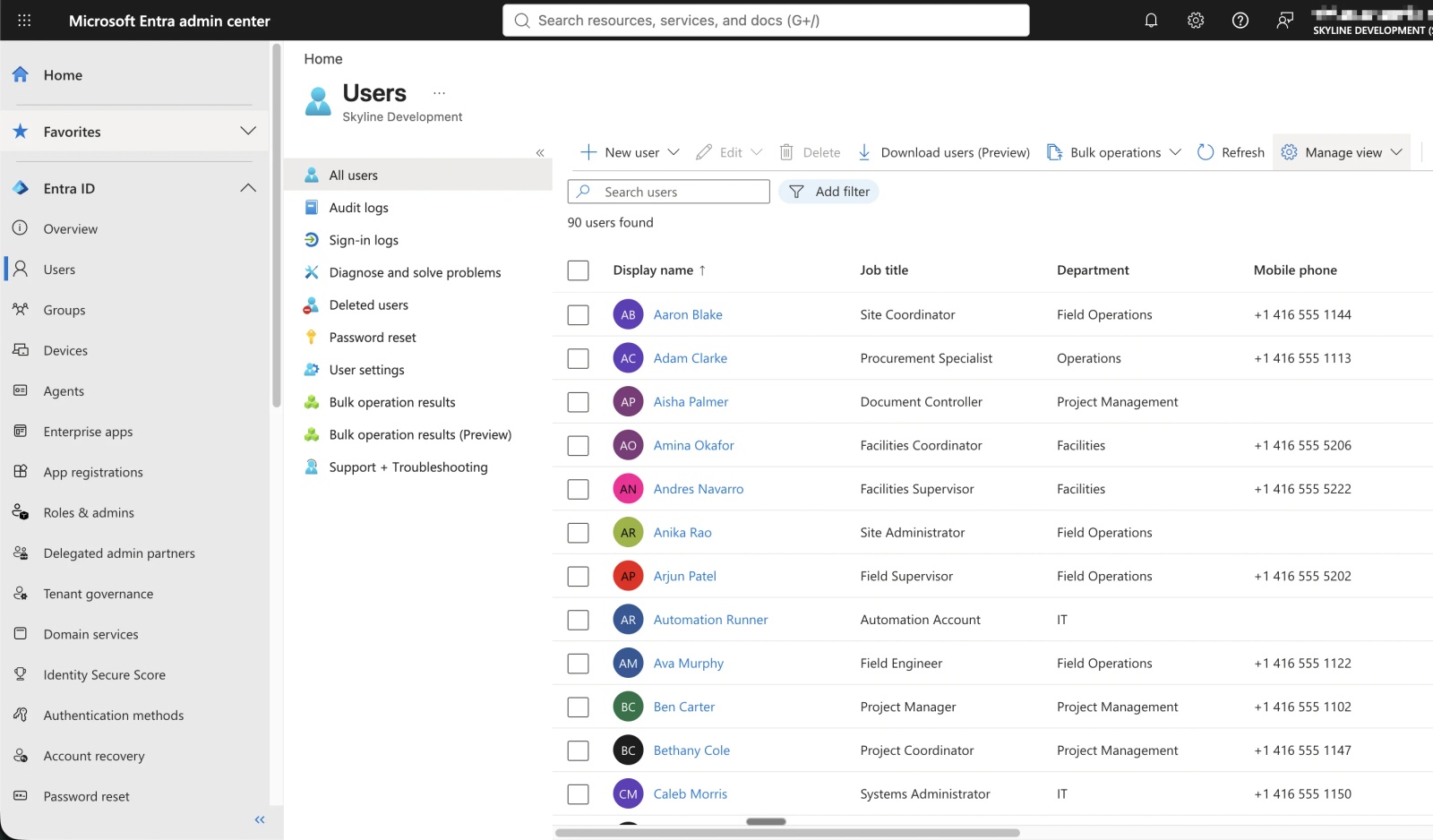
Every staff entry in the Global Address List starts as a user account in Microsoft Entra ID. In a cloud-only tenant, an admin creates the user in the Microsoft 365 admin center, and Exchange Online creates the mailbox automatically once the user has an Exchange Online licence.
In a hybrid organisation, Microsoft Entra Connect Sync (formerly Azure AD Connect) copies users from on-premises Active Directory, including the phone, mobile, department and title fields in its Exchange Online attribute set. Synced users' details are normally edited on-premises and flow up to the GAL.
How do I hide someone from the Global Address List?
To hide someone from the Global Address List, an Exchange admin opens the mailbox in the Exchange admin center, selects Manage hide from GAL under Hide from global address list (GAL) and turns the toggle on, or runs Set-Mailbox with -HiddenFromAddressListsEnabled $true. Microsoft's guide to managing address lists in Exchange Online notes that hidden people still receive email.
Tip 💡 Hiding a leaver from the GAL is one of many offboarding steps. Our IT offboarding checklist covers the rest.
How do I export the Global Address List to CSV?
Outlook can't export the Global Address List, so admins use Exchange Online PowerShell. This script is built from Microsoft's documentation rather than run in our tenant: it passes the default GAL's filter to Get-Recipient, with -ResultSize Unlimited because Get-Recipient otherwise stops at 1,000 results.
Connect-ExchangeOnline
$filter = (Get-GlobalAddressList "Default Global Address List").RecipientFilter
Get-Recipient -RecipientPreviewFilter $filter -ResultSize Unlimited |
  Where-Object { -not $_.HiddenFromAddressListsEnabled } |
  Select-Object DisplayName, PrimarySmtpAddress, RecipientType |
  Export-Csv -Path .\global-address-list.csv -NoTypeInformation -Encoding UTF8
The preview filter also returns hidden people, so Where-Object drops them. To add columns such as job title or department, pipe one recipient to Format-List first to see which properties your tenant returns. If Get-GlobalAddressList isn't recognised, your role group probably lacks the Address Lists role, which Microsoft doesn't assign to any role group by default. A CSV goes stale at the next joiner or leaver; a scheduled import from Entra ID keeps a copy current.
Why isn't the Global Address List in my phone's Contacts app?
The Global Address List lives in Exchange Online, and every Outlook app reads it from there, or from a downloaded copy in classic Outlook. The mobile apps' Save Contacts and Sync Contacts settings copy only your own contacts, so a colleague you can find in Outlook isn't in the phone's Contacts app, and their calls show as a bare number with no caller ID.
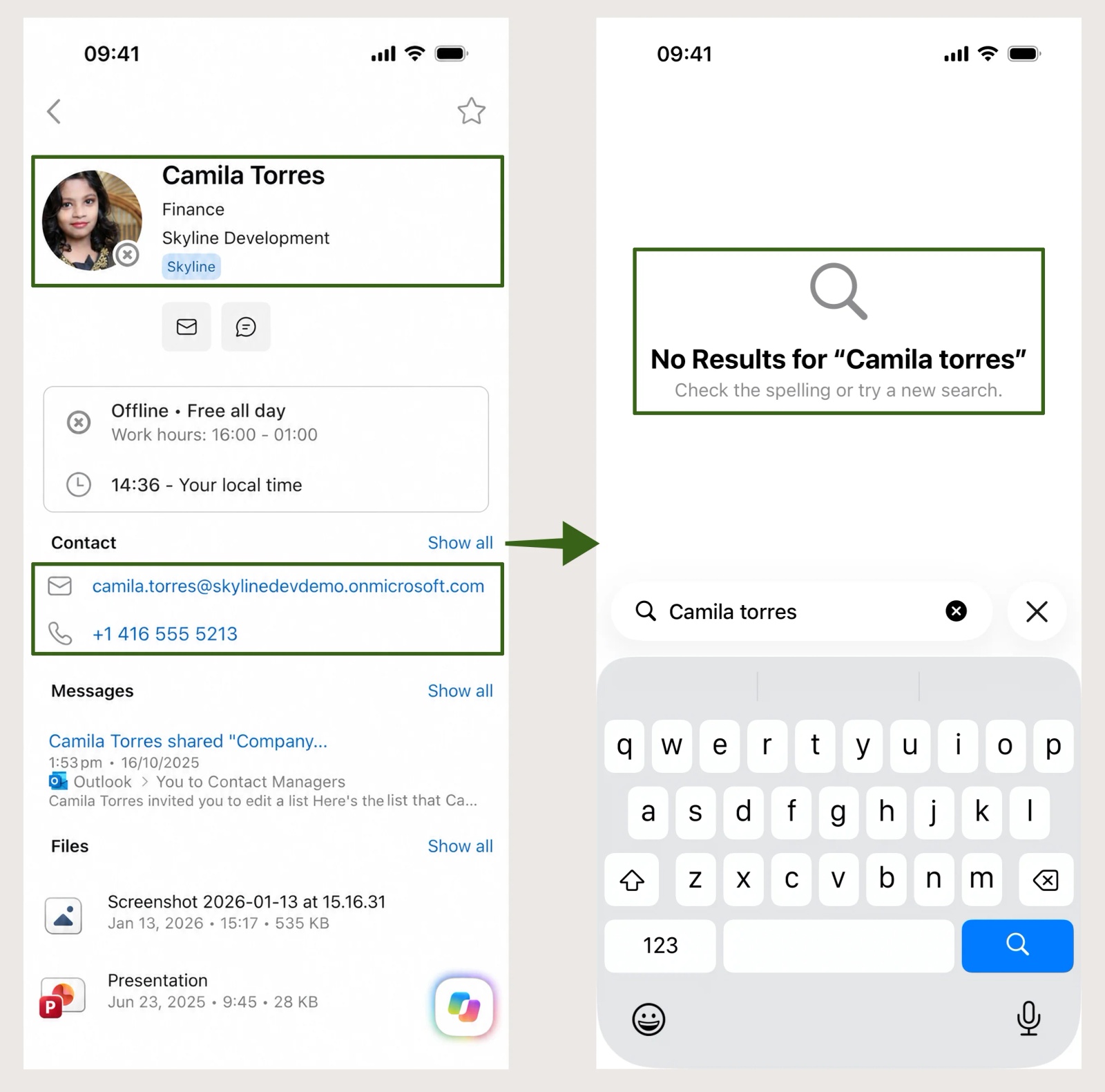
Checked on an iPhone 15 running iOS 26.6.2 with Outlook for iOS, October 2026.
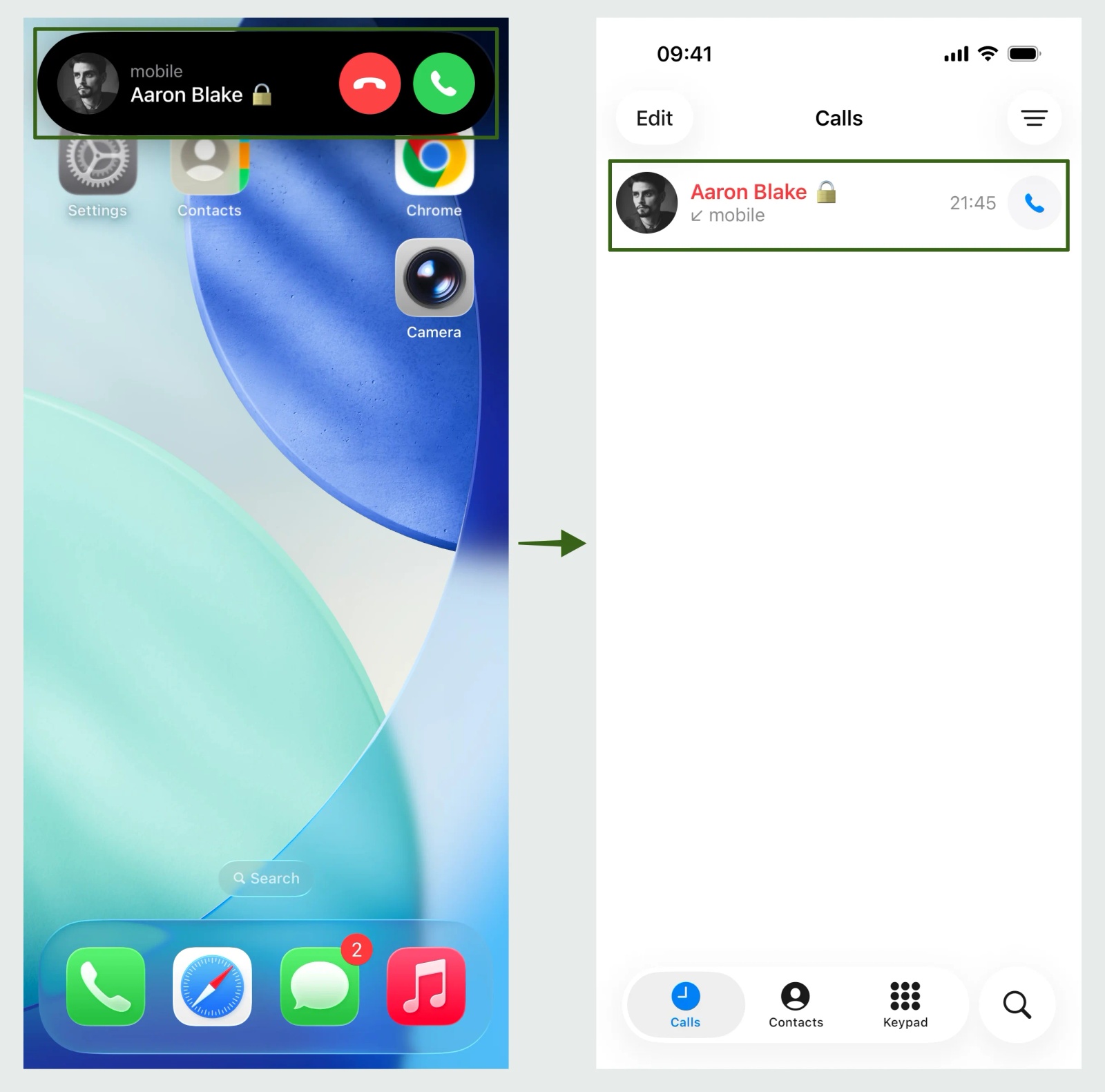
Contactzilla imports your staff (the Entra ID users behind the GAL) on a schedule, and can leave out shared mailboxes and service accounts. It delivers them to each phone's own Contacts app as read-only contacts, through your MDM or a QR code. With delete handling turned on, anyone disabled in Entra ID drops off the phones at the next import and sync.
Tip 💡 Our guides to the GAL on iPhone, Android and phones without Intune cover delivery, the help article on importing contacts from Microsoft Entra ID has every click, and our video Sync Microsoft Global Address List to iPhone & Android shows the whole setup.
What IT teams ask us about the Global Address List
In the last 12 months, five organisations raised "the GAL" with us by name, in construction, public transit, environmental services, IT services and events, and all five wanted it on staff phones. Three wanted joiners, leavers and number changes to flow through on their own. A US construction contractor with about 900 managed iPhones and iPads asked for its GAL synced "including employee additions, removals, and phone number changes", and is now testing the Entra ID importer.
Four organisations, three of them among those five, also asked whether the contacts would appear in Outlook. Contactzilla syncs to phones and doesn't write contacts into Outlook mailboxes today. One European IT services provider wanted only certain external mail contacts on a client's iPhones, so it's worth agreeing which part of the GAL you mean before choosing a tool.
Next steps after finding the Global Address List
- Your staff on their phones: Sync the Global Address List (GAL) to iPhone Contacts.
- The Entra ID import, click by click: How to import contacts from Microsoft Entra ID, and the video Sync Microsoft Global Address List to iPhone & Android.
- Removing leavers properly: our IT offboarding checklist.
Frequently Asked Questions
Can users edit their own details in the Global Address List?
No, not from Outlook, which only reads the Global Address List. An admin fixes a wrong mobile number or job title in the Microsoft 365 or Entra admin center, on-premises for synced users, or in the Exchange admin center for mail contacts.
Should a new employee appear in the Microsoft 365 Global Address List straight away?
Not always. Microsoft allows at least 24 hours for a new mailbox to propagate, and classic Outlook's offline copy can lag a further day. If someone is still missing, check they have an Exchange Online licence (no licence, no mailbox) and aren't hidden from address lists.
Can a Microsoft 365 organisation have more than one Global Address List?
Yes, but most have one. Microsoft says users can only see one GAL in Outlook, so extra GALs, assigned with address book policies, are for keeping groups apart, such as two companies in one tenant.
Can I search the Global Address List from a personal Outlook.com account?
No. The Global Address List belongs to a Microsoft 365 work or school account, and personal Outlook.com and Hotmail accounts have no company directory. Microsoft says Outlook for iOS and Android can't search the corporate directory from a personal account, even on a phone that has both.
Is there a Global Address List in Google Workspace?
No, not by that name. Google Workspace's equivalent is the Directory, which staff see when contact sharing is on in the Admin console. Our guide to the Google Workspace shared contact list covers how it reaches work phones.