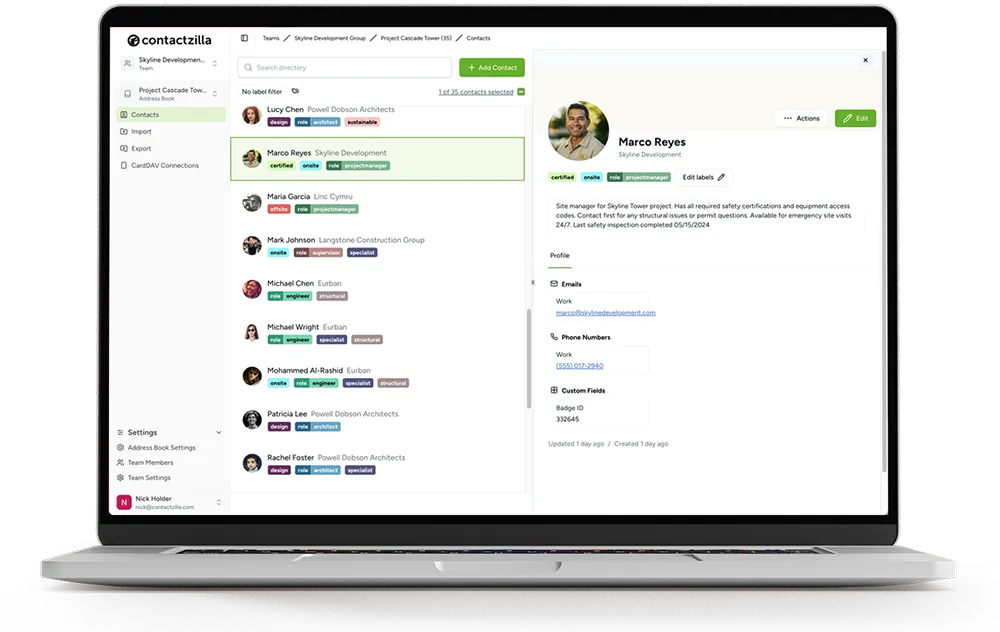
MDM vs MAM: What Each Means for Company Contacts

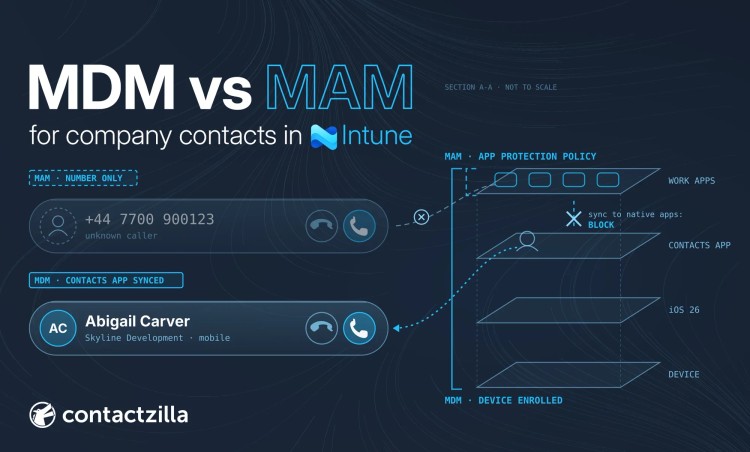
On a personal phone, a call from a colleague can show as a bare number.
Short answer: MDM enrols the whole phone, so it can deliver a shared company address book to the phone's own Contacts app. MAM (Intune app protection) protects only work apps such as Outlook, and on its own it cannot.
Outlook's Save Contacts can copy a user's own Outlook contacts to the phone, but not the company directory. It is off by default, and one app protection setting hides it. We tested this on an unenrolled iPhone in November 2026.
Contactzilla syncs one company address book, read-only if you choose, into the phone's own Contacts app on iPhone and Android, through your MDM or, on phones with no MDM, by a QR code.
MDM vs MAM: what is the difference?
MDM (mobile device management) means IT enrols the phone itself. IT can then deploy apps, push settings and accounts, and wipe the device. MAM (mobile application management) means IT manages only the work apps and the data inside them. The phone is not enrolled. In Intune, the MAM controls are app protection policies.
Microsoft says you can use app protection policies independent of any mobile-device management (MDM) solution. Vendors also use UEM (unified endpoint management) and EMM (enterprise mobility management) as umbrella terms for platforms that cover both.
| Question | MDM | MAM |
|---|---|---|
| What does IT manage? | The whole phone: its settings, accounts and the apps IT deploys | The work apps and the data inside them |
| Is enrolment needed? | Yes | No (Intune calls it MAM without enrollment) |
| Whose phone is it, typically? | Often company-owned, though it can cover personal phones | Often employee-owned (BYOD), though it also works on company phones |
| What can IT deploy? | Apps, certificates, Wi-Fi and VPN settings, accounts | Policies on protected apps only |
| What can IT remove? | Company management and data on the phone (retire), or the whole device on a company phone (wipe) | Company data in the protected apps (selective wipe) |
| Intune's name for it | Device enrolment | App protection policies |
The two also combine. Microsoft's own example is an employee with a company-issued device that is enrolled in MDM and protected by app protection policies, and a personal device that has app protection policies only.
What is Intune MAM without enrollment, and what can't it do?
MAM without enrollment is Microsoft's name for app protection on a phone that is not enrolled in any MDM. It works for apps that use the Intune App SDK or are wrapped with the Intune App Wrapping Tool, such as Outlook.
Microsoft lists three things it cannot do on those phones. IT cannot deploy apps, so staff install Outlook from the store themselves. IT cannot provision certificate profiles. IT cannot provision company Wi-Fi and VPN settings.
Two more points. An app protection policy alone does not stop someone adding the work mailbox to the phone's native Mail app. Microsoft's fix is a Conditional Access policy that requires an app protection policy. On Android, the Company Portal app must also be on the phone to receive app protection policies.
What is an Intune app protection policy?
An Intune app protection policy is a set of rules that Intune applies inside supported apps, such as Outlook, Teams and Edge, rather than to the whole phone. It is how Intune does MAM. Microsoft groups the settings into three areas: data protection (what work data can leave the app, such as copy and paste, Save As and saving to the phone's own apps), access requirements (a PIN or Face ID to open the app) and conditional launch (what happens on a jailbroken phone, for example). Microsoft's overview explains how the same policy can cover enrolled and unenrolled phones.
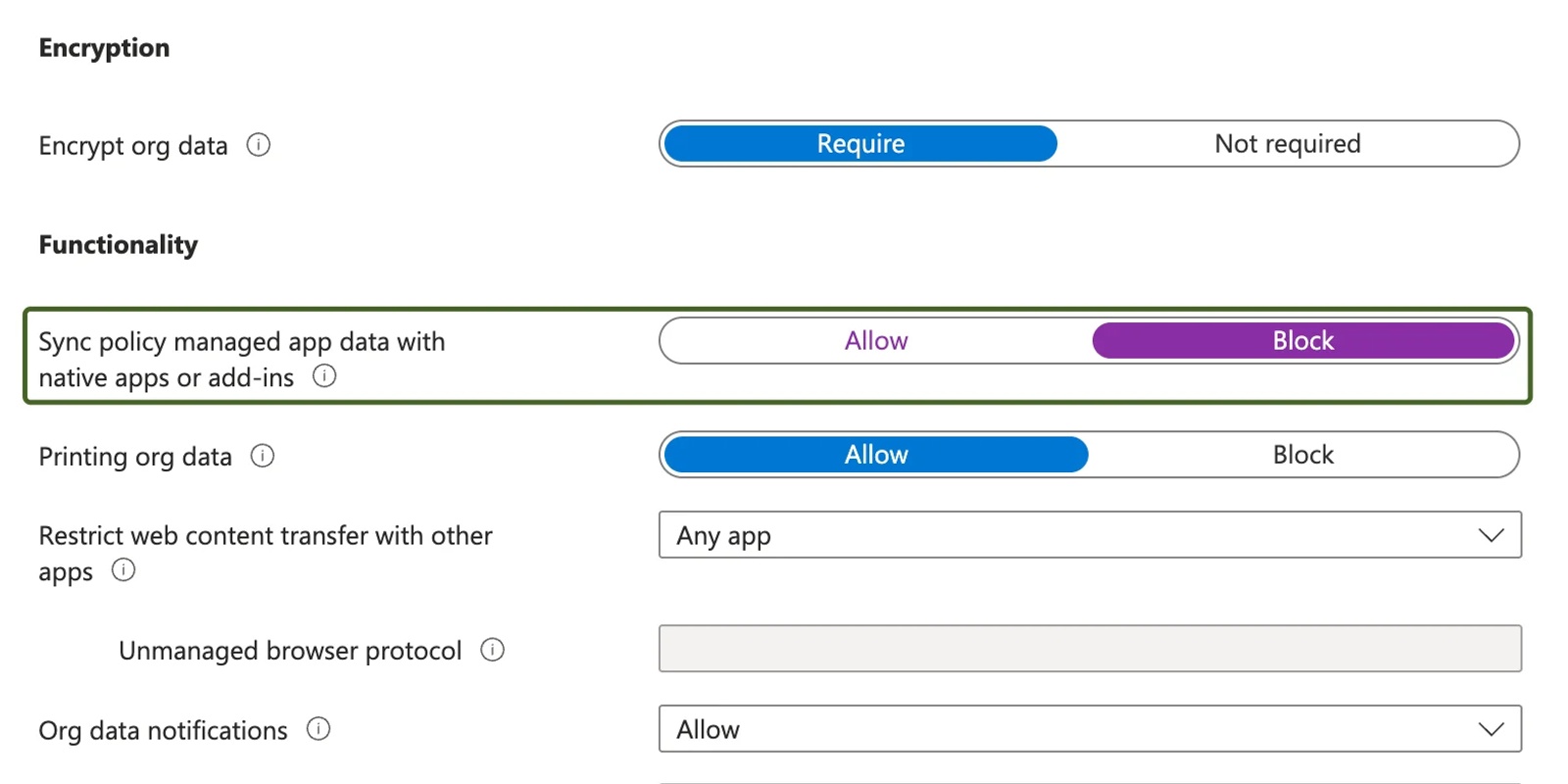
You create one in the Intune admin center under Apps > App protection policies > Create policy, choose iOS/iPadOS or Android, pick the apps and assign it to groups of users. For company contacts, one data protection setting matters most: Sync policy managed app data with native apps or add-ins. It is set to Allow by default. Set it to Block and, Microsoft says, Outlook's Save Contacts, Sync Calendars and add-ins are disabled for the work account.
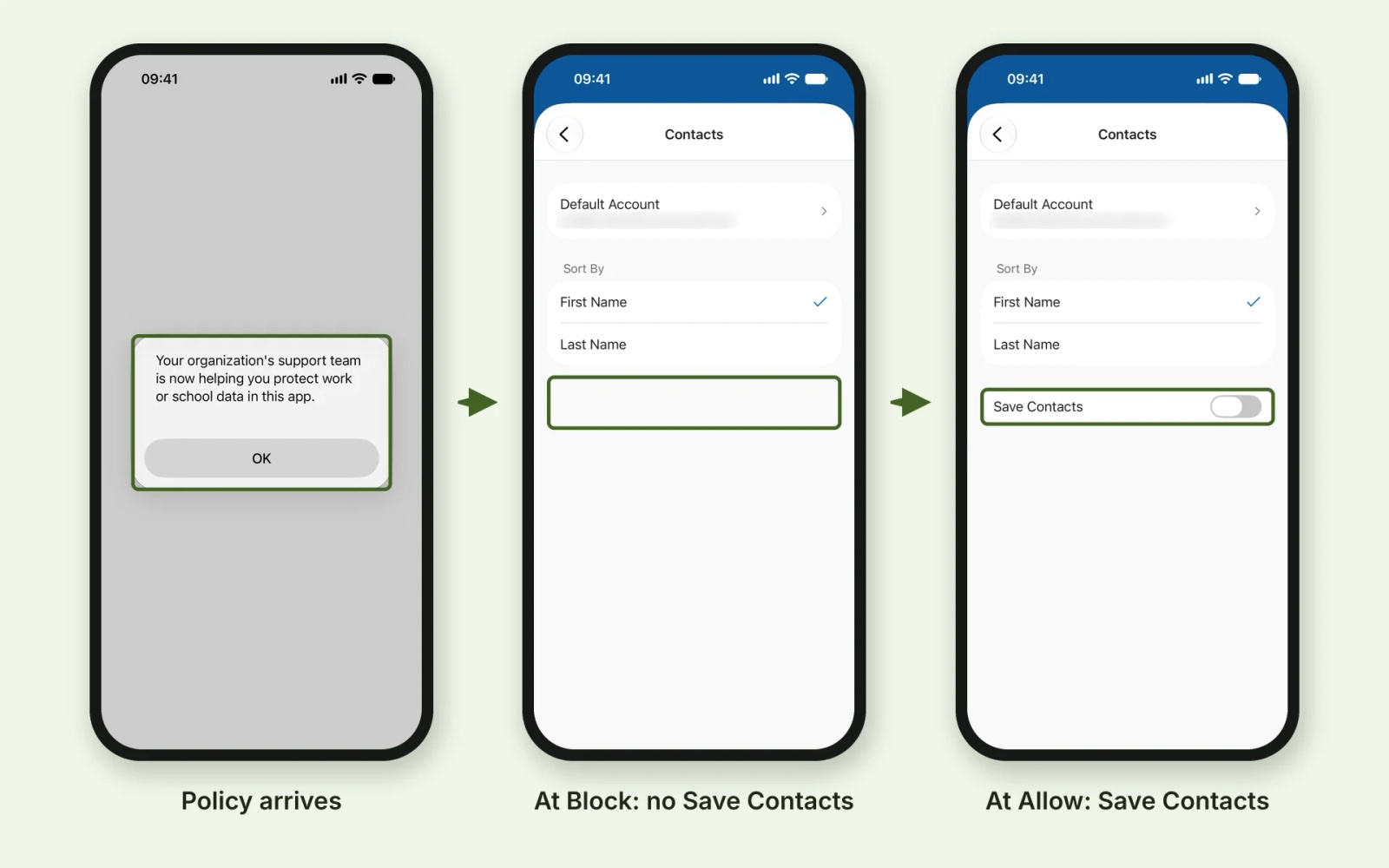
On our test iPhone, which was not enrolled in any MDM, the policy arrived as a message in Outlook. At Block, Save Contacts did not grey out. It disappeared from Outlook's Contacts settings, and came back once we changed the setting to Allow.
Can MAM (Intune app protection) put company contacts in the phone's Contacts app?
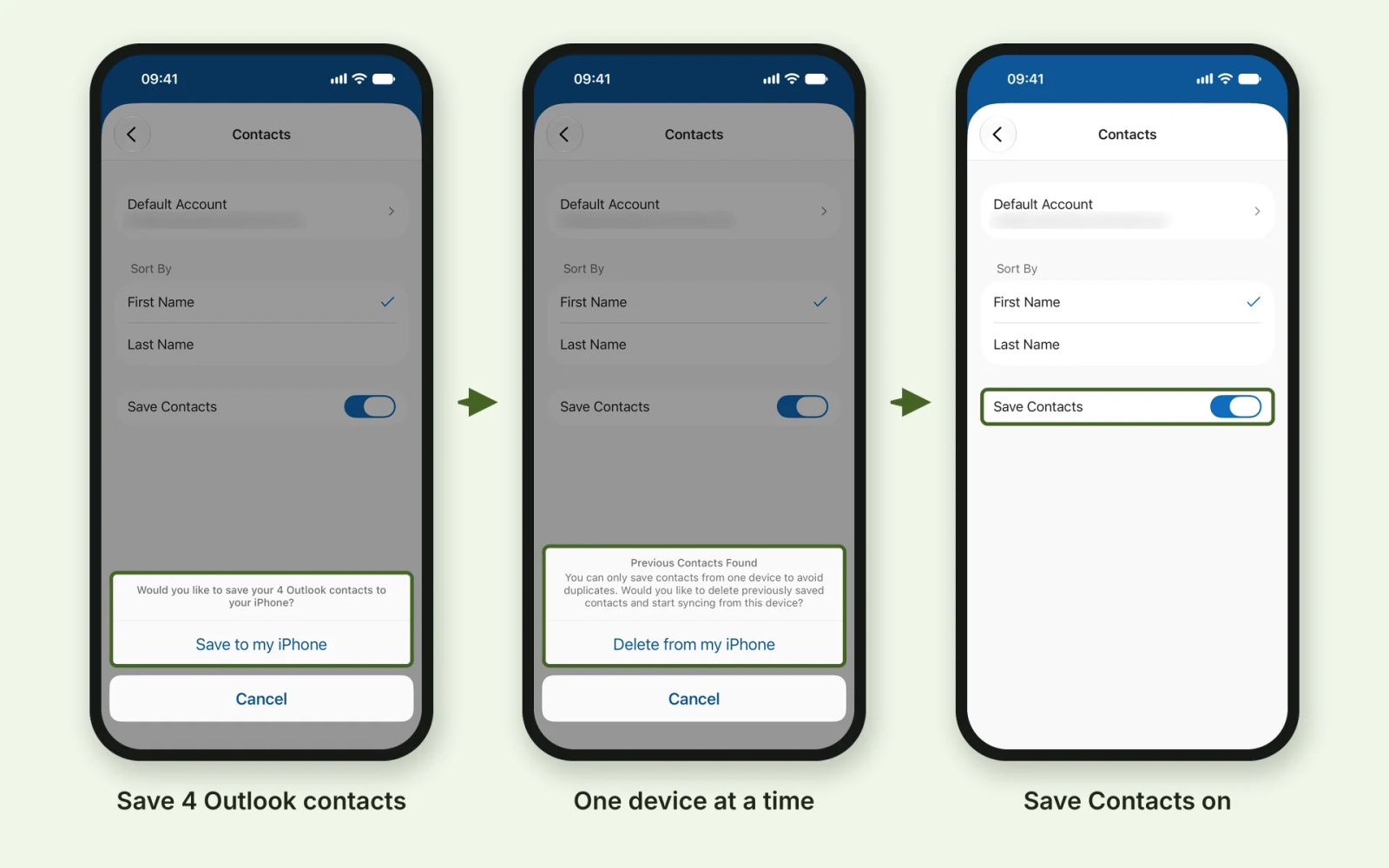
Not the shared company directory. Outlook has a Save Contacts setting that copies a person's own Outlook contacts into the phone's own Contacts app, so calls and texts can be matched to names. We switched it on under an app protection policy, and four details decide what you get.
- It is off by default, and the user turns it on. The app configuration key is
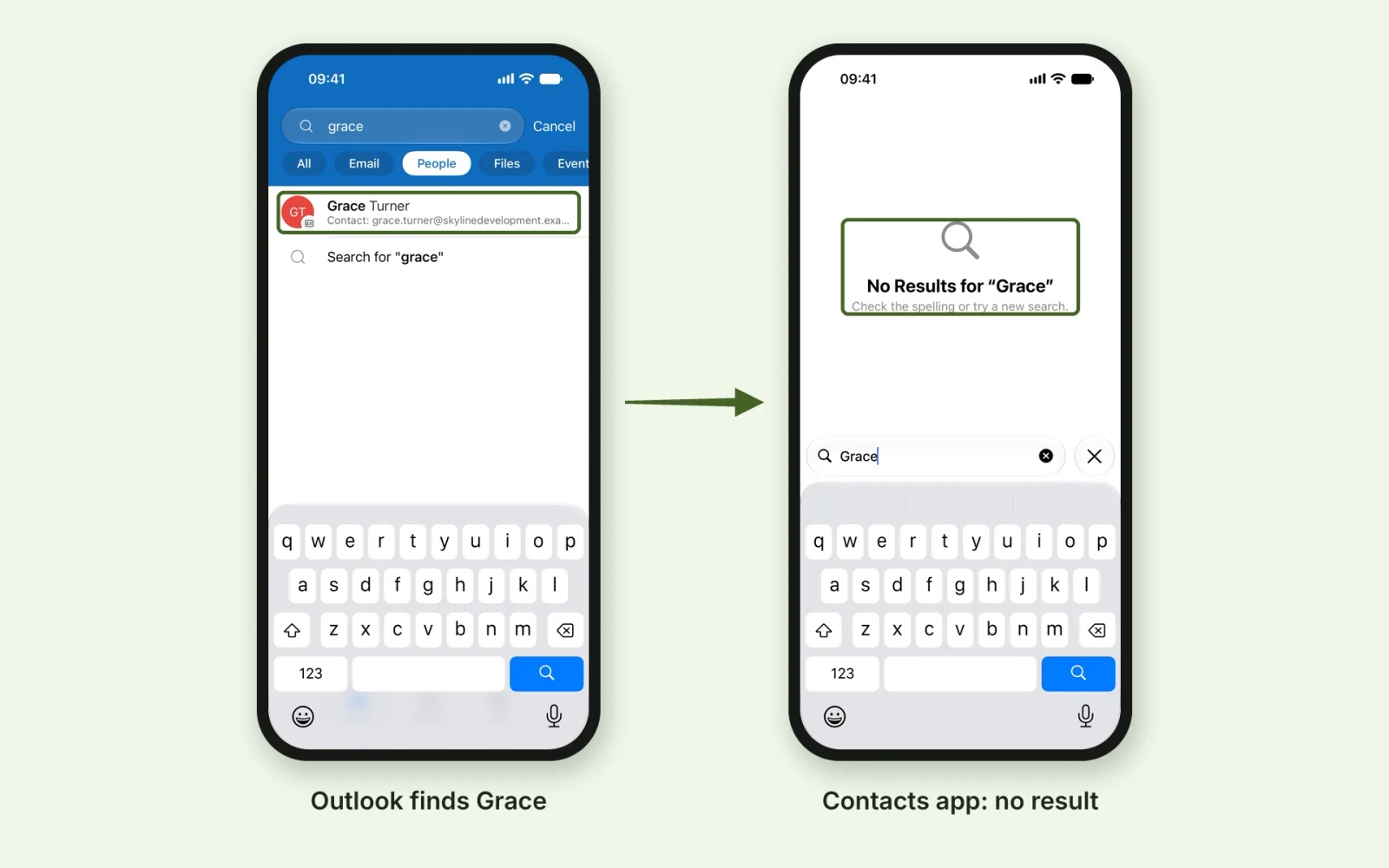
com.microsoft.outlook.Contacts.LocalSyncEnabled, and Microsoft lists it for both managed devices and managed apps, so IT can set it on by default with an app configuration policy. Microsoft says it still needs the user to allow Outlook access to Contacts (our phone had already granted it). On our phone, the switch asked to save "4 Outlook contacts" to the iPhone. - It copies the user's own Outlook contacts, not the directory. Outlook offered to save all four contacts in the test mailbox. Grace Turner, who is in the company directory but not in that mailbox, came up in Outlook's People search and returned no results in the Contacts app. Colleagues found only through the directory stay unsaved, so their calls show as numbers.
- It works from one device at a time. Our test account had used Save Contacts before, so Outlook showed "Previous Contacts Found". It saves contacts from only one device, and offered to delete the copies saved earlier before syncing from this phone. Someone with an iPhone and an iPad gets the copies on one of them only.
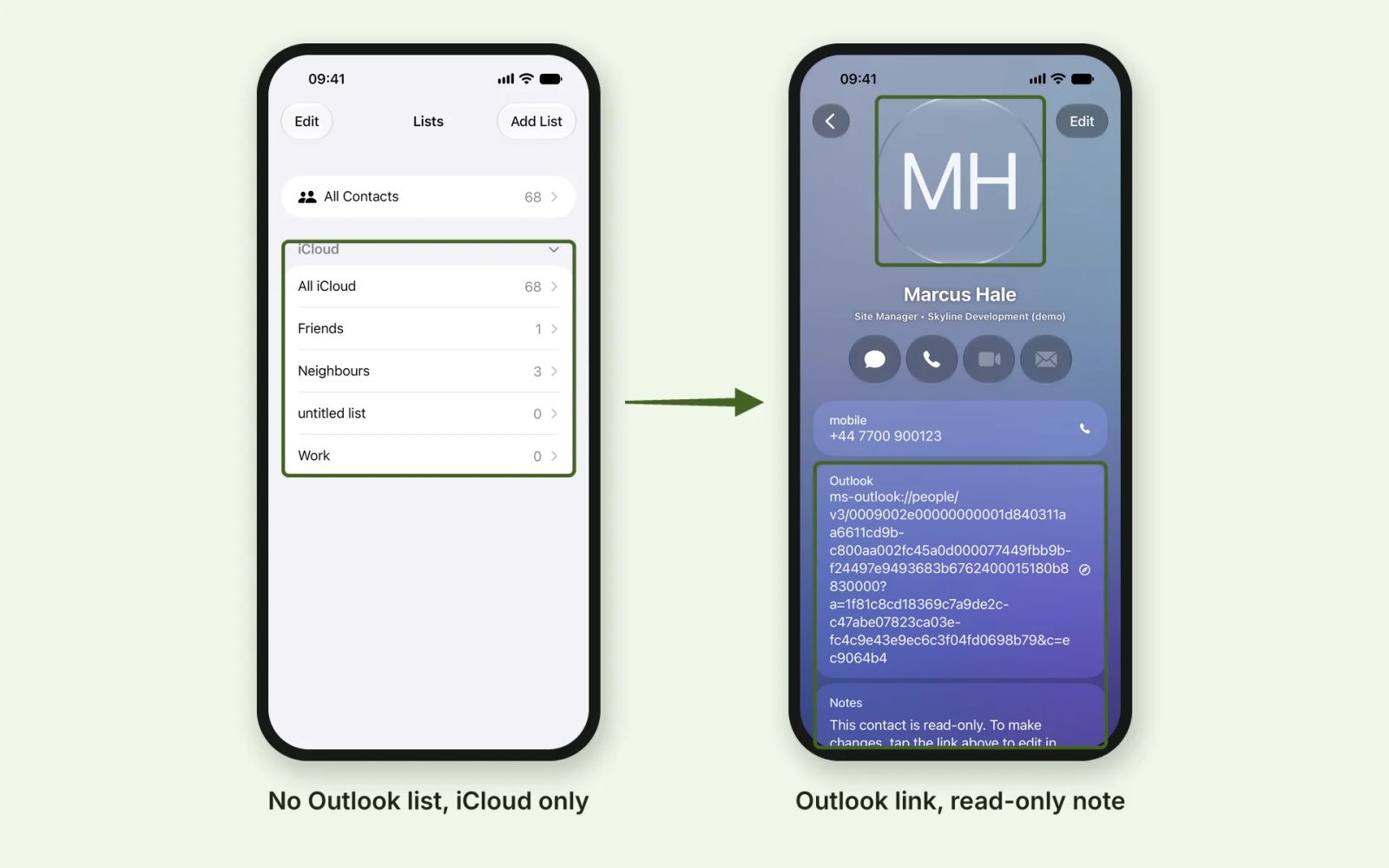
- The copies are ordinary contacts. The card we checked (Marcus Hale) had the name, job title, company and number, an Outlook link and a note saying the contact is read-only. The card still showed an Edit button, because it is an ordinary iCloud contact. It had no photo, although the Outlook contact had one.
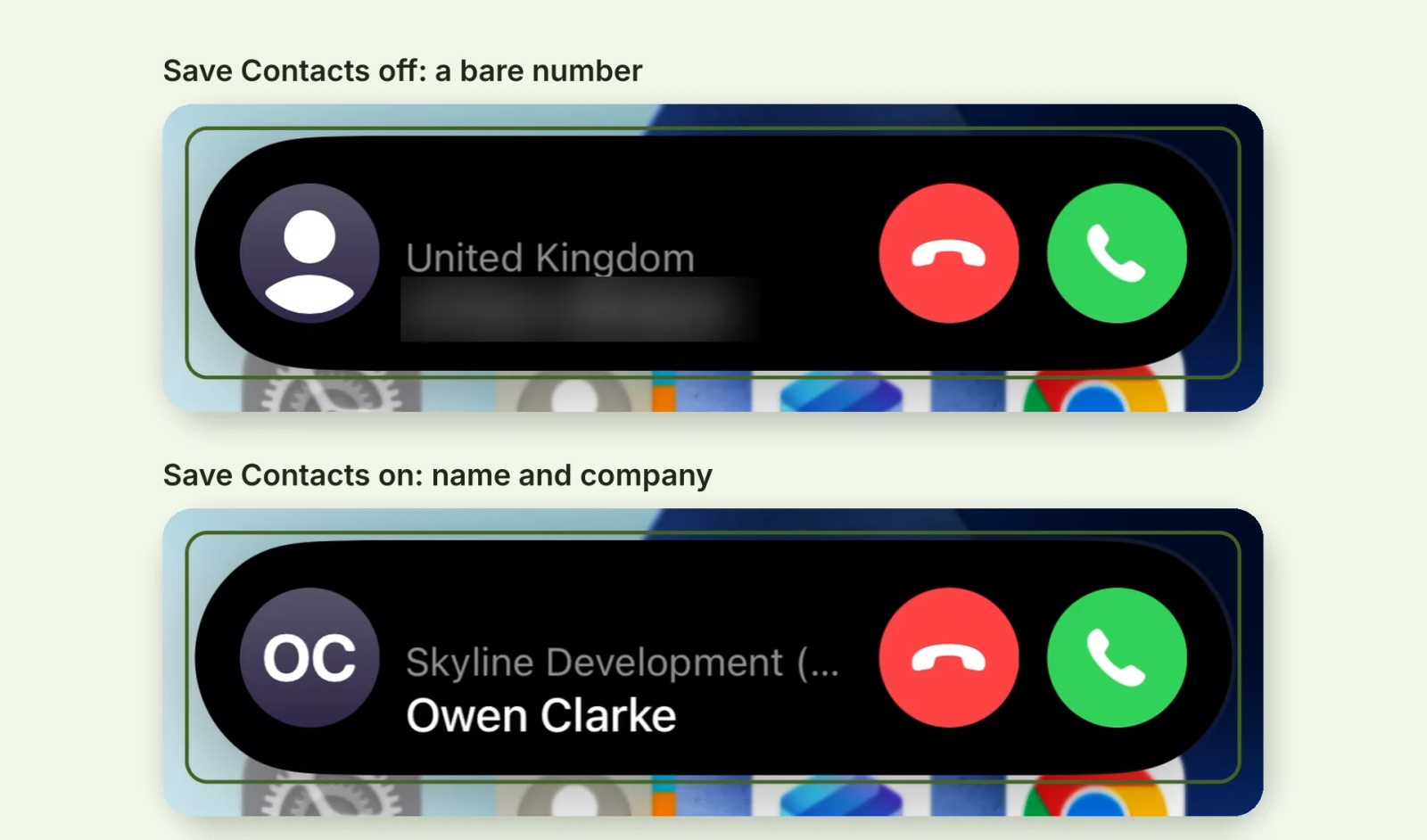
For the contacts it does copy, caller ID works. A call from Owen Clarke, one of the four, showed a bare number with Save Contacts off and his name and company once it was on.
On iPhone, there is a side effect. Microsoft's steps tell users to set the default account to iCloud first. On our test phone, the saved contacts went into the iCloud account alongside personal contacts, with no separate Outlook list. Microsoft notes they then sync to every device on that iCloud account. If client or patient contacts are in the set, that copy now sits in a personal iCloud account.
That matters when someone leaves. Microsoft says a selective wipe removes data synced directly from the app to the native app, but not data that the native app has since synced to another source. Whether a copy that has reached iCloud survives the wipe is a question to settle in your own tenant. Staff can also clear the copies themselves with Delete All Saved Contacts in Outlook's Help & Feedback settings.
Tip 💡 For what Allow and Block do to Outlook contacts and caller ID, read our Sync Policy Managed App Data With Native Apps guide.
Where do company contacts end up under MAM, MDM and a QR code?
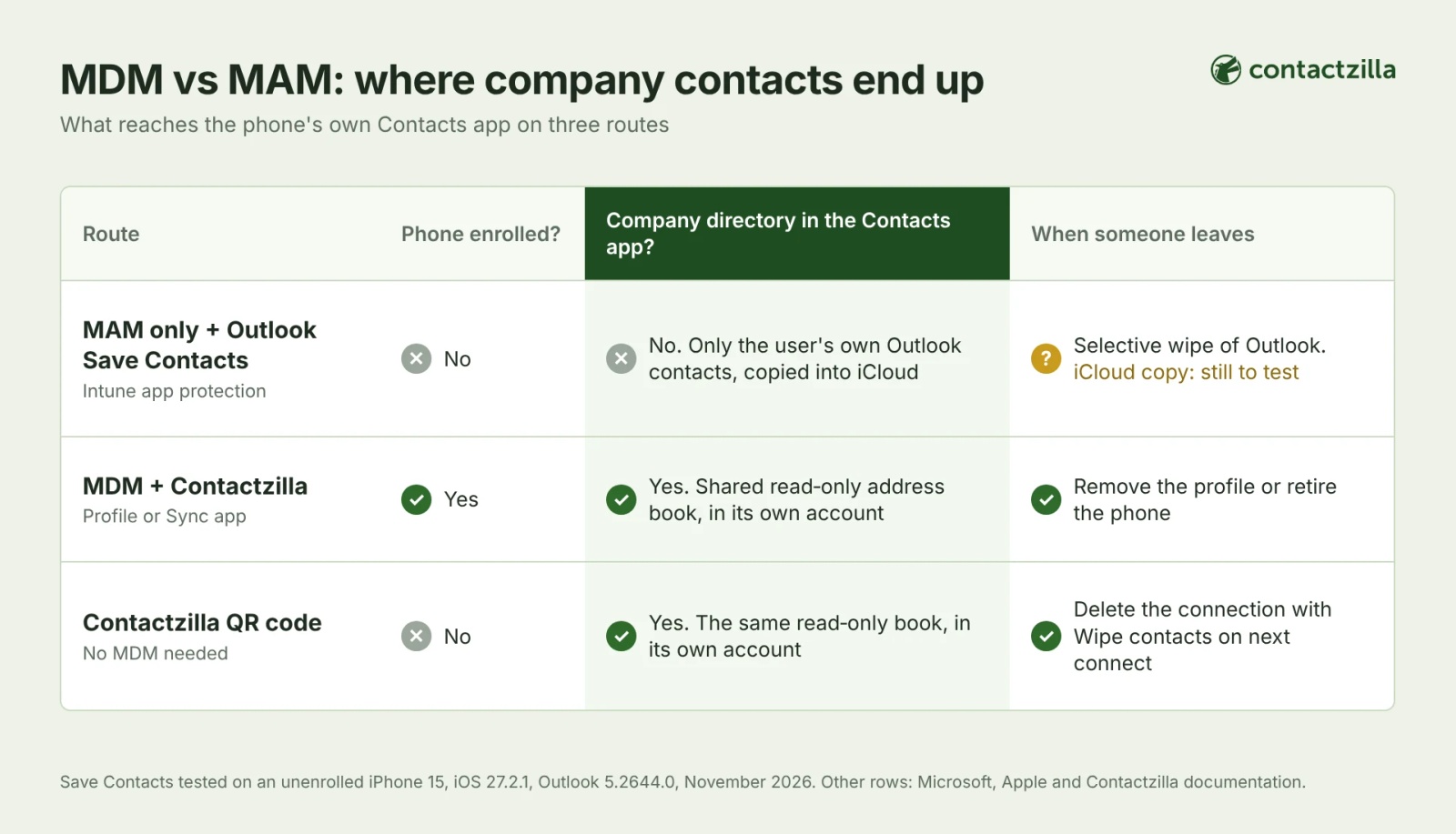
The table compares five routes. It shows where the company contacts live, whether they reach the phone's Contacts app and how they come off when someone leaves.
| Route | Phone enrolled? | Where the contacts live | In the phone's Contacts app, with caller ID? | How they come off |
|---|---|---|---|---|
| MAM only, Outlook as it is | No | Inside Outlook | No: Save Contacts is off by default | Selective wipe of the app |
| MAM only, Outlook Save Contacts on | No | Outlook, plus a copy of the user's own Outlook contacts in the phone's default account (iCloud in our test) | Yes for the user's own contacts, once the user turns it on. Not the directory. | Selective wipe removes data synced directly from Outlook. Copies already synced on to iCloud may stay, so check this in your own tenant. |
| MAM only, plus a Contactzilla QR code | No | Contactzilla read-only address book, as its own account | Yes. App protection governs apps such as Outlook, not accounts in the Contacts app. | Delete the connection with Wipe contacts on next connect ticked |
| MDM (device or User Enrollment), plus a Contactzilla profile or Sync app | Yes | Contactzilla read-only address book | Yes. Apple lists the Contacts payload for all three enrolment types. | Remove the profile or retire the device in the MDM. Wipe on next connect does not apply to MDM phones. |
| MDM, plus Outlook app configuration | Yes | Outlook, plus a copy of the user's own contacts | As Save Contacts above | MDM retire, plus app wipe |
Outlook's own route puts a person's own contacts on the phone. Of the routes in this table, only the ones that deliver a separate address book account (here, Contactzilla by MDM profile or app, or by QR code where there is no MDM) put the shared directory in the phone's own Contacts app. A script that writes directory entries into every mailbox, with Save Contacts on, gets part of the way, but only for staff who use Outlook and allow the copy.
MAM vs MDM: which should you choose, or both?
Choose by what you need to control on the phone.
- Choose MDM if your organisation owns the phone, you need to deploy apps, certificates, Wi-Fi or VPN settings, or you want the company directory delivered to every phone by profile.
- Choose MAM if staff use their own phones, will not enrol, and protecting the data in Outlook and Teams is enough. Add a QR code connection if they also need the directory in the Contacts app.
- Choose both if you have a mix. Microsoft's own example pairs an enrolled company device with an app-protected personal device.
MDM for BYOD: what User Enrollment and work profiles add
On a personal phone, enrolment can be limited to work data. On iPhone, Apple's account-driven User Enrollment is designed for BYOD. Apple says IT can apply only a limited set of payloads and can manage only the organisation's own accounts and information. Microsoft says its version keeps work data on a separate volume and in managed apps, and its page on what the company can see lists contacts among the things the organisation can't see. That covers what the company can see. Delivering an address book is a separate question.
Apple lists the Contacts payload as supported on Device Enrollment, Automated Device Enrollment and User Enrollment. Going by Apple's list, a company address book can therefore reach a user-enrolled iPhone through your MDM. Apple adds that each management service implements the settings differently, so check your MDM's own documentation.
On an Android work profile, Microsoft says personal dialler and messaging apps can read work contacts by default, which is how a work name can appear on an incoming call, though some apps don't support it properly. Our GAL to Android post covers work profile caller ID and the Intune setting that controls it.
For the ownership models themselves (BYOD, COPE and the rest), see our BYOD vs COPE guide.
How do you get company contacts onto MAM-only phones with no MDM?
Microsoft's list of what MAM without enrollment cannot do covers apps, certificates, and Wi-Fi and VPN settings. A contacts account reaches a phone the same way, as a configuration profile, so app protection alone won't put one on an unenrolled phone. Contactzilla's QR route exists for that phone. The decisions, in order:
1) Per person or shared: a per-person connection suits small teams and limits each code to one phone. A shared connection covers many phones, but anyone with the code can add one.
2) Read-only: make the address book read-only so staff cannot change the shared list. iPhone installs a profile; on Android, the code is scanned in the Contactzilla Sync app.
3) Leavers: deleting the connection with Wipe contacts on next connect ticked removes the contacts from the phone the next time it connects. On a shared connection, that reaches every phone using it.
4) Later enrolment: if you enrol these phones in an MDM, remove the QR-installed account first so the address book does not appear twice.
The clicks are in our help article, Deploy contacts to phones without MDM (QR code).
App protection policies govern protected apps such as Outlook, not accounts in the Contacts app, so a policy on Outlook doesn't change the QR-installed address book.
Tip 💡 Not using Intune at all? Our Sync GAL Without Intune post covers the no-Intune routes for iPhone and Android.
Next steps
- Follow the QR route step by step in Deploy contacts to phones without MDM (QR code), and watch our video Securely Remove Contacts from Devices | Contactzilla's Wipe on Delete Feature, which shows the removal step.
- Deploying through Intune instead? Use the Intune iPhone help article or the Intune Android help article.
- Try the QR route on one phone with a free 14-day Contactzilla trial.
How we built this MDM vs MAM guide
We built this from Microsoft and Apple documentation, our own help articles, and a test of Outlook's Save Contacts under an Intune app protection policy, at Block and then Allow. The contacts shown are demo data.
Tested on: iPhone 15, iOS 27.2.1, not enrolled in any MDM, Outlook for iOS 5.2644.0, November 2026.
Frequently Asked Questions
MAM vs MDM: is MAM enough for BYOD phones?
Yes for protecting work data, if a Conditional Access policy also requires app protection, and no for company contacts in the phone's Contacts app. MAM protects apps such as Outlook without enrolling the phone, but on its own it cannot deploy a shared directory. Add a QR code connection, or enrol the phones, if staff need names on incoming calls.
Can you use MDM and MAM together on the same phone in Intune?
Yes. Microsoft says organisations can use app protection policies with and without MDM at the same time. An enrolled company device can carry app protection policies as well, while an unenrolled personal device gets app protection alone.
Does MAM need device enrolment in Intune?
No. Microsoft calls this MAM without enrollment. The phone is not enrolled in any MDM, and Intune manages only the work apps and their data. On Android, the Company Portal app must still be on the phone to receive app protection policies.
Can Intune app protection put company contacts in the iPhone Contacts app?
Only the user's own Outlook contacts, and only if Save Contacts is on. It is off by default, and at Block the sync policy setting hides it. In our test, a colleague found only through the company directory never reached the Contacts app. For the shared directory in its own account, use MDM or a QR code connection.
What happens to company contacts on a personal phone under MAM or MDM when someone leaves?
It depends on the route. A selective wipe removes work data from protected apps such as Outlook. A Contactzilla QR connection is deleted with Wipe contacts on next connect ticked. On MDM phones, remove the profile or retire the device. Our IT offboarding checklist covers phones in full.
Is MAM the same as app protection policies in Intune?
In practice, yes. App protection policies are the Intune controls that deliver MAM. They apply to apps built with the Intune App SDK or wrapped with the App Wrapping Tool, whether or not the phone is enrolled.