Google Shared Contacts Guide: Domain Shared Contacts, the API and Where They Stop


Google shared contacts are the external people, such as suppliers and clients, that a Google Workspace admin adds for the whole domain to see. They sit next to your own users in the Directory, and they come with more limits than most admins expect.
Short answer: Google shared contacts (Google calls them domain shared contacts) are external contacts an admin adds to the Google Workspace Directory so every user sees them in Gmail autocomplete and Google Contacts. There is no screen for them in the Admin console: they are added through the Domain Shared Contacts API, Google Cloud Directory Sync or a Marketplace app, they can’t have labels or custom fields, and they never appear in the Contacts app on staff phones. Contactzilla can push a labelled address book into Google shared contacts on a schedule, and separately put the same list on every iPhone and Android phone.
What are Google shared contacts, and how are they different from the Directory and My Contacts?
Google Workspace keeps three different kinds of contact, and most “shared contacts” problems come from mixing them up.
Domain shared contacts are external people, outside your domain, that an admin adds once so everyone in the organisation can find them. Google’s own term is “shared external contacts”; most people search for “Google shared contacts”. They are managed through the Domain Shared Contacts API, not through Google Contacts.
Directory profiles are your own users: everyone with an account in your domain, with the name, email, phone and job title on their profile. Google creates these automatically. Together with the domain shared contacts, they make up the Directory that users see in Google Contacts and in Gmail autocomplete.
My Contacts are each person’s own saved contacts in Google Contacts. They belong to one account only, and they are the only contacts a Google Workspace account syncs to a phone.
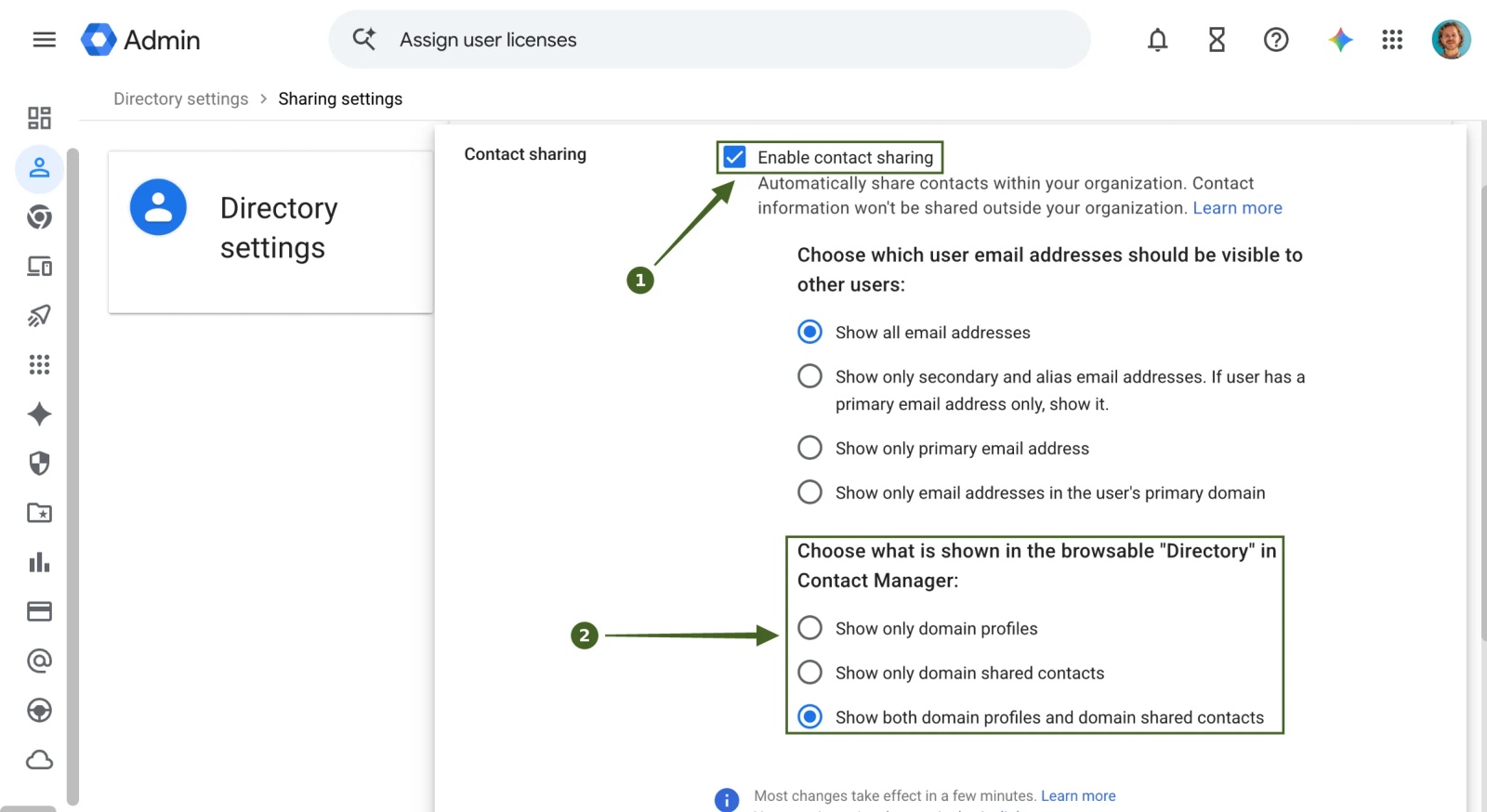
Users see the Directory, shared contacts included, only when an admin has turned on contact sharing. In the Google Admin console, go to Directory > Directory settings > Sharing settings > Contact sharing, tick Enable contact sharing, and choose whether users see domain profiles, domain shared contacts or both (Google’s steps, checked October 2026).
Which Google contacts API do you need?
Four Google services get called “the Google contacts API”, and they do different jobs. The one for shared contacts is the oldest of them.
| You want to | Use | Status (checked October 2026) |
|---|---|---|
| Read or edit a user’s own contacts (My Contacts) | People API | Current. It replaced the Contacts API, which Google turned down on 19 January 2022; the old m8/feeds scope now works as an alias for the contacts scope. |
| Read your domain’s users and their profiles | Admin SDK Directory API | Current. Read-only scope admin.directory.user.readonly is enough to read the Directory. |
| Add, edit or delete shared external contacts for the whole domain | Domain Shared Contacts API | Current, and unchanged by the Contacts API shutdown. Still a GData API: Atom XML, with the GData-Version: 3.0 header. |
| Let LDAP-based apps look up users and groups | Secure LDAP (Business Plus, Enterprise and Education editions) or Google Cloud Directory Sync | Current. Users and groups only; neither exposes shared contacts. |
So “google contacts api” usually means the People API, and it can’t create shared contacts. For shared contacts you need the Domain Shared Contacts API (Google’s overview, updated September 2026), and your Cloud project has to have the API enabled in the Admin console first.
One detail that catches people out: Contactzilla’s export to Google shared contacts needs the legacy Contacts API enabled in the Google Cloud project, not just the People API, because the Domain Shared Contacts feed belongs to the older API.
How do you add Google shared contacts to the Directory?
Google gives admins three routes, and none of them is a form in the Admin console (Google’s admin help, updated 13 October 2026):
- The Domain Shared Contacts API, if you can write code or run a script. Each contact is one entry in an Atom feed.
- Google Cloud Directory Sync (GCDS), if the contacts already live in Microsoft Active Directory or another LDAP server.
- A Google Workspace Marketplace app, if you want a user interface. These apps sit on top of the same API, so the limits below still apply.
Whichever route you use, allow time. Google says changes can take up to 24 hours to show in autocomplete and the contact manager, though they usually appear sooner.
Why aren’t my Google shared contacts showing?
Almost every “shared contacts not working” case is one of six things.
| What you see | Cause | Fix |
|---|---|---|
| Nobody can see the shared contacts, in Gmail or Google Contacts | Contact sharing is off, or set to show only domain profiles | Admin console > Directory > Directory settings > Sharing settings > Contact sharing: enable it and include domain shared contacts |
| Contacts were added an hour ago and still don’t appear | Propagation | Wait. Google allows up to 24 hours |
| A colleague now appears twice | An internal user was added through the Domain Shared Contacts API | Delete the shared-contact copy. Internal users belong to the Directory API, external contacts to the Domain Shared Contacts API |
| 401 Unauthorized from the API | Wrong scope or missing version header | Request the https://www.google.com/m8/feeds/ scope and send GData-Version: 3.0 on every request |
| Contacts show on the web but not on anyone’s phone | Working as designed | Google shared contacts never sync to phones; see below |
| New contacts stop appearing with no error | The 200,000-contact or 40 MB limit, or a stalled entry | Check the count, and look for unusual characters in the entry that stopped |
What are the limits of Google shared contacts?
Once they are working, the limits are what you notice.
- No labels or groups. Shared contacts can’t carry a label, so there is no way to group them into “Suppliers” or “Site A” (Google’s element list).
- No custom fields. Only the standard fields.
- Copies go stale. If a user saves a shared contact to My Contacts, they get a copy. Update the shared contact later and the copy doesn’t change; the user has to delete and re-save it.
- Everyone or no one. A shared contact is visible to the whole domain. There is no way to share a set of contacts with one team only.
- Size. 200,000 contacts or 40 MB per domain, whichever comes first. Personal Google Contacts are capped separately at 25,000 contacts or 20 MB (Google Contacts limits).
- 24 hours. Changes can take a day to appear.
- No phones. The limit most admins only find out about after setup, below.
Do Google shared contacts sync to iPhone and Android?
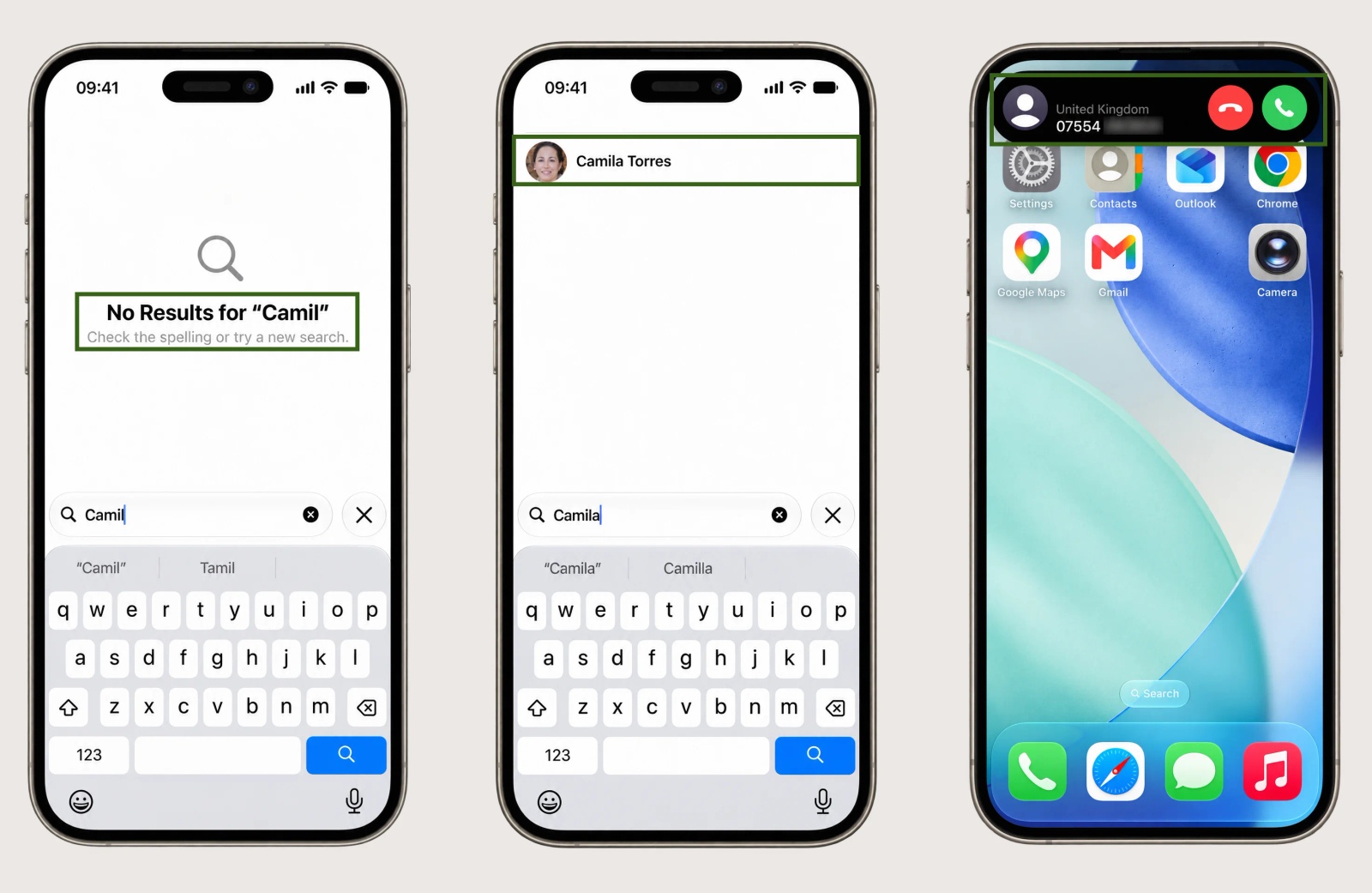
No. When someone adds their Google Workspace account to a phone, Google syncs that person’s My Contacts to the phone’s Contacts app and nothing else. Directory profiles and shared contacts stay in Google: they can be searched for in some Contacts apps, but they don’t appear as a list, and a call from a shared contact arrives as a bare number. WhatsApp, Teams and the Phone app all read the phone’s own contacts, so they can’t see shared contacts either.
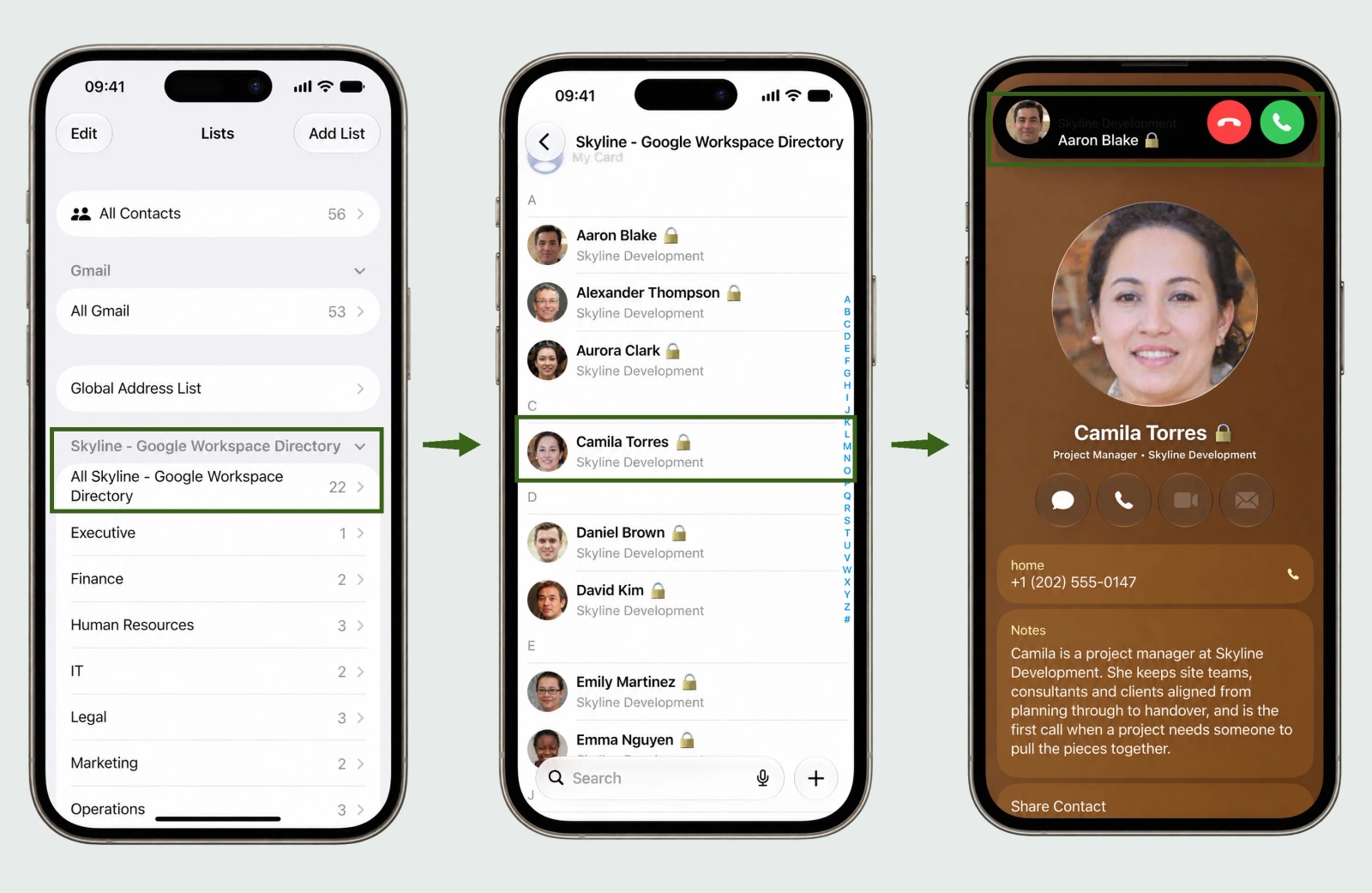
If what you actually need is colleagues on every work phone, that’s a different job from shared contacts, and the Directory is the source for it. Our guide to getting the Google Workspace Directory onto work phones covers it end to end.
How do you push contacts into Google shared contacts automatically?
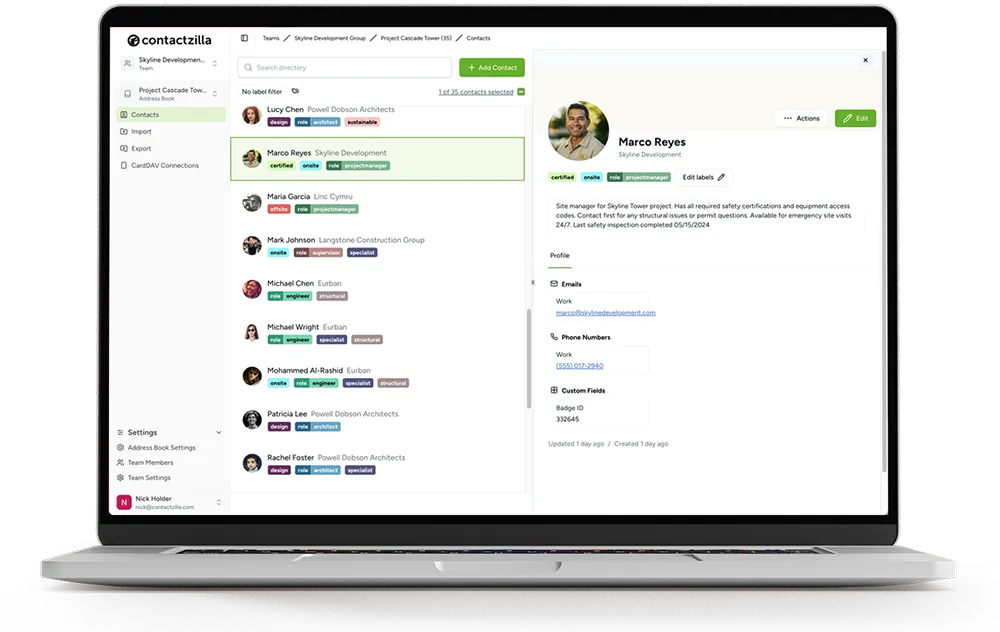
Contactzilla has an export to Google shared contacts. You keep the contacts in a Contactzilla shared address book, with labels, custom fields and read-only or editable access per person, and the export writes the contacts you choose into Google shared contacts on a schedule. The address book is the source of truth; Google shared contacts become a published copy that Gmail autocomplete can see.
Setup needs a Google Cloud project with an OAuth client and a Contactzilla Google connector, then Export > Google Shared Contacts on the address book. Two settings matter: the label filter, so you publish a subset rather than the whole book, and delete all Google Shared Contacts first, which clears whatever is there before the first run, so take a backup. The export makes contacts visible to every user in your domain, so set up one export from one address book and test it before you rely on it.

Tip 💡 Every click of the Google Cloud and connector setup is in the help article How to set up Google OAuth/OIDC for the Google Shared Contacts export.
Because the address book can also be filled by an importer, the same setup turns into a Salesforce to Google shared contacts sync, or a HubSpot one, with no code.

When Google shared contacts are enough, and when they aren’t
- Enough: a few hundred suppliers or partners that everyone should find in Gmail autocomplete, maintained by one admin, with no need for groups or phones.
- Not enough: lists that need labels or custom fields; contacts for one team rather than the whole domain; anything staff need on their phones, in Contacts, with caller ID (that’s what Contactzilla’s Google Workspace sync does); or contacts that change often enough that stale copies become a support problem.
Next steps
- Want colleagues on staff phones rather than external contacts in Gmail? Read Google Workspace Shared Contact List: How to Get the Directory on Work Phones.
- Android fleets: how Contactzilla Sync puts shared contacts in the Android Contacts app, and what CardDAV is, the standard both iPhone and Android use for it.
- Setting up the export: the Google OAuth/OIDC help article.
- Google’s own references: Domain Shared Contacts API and Add shared external contacts to the Directory.
Frequently Asked Questions
Can I create Google shared contacts with the People API?
No. The People API reads and edits a user’s own contacts. Shared external contacts for the whole domain are created with the Domain Shared Contacts API, which is unaffected by the Contacts API shutdown and still uses GData version 3.0.
Why aren’t Google shared contacts in Gmail autocomplete?
Either contact sharing is off for your domain, or the contacts haven’t propagated yet. Check Directory > Directory settings > Sharing settings > Contact sharing in the Admin console, make sure domain shared contacts are included, and allow up to 24 hours.
Can Google shared contacts have labels?
No. The Domain Shared Contacts API has no label or group element, so shared contacts appear ungrouped in the Directory. If you need groups, keep the contacts in a tool that supports labels and publish them to Google shared contacts from there.
Can users edit Google shared contacts?
No. Only an admin, through the API or a tool using it, can change them. A user who saves a shared contact to My Contacts gets an editable private copy that no longer updates.
How many Google shared contacts can a domain have?
200,000 contacts or 40 MB of data, whichever comes first. Most organisations are nowhere near it; new contacts failing silently well below the limit usually means a stalled entry with unusual characters.
Does Google Workspace have an LDAP directory for contacts?
Not for contacts. Secure LDAP lets LDAP-based apps look up Google Workspace users and groups, and Google Cloud Directory Sync pushes users and shared contacts into Google from an LDAP server. Neither exposes shared contacts to LDAP clients.
How do Google shared contacts compare with the Microsoft 365 GAL?
Both make a whole-organisation list that mail clients can search, and neither syncs it to phones as a contact list by default. Google’s has an API for adding external contacts; Microsoft’s shows richer profile data in Outlook. Our Microsoft posts cover getting the GAL onto iPhones, and Microsoft 365 contact sync shows how Contactzilla handles it.