CiraSync vs Contactzilla: An Honest Comparison and CiraSync Alternative (2026)

If you are looking at CiraSync to get Microsoft 365 contacts onto company iPhones and Android phones, or looking for an alternative to it, Contactzilla is probably on your shortlist. We make Contactzilla, so we have tried hard to keep this comparison fair: every statement about CiraSync below comes from CiraSync's own documentation, checked on 16 October 2026, with links so you can check it yourself.
Short answer: CiraSync and Contactzilla can both put company contacts into the native Contacts app on iPhone through your MDM, using CardDAV. CiraSync is the better fit if you also need shared calendars on phones, or want Microsoft 365 to stay the only place contacts are managed. Contactzilla is the better fit for MDM-managed iPhone and Android fleets, shared or user-less devices, and teams that need different read-only contact lists built from Microsoft Entra ID, a shared mailbox and contacts that are not in the directory at all.
This short demo video shows the Contactzilla side: one shared address book, deployed through an MDM, appearing in the Contacts app on managed iPhones and Android phones.
What are CiraSync and Contactzilla?
CiraSync is a Microsoft 365 contact and calendar sync service from Cira Apps. It reads contacts from Microsoft 365, including Exchange Online and Microsoft Entra ID, and delivers them to phones either by writing them into each user's mailbox or, with its newer Mobile Direct mode, over CardDAV through an MDM. Microsoft 365 stays the place contacts are managed. CiraSync is sold as a cloud service and as an on-premises edition.
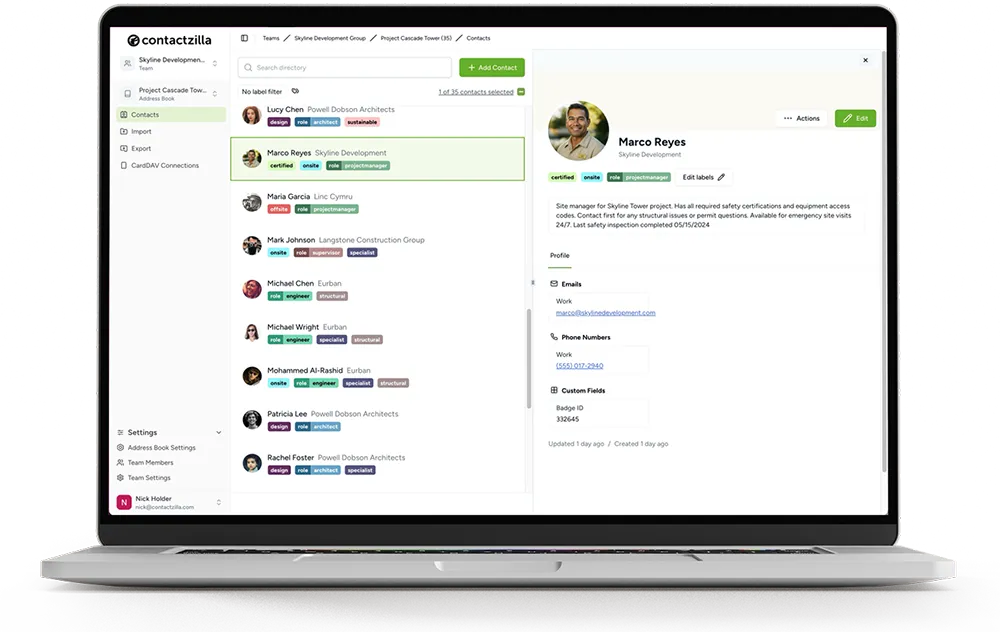
Contactzilla is a cloud service for shared business contacts; it handles contacts only, not calendars. You import contacts from Microsoft Entra ID, a Microsoft 365 shared mailbox, Google Workspace, Salesforce or a CSV file into a shared address book, organise them with labels, and publish that address book over CardDAV to the native Contacts app on iPhones and Android phones, usually through an MDM.
The main difference is in the design. CiraSync copies contacts from Microsoft 365 to phones, so Microsoft 365 is where you manage them. Contactzilla puts a shared address book between your sources and the phones, so you can add contacts that are not in your directory, label them and send different lists to different groups of phones.
CiraSync vs Contactzilla at a glance (checked October 2026)
The table compares CiraSync's cloud service with Contactzilla. CiraSync also sells an on-premises edition, covered in the next section. Where CiraSync does not publish something, the table says so rather than guessing.
| Feature | CiraSync (cloud) | Contactzilla |
|---|---|---|
| What it is | Syncs Microsoft 365 contacts and calendars to users and devices. Microsoft 365 stays the source of truth. | A shared business address book you manage, filled from Microsoft Entra ID and other sources, then published to phones. |
| How contacts reach iPhones | A CardDAV profile deployed through MDM (Mobile Direct), or contacts written into each user's mailbox and synced by Exchange ActiveSync or Outlook. | A CardDAV profile deployed through MDM, or a QR code or emailed profile for phones outside MDM. |
| MDM platforms with published guides or videos | Microsoft Intune and Workspace ONE. CiraSync On-Prem lists more. | Microsoft Intune, Jamf Pro, Mosyle, IBM MaaS360, Workspace ONE, Hexnode, SOTI MobiControl, NinjaOne, ManageEngine and Applivery. |
| Android | Not covered in the cloud Mobile Direct guide. CiraSync On-Prem uses a companion app called CardDAV Direct. | The Contactzilla Sync app, deployed through Managed Google Play in Intune and other Android Enterprise MDMs. |
| Edits made on the phone | Overwritten by the source at the next sync. | Blocked when the address book is deployed read-only (with an optional lock emoji), or allowed with read/write access. |
| Different lists for different teams | The Mobile Direct profile is assigned to Intune groups, users or devices. CiraSync's guide does not describe building different lists per group. | Labels on one address book, with one device connection per list. |
| Contacts that are not in your directory | From Microsoft 365 sources such as shared mailboxes and public folders, plus CRM connectors. | Add, import or label any contact, such as suppliers or out-of-hours numbers, alongside directory contacts. |
| Calendars | Yes, including shared and public folder calendars. | No. |
| Writes contacts into Outlook mailboxes | Yes, in its mailbox sync mode. | No. User mailboxes are never changed. |
| Hosting | CiraSync cloud on Microsoft Azure, or CiraSync On-Prem on your own servers. | Contactzilla cloud only. |
| Pricing | Not published. Quote-based, per user. | Published, per device: $1.79, $1.49 or $1.20 a month by volume, plus $50 a month for the Microsoft Entra ID or shared mailbox importer. |
| Company | Cira Apps, which also owns SyncGene, CiraHub and itrezzo. | Contactzilla, a team of fewer than 10 people. |
Sources for the CiraSync column: CiraSync's own Mobile Direct guide, product pages and press releases from June and July 2026, and its Capterra pricing listing, all checked on 16 October 2026.
How do CiraSync and Contactzilla get contacts onto iPhones through MDM?
Here is how each product gets company contacts from Microsoft 365 onto a managed iPhone, CiraSync first and then Contactzilla, followed by what is the same and what differs.
How CiraSync gets Microsoft 365 contacts onto iPhones
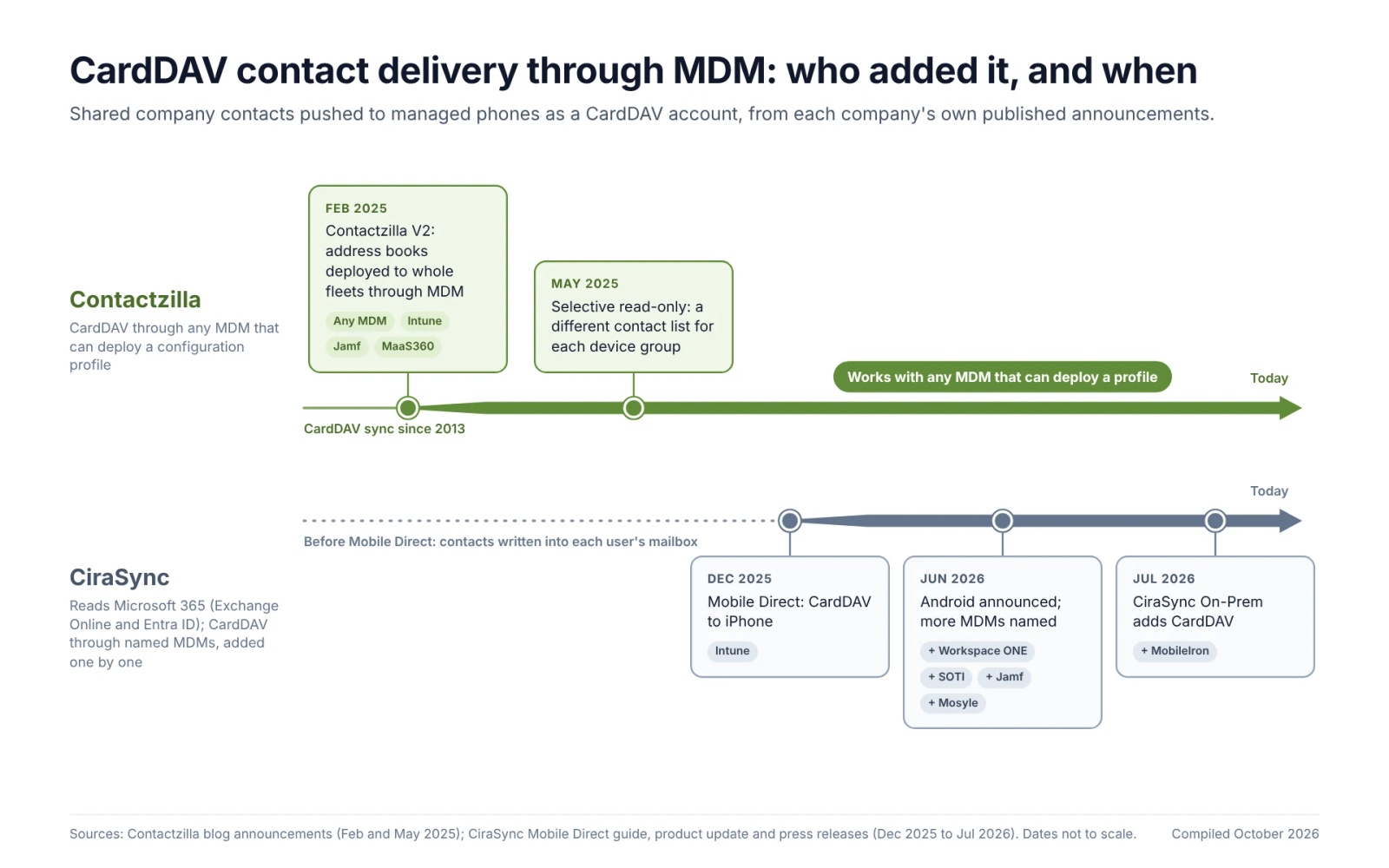
CiraSync now supports CardDAV delivery through MDM. When this post was first published in December 2025, CiraSync delivered contacts to phones by writing them into each user's mailbox. Since then it has added CardDAV, and we have updated this comparison to reflect it:
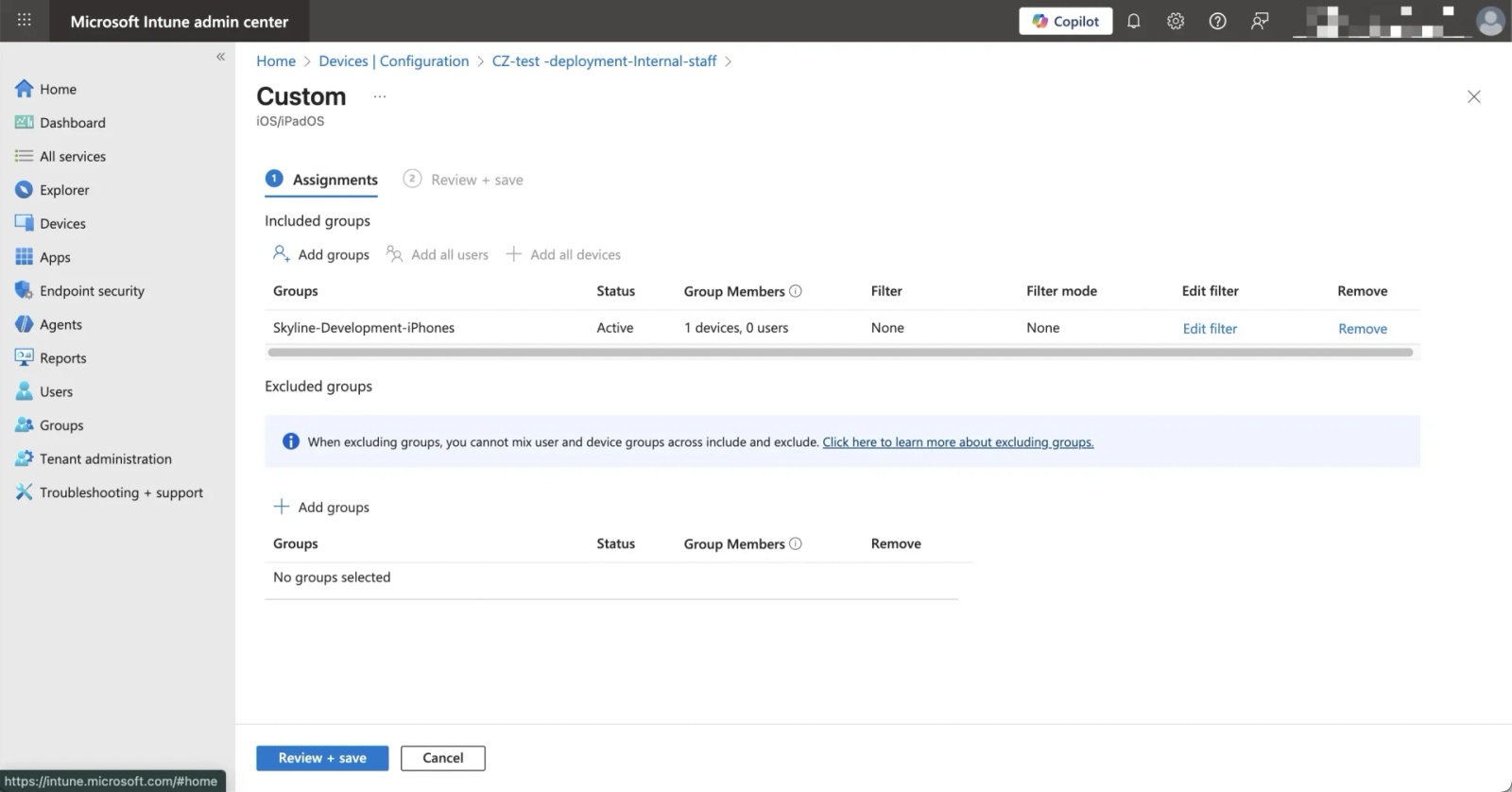
- Mobile Direct (cloud): CiraSync's guide, first published in December 2025, delivers contacts to iPhones over CardDAV. You enable Mobile Direct on a sync tunnel, download a configuration file and deploy it in Microsoft Intune as a custom iOS policy. No app is needed on the iPhone, and users without an Exchange mailbox are supported.
- Workspace ONE (June 2026): CiraSync announced Mobile Direct support for VMware Workspace ONE alongside Intune, and says support for more MDM providers is in development.
- Android (June 2026): CiraSync announced Mobile Direct for Android devices, delivered through your MDM, and lists a CiraSync CardDAV Direct app on Google Play. At the time of writing it has not published Android set-up steps.
- CiraSync On-Prem (July 2026): version 15.0.1 added CardDAV for organisations that run CiraSync on their own servers. CiraSync names Intune, Workspace ONE, MobileIron, SOTI, Jamf and Mosyle, and its set-up guide covers DNS, TLS certificates, IIS configuration and port mapping on your own infrastructure.
CiraSync also still offers its original mode, which writes contacts into each user's Outlook Contacts folder so that Exchange ActiveSync or the Outlook app carries them to the phone. So the question is no longer which product can do CardDAV. It is which one fits the way you manage your phones.
How Contactzilla gets Microsoft 365 contacts onto iPhones
Contactzilla works in two halves: an importer fills a shared address book, and a device connection publishes that address book to phones over CardDAV. The Microsoft Entra ID import guide and the Intune iOS deployment guide have every click; here is what each half looks like.
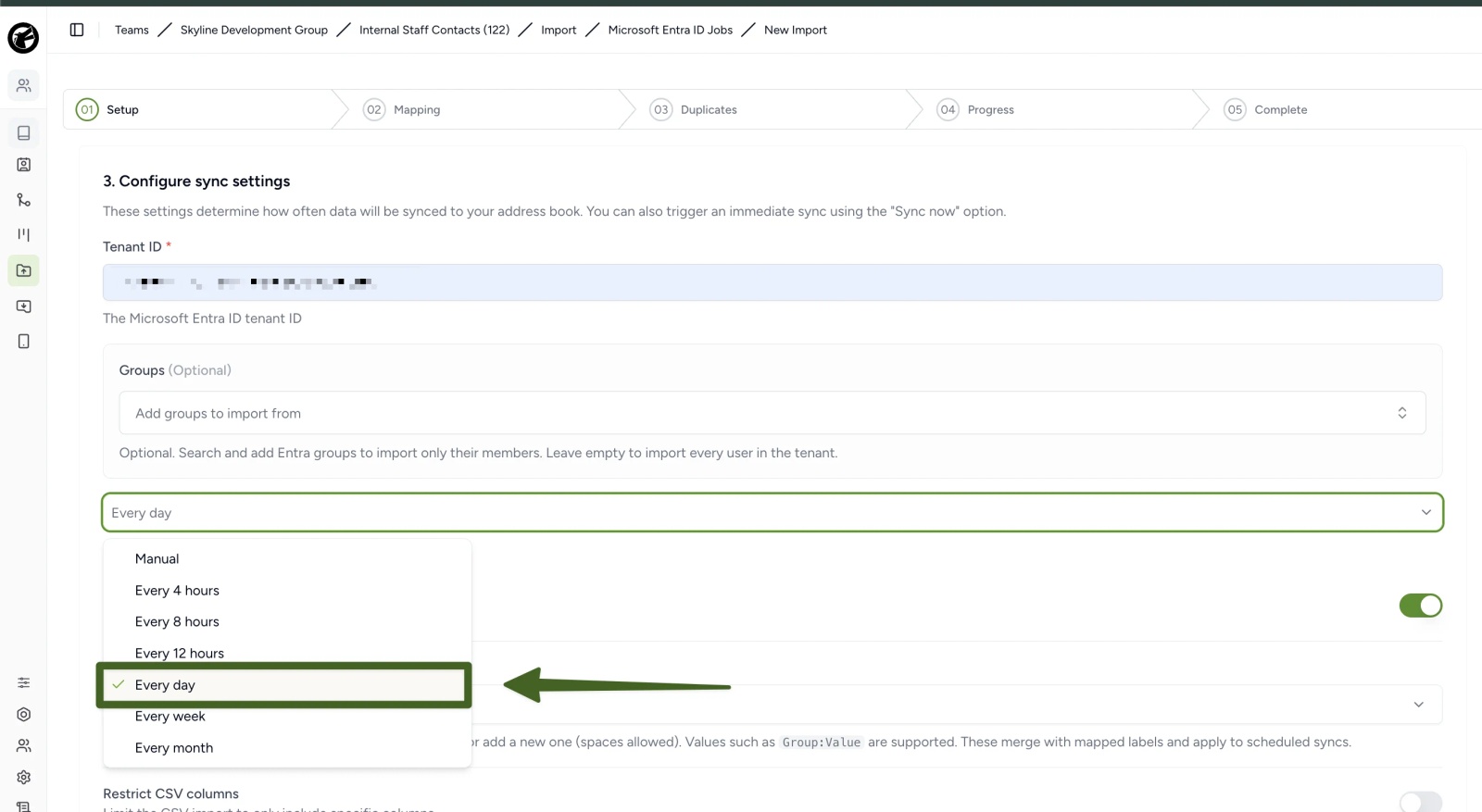
To see the whole Microsoft Entra ID to iPhone and Android set-up from start to finish, watch our video Sync Microsoft Global Address List to iPhone & Android.
Tip 💡 Want your Microsoft 365 Global Address List, the people in Microsoft Entra ID, on company phones? Our guides cover syncing the GAL to iPhone, syncing the GAL to Android and doing it without Intune.
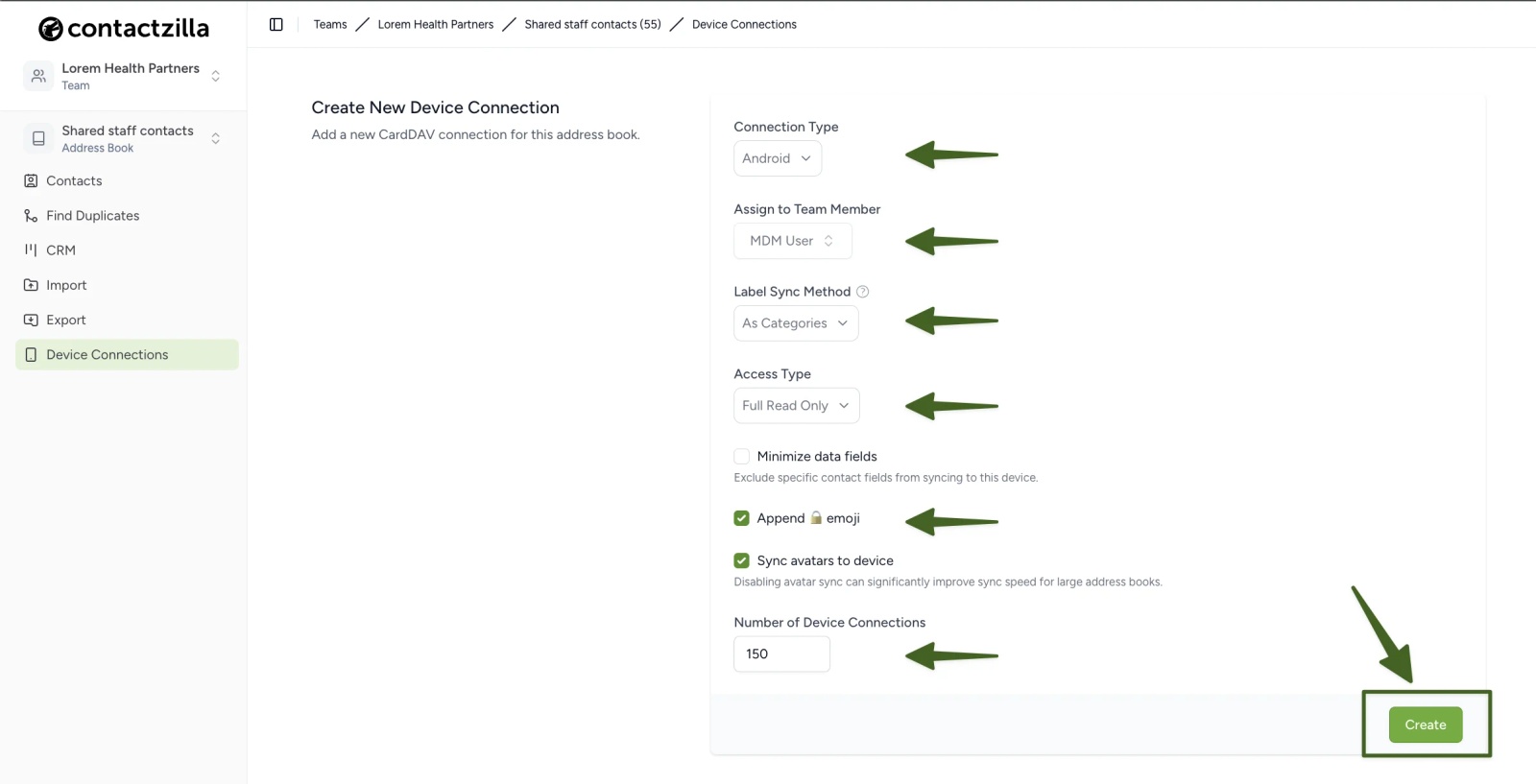
When an address book is ready, you create a device connection for it. You choose the platform, the access level (read/write, full read-only, or selective read-only by label) and how many devices it covers.
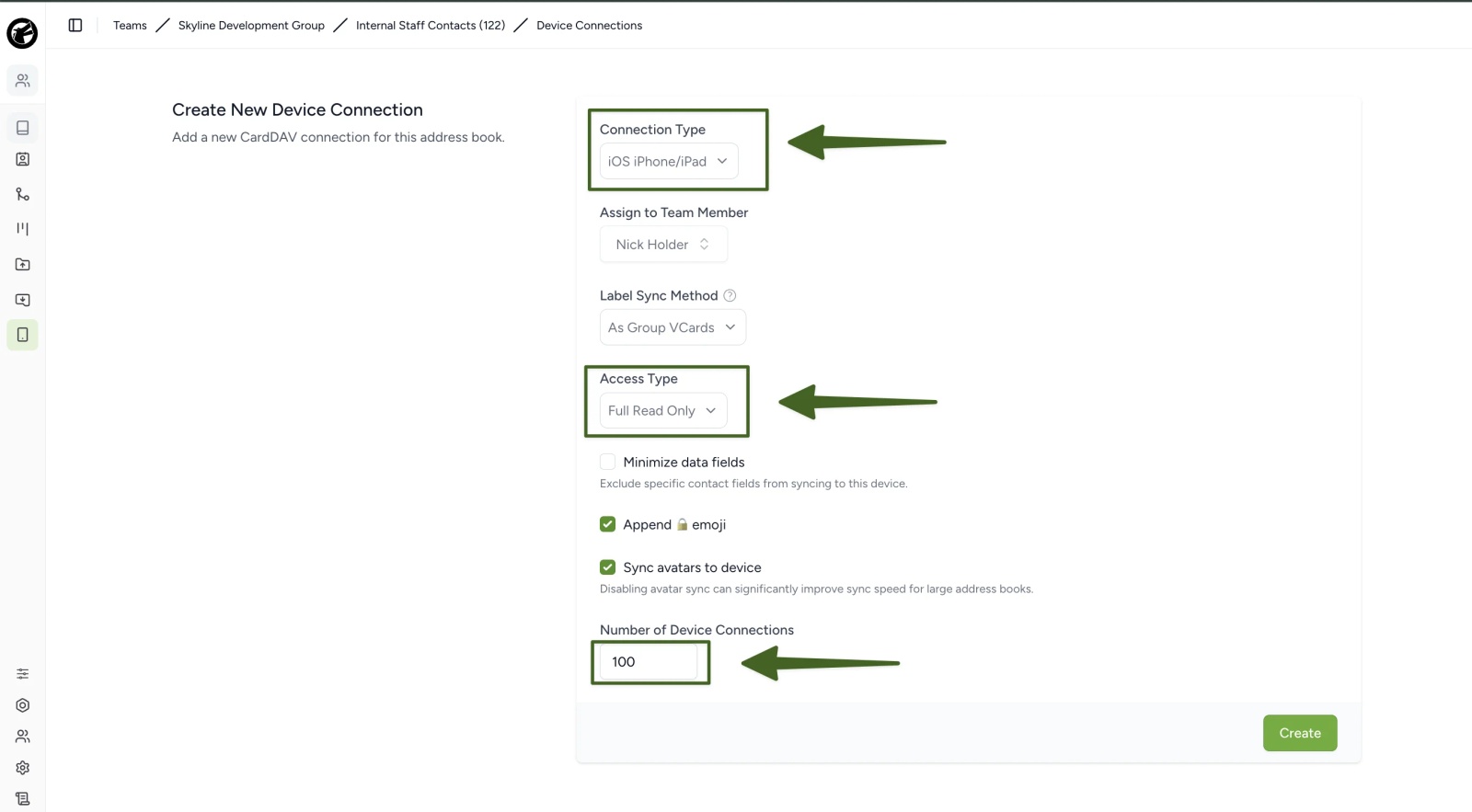
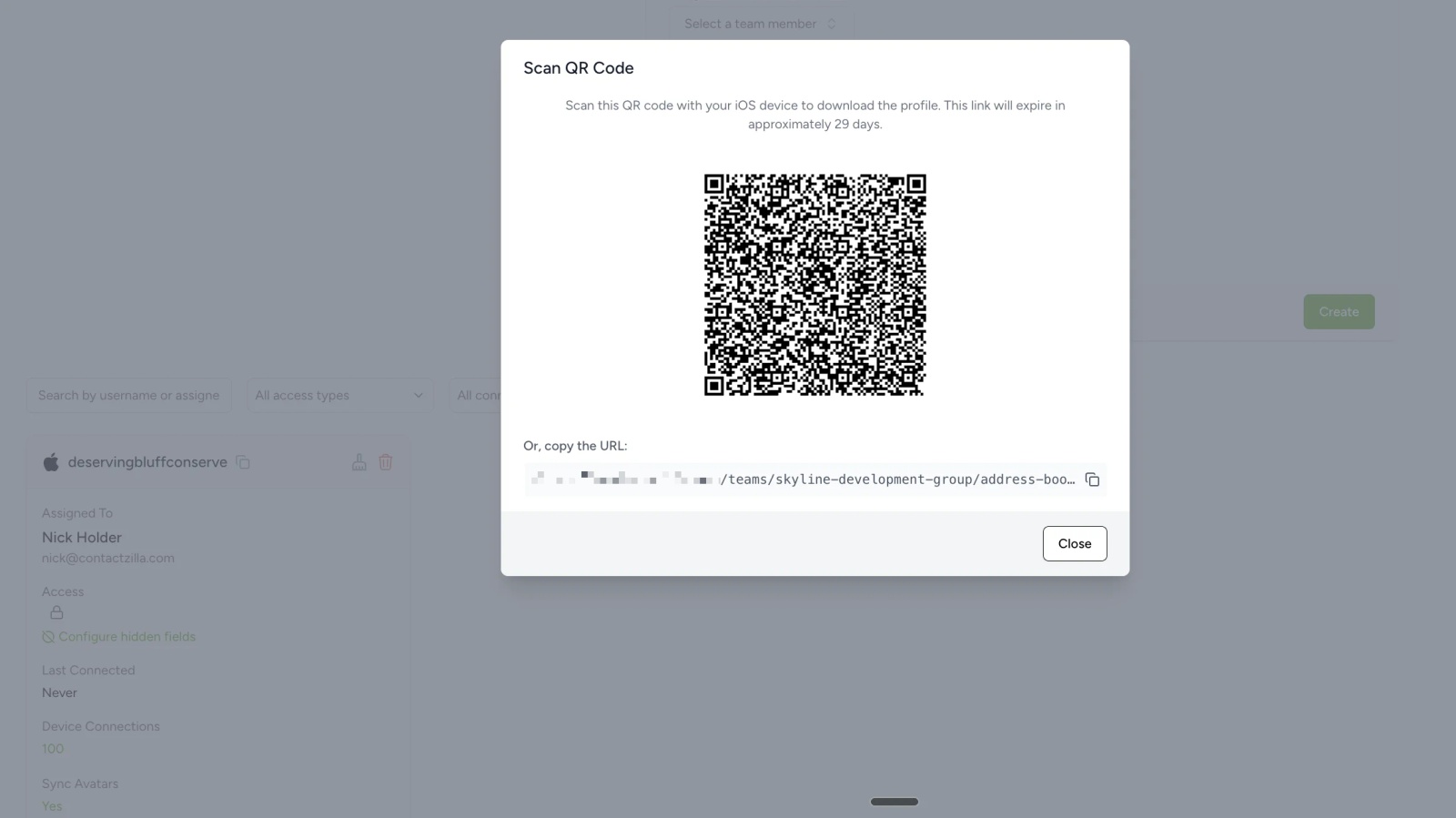
For managed iPhones, the connection produces a .mobileconfig profile that you upload to your MDM as a custom profile and assign to a device group, exactly as CiraSync's Mobile Direct profile is deployed in Intune. For phones outside MDM, the same connection gives you a QR code or a profile link to email.
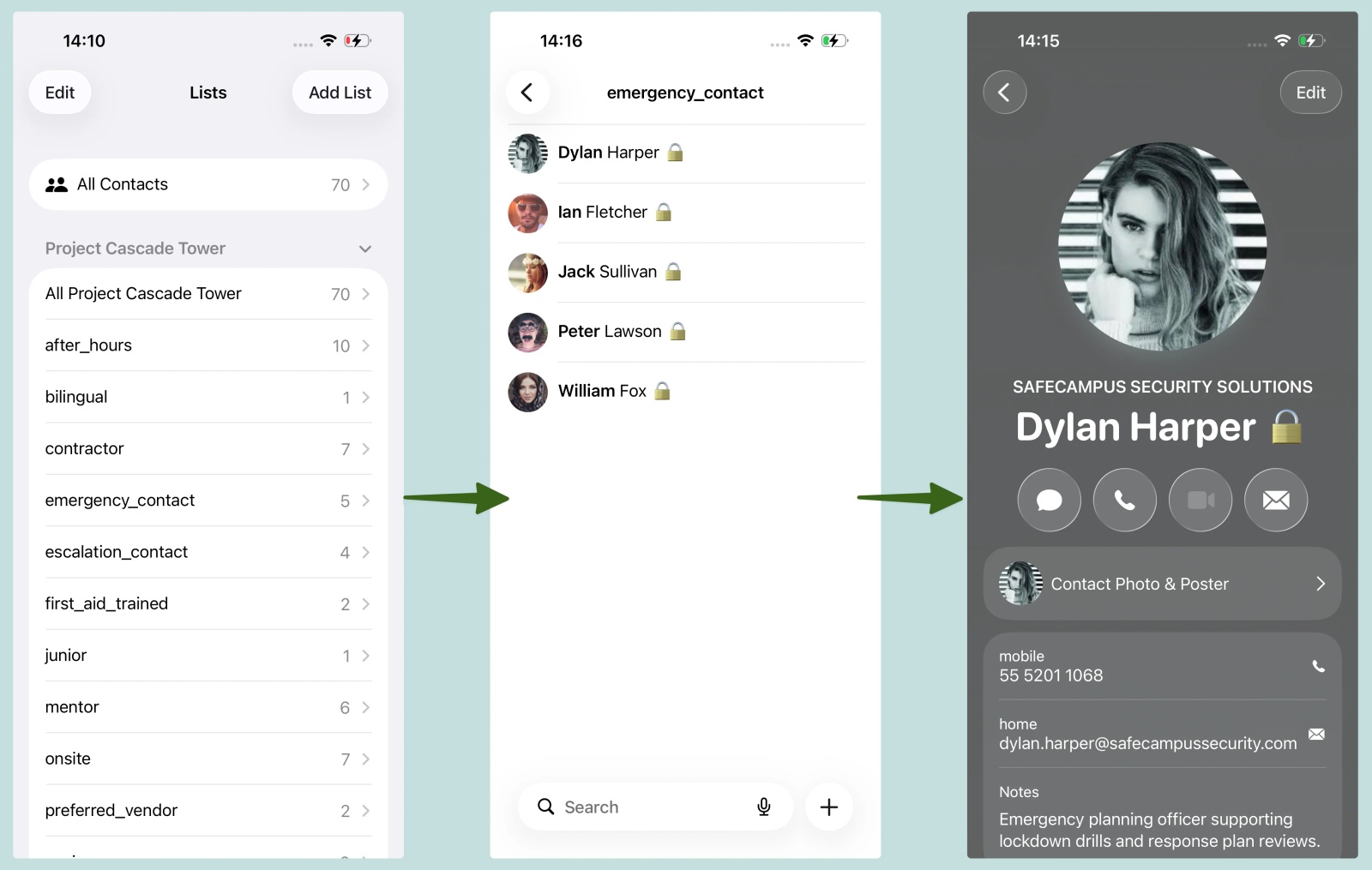
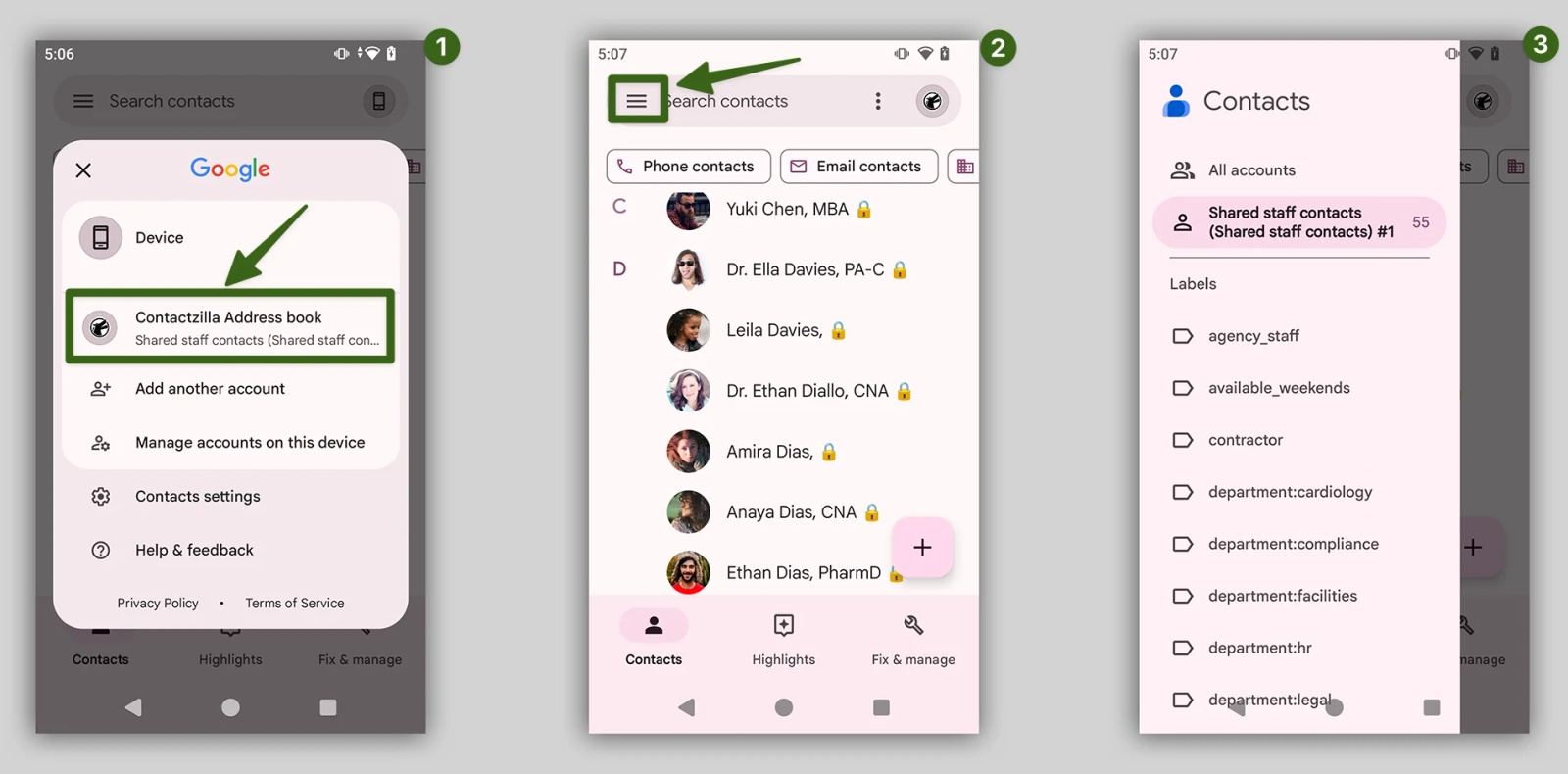
On the phone, the address book appears as its own account in the native Contacts app, with your labels as lists. With the optional lock emoji switched on, staff can see at a glance which contacts are company-managed and read-only.
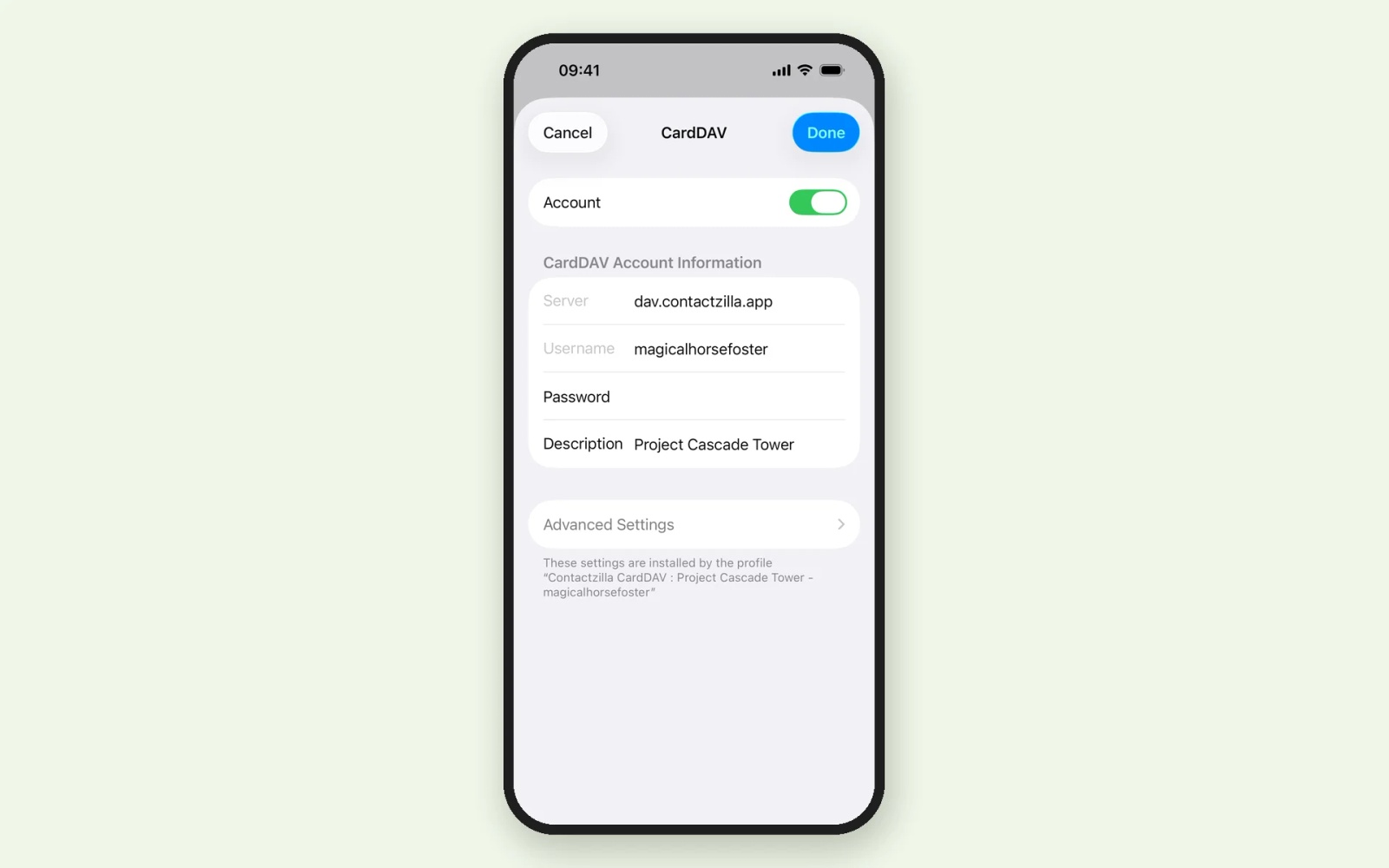
Tested on an iPhone 15 running iOS 26.6.2, October 2026. On iOS 17 and earlier, the Contacts settings sit under Settings > Contacts rather than Settings > Apps > Contacts.
CiraSync vs Contactzilla delivery: what is the same and what differs
The last mile is now the same: a CardDAV profile, uploaded to your MDM and assigned to a group of devices, puts the contacts in the phone's own Contacts app, and both set-ups take a handful of steps. The differences are in what sits behind and around that profile: which MDMs are documented, how Android is handled, whether different teams can get different lists, and how shared phones are licensed. The next sections take those one at a time.
Tip 💡 New to the protocol both products use? Read What Is CardDAV? Contact Sync Explained.
CiraSync vs Contactzilla on Android: what each one needs
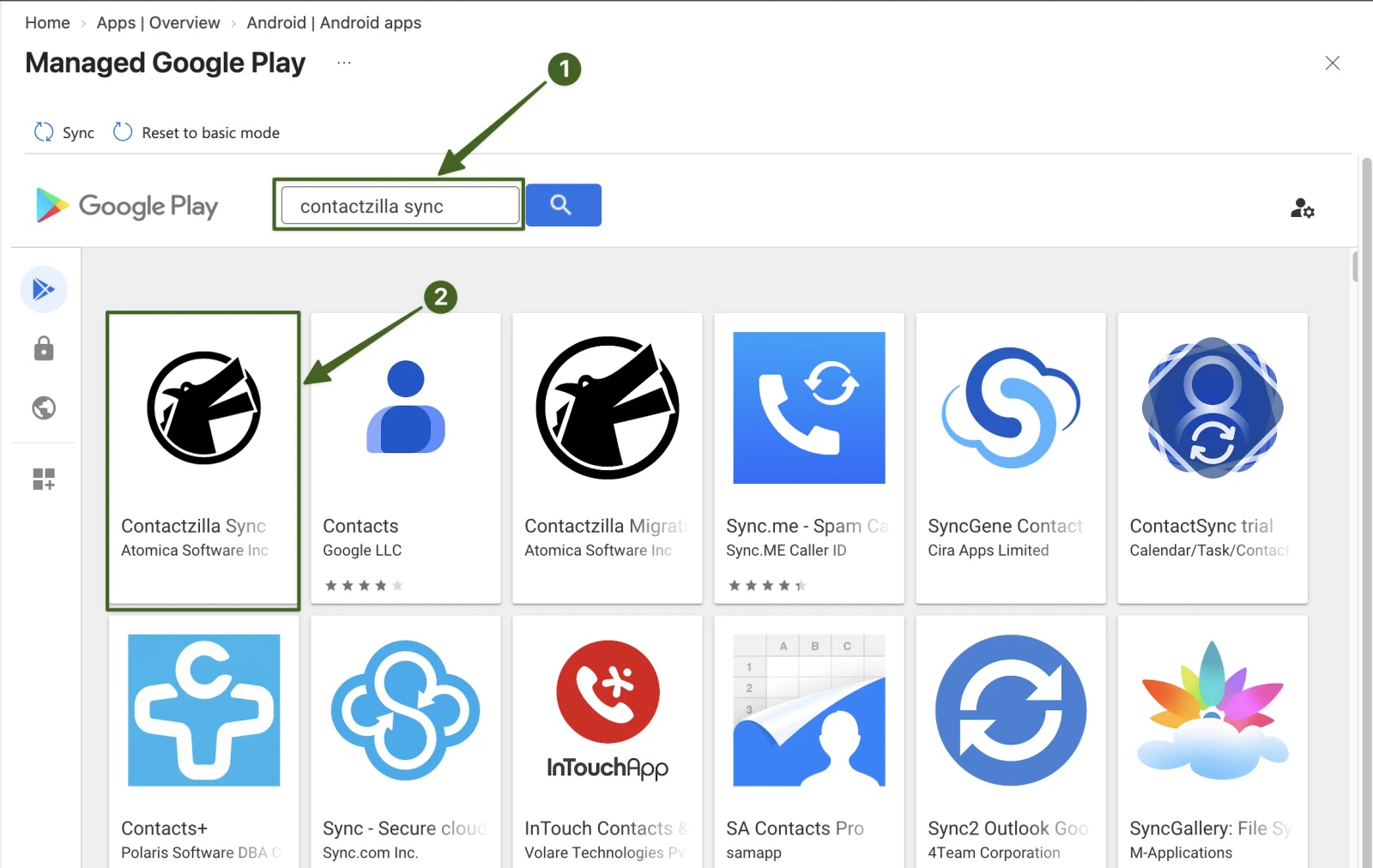
Android has no built-in CardDAV account type like the iPhone's, so both products rely on an app for Android CardDAV. CiraSync announced Mobile Direct for Android in June 2026, and a CiraSync CardDAV Direct app is listed on Google Play, but CiraSync's published set-up guides still cover iPhones only. If Android matters to you, ask CiraSync for its Android deployment steps for your MDM before you commit.
Contactzilla uses the Contactzilla Sync app, which you approve in Managed Google Play and push with an app configuration policy. In Intune, the policy auto-grants the contacts permissions and carries the connection settings, so staff do not need to touch anything. The Intune Android guide covers it step by step, and so does our video Sync Shared Contacts to Android with Microsoft Intune.
Which MDM platforms work with CiraSync and Contactzilla?
CiraSync publishes step-by-step Mobile Direct guides for Microsoft Intune and Workspace ONE, and its June 2026 product update names SOTI, Jamf and Mosyle as supported too. CiraSync On-Prem adds MobileIron to that list, but that route means running and maintaining CiraSync on your own Windows servers.
Contactzilla's iPhone profile uses Apple's standard Contacts payload for CardDAV accounts, so it works with any MDM that can deploy a custom iOS configuration profile. We have published guides or videos for these platforms:
- Microsoft Intune: iPhone guide and Android guide
- Jamf Pro: guide and video
- Mosyle: guide and video
- IBM MaaS360: guide and video
- Workspace ONE: iPhone video and Android guide
- Hexnode: Android guide and iPhone video
- SOTI MobiControl: iPhone video and Android video
- NinjaOne: iPhone video and Android video
- ManageEngine: iPhone video
- Applivery: iPhone video
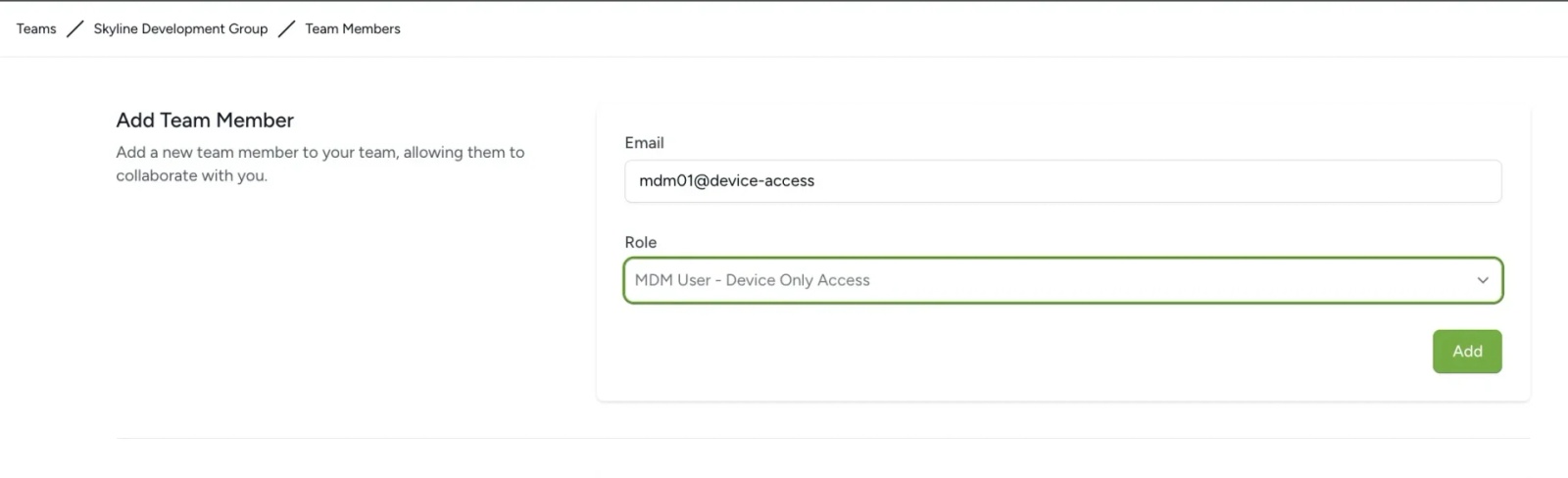
For fleets, Contactzilla also has an MDM User role with device-only access: an account that exists only to authenticate devices and cannot sign in to the web app.
Can CiraSync and Contactzilla send different contact lists to different teams?
With CiraSync, ask how it would work for you: its Mobile Direct guide shows the profile being assigned to Intune groups, users or devices, but does not describe building a different contact list for each group. Contactzilla does this with labels. You label contacts in one address book (by team, site or role, for example) and create a device connection per list with selective read-only, so each group of phones receives only the contacts carrying its labels. Labels can come straight from Entra ID groups and roles during the import.
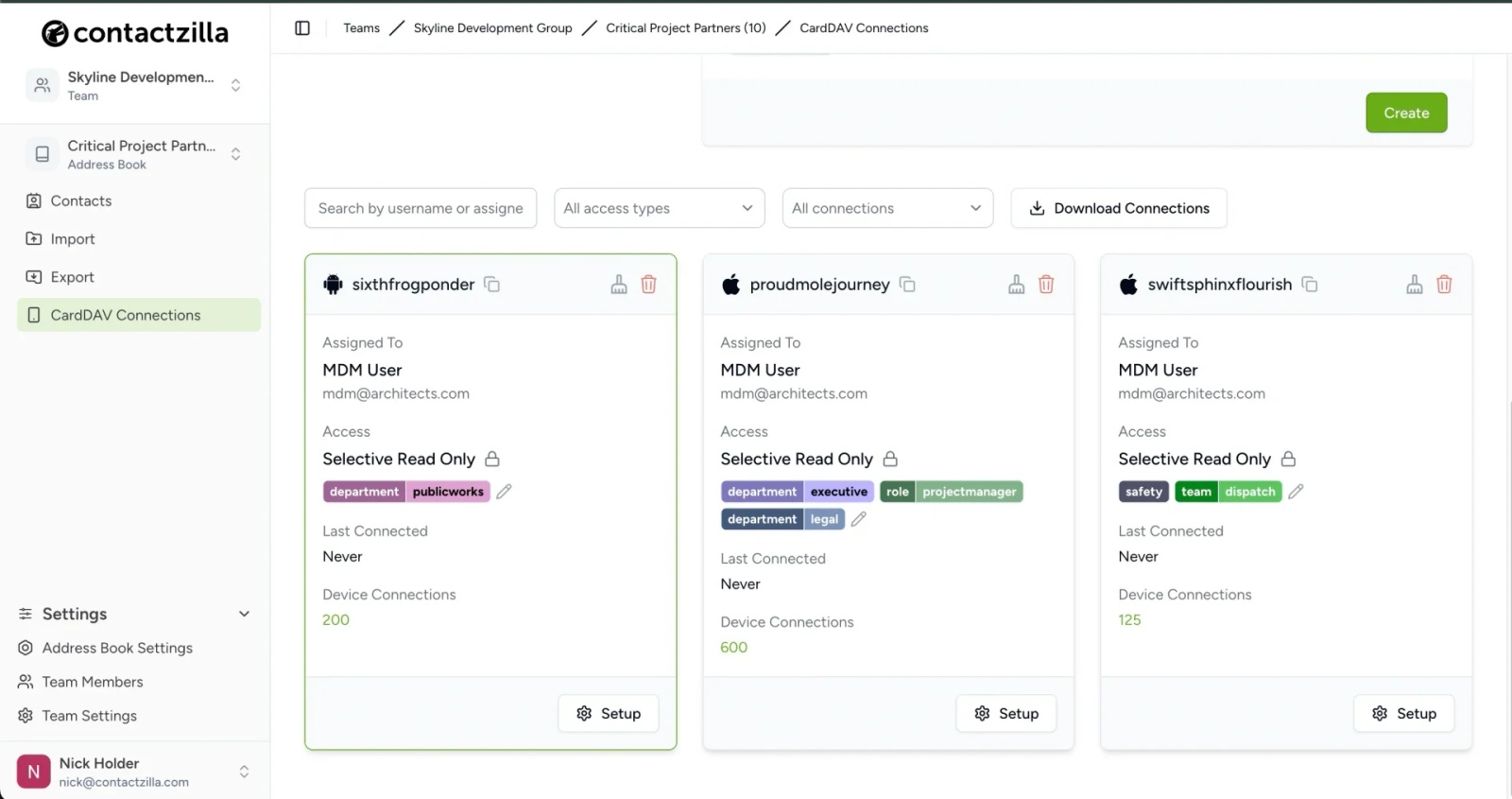
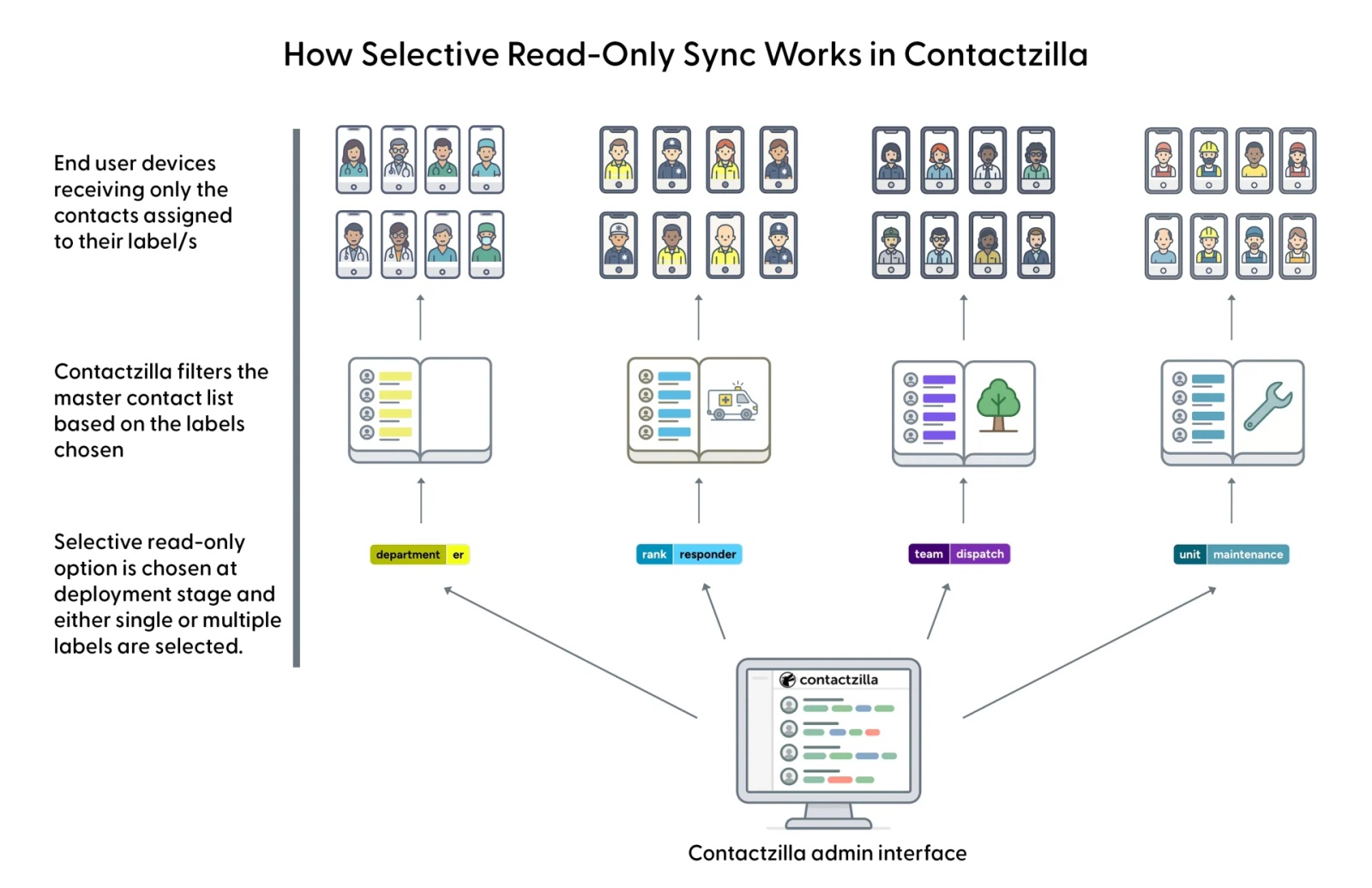
The practical difference is where the lists live. CiraSync's contacts come from your Microsoft 365 sources. Contactzilla's lists live in the address book itself, so you can add contacts that will never be in your Global Address List, such as suppliers, partner agencies or out-of-hours numbers, and send them to exactly the phones that need them.
Tip 💡 See Using Labels to Organize and Filter Contacts for how labels work, and our video Organizing your business contacts with labels.
CiraSync vs Contactzilla for shared and user-less devices: per-device vs per-user licensing
Shared phones are where the two models differ most. CiraSync licenses users. Its Mobile Direct mode supports accounts without an Exchange mailbox, so how it counts a phone shared by several shift workers is a good question to ask when you get a quote. Contactzilla licenses devices: a pooled phone used by five people on different shifts is one device, and users, address books and contacts are unlimited.
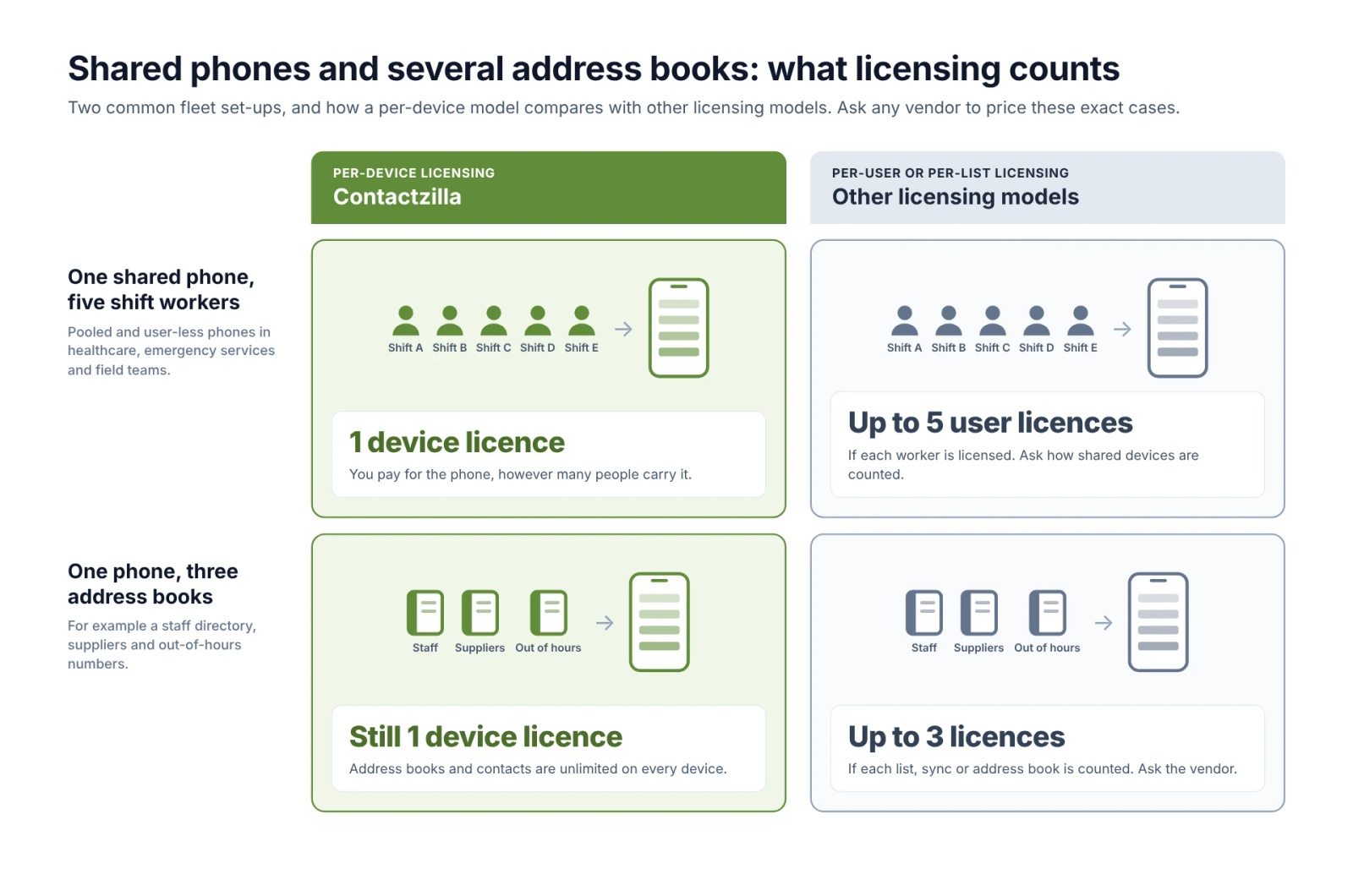
A real example: a regional public-sector care service we worked with in 2026 runs about 230 shared iPhones with no user signed in, carried by nurses and support workers across shifts. Its contacts are maintained in an Exchange Online shared mailbox whose user account is disabled. Contactzilla's Microsoft Outlook contacts importer reads that shared mailbox, two contact lists go to two groups of phones through Intune, and the cost is 230 devices at $1.49 plus the $50 importer: $392.70 a month.
One thing to plan for on read-only phones: if the read-only company address book is set as the phone's default contacts account, a contact the user saves goes into that read-only book and disappears at the next sync. Set a writable account, such as iCloud, On My iPhone or the user's Exchange account, as the default, and personal contacts stay where they are saved.
Switching from CiraSync to Contactzilla
A real example: a US public transport operator moved its phones from CiraSync to Contactzilla in 2026, and is now moving its MDM from Workspace ONE (AirWatch) to Intune. Based on that move, the order we recommend:
- Remove the contacts CiraSync's mailbox mode wrote into Outlook mailboxes, using the clean-up guide in CiraSync's own support centre, and remove any Exchange ActiveSync contact accounts you no longer need on the phones.
- Give staff a way to back up personal contacts first. The Contactzilla Migration Tools app, for iPhone and Android, is built for that. Watch Contactzilla Migration Tools - for Android.
- Import your directory or shared mailbox into Contactzilla, then deploy a read-only device connection through your MDM.
- Check each phone's default contacts account is a writable one, as above.
Calendars, CRM and Microsoft 365 sources: where CiraSync does more
CiraSync covers more than contacts, and if you need any of the following it is the stronger choice:
- Shared and public folder calendars on phones. Contactzilla does not sync calendars at all.
- Contacts written into Outlook mailboxes, for users who sign in to Outlook on their own phones without an MDM.
- CRM contacts in Outlook folders, through CiraSync's Salesforce and HubSpot connectors.
- On-premises hosting, through CiraSync On-Prem.
Contactzilla's sources are Microsoft Entra ID (the people in your Global Address List), a Microsoft 365 shared mailbox's contacts, Google Workspace directories, Salesforce, CSV files and vCards. Whatever the source, everything lands in one address book that you can edit, label and publish.
How much does CiraSync cost compared with Contactzilla?
CiraSync does not publish prices on its website: its pricing page offers a demo instead. Third-party listings such as Capterra describe one Enterprise plan, licensed per user per month, quoted on request and sold in licence packs of 10, with a free trial. Per-user figures for CiraSync circulate online, but we could not confirm any of them with CiraSync's own published material, so we have not quoted one here.
Contactzilla's pricing is published in full and works on one simple unit: the number of devices you deploy to. You are not charged per user, per address book or per contact, and a phone that receives several address books still counts as one device.
- 1 to 199 devices: $1.79 per device per month
- 200 to 499 devices: $1.49 per device per month
- 500 to 1,999 devices: $1.20 per device per month
- Microsoft Entra ID importer or Microsoft Outlook contacts (shared mailbox) importer: each a flat $50 a month
Two worked examples: 25 managed phones fed from Entra ID cost 25 x $1.79 + $50 = $94.75 a month. The 230 shared care phones above cost $392.70 a month. For a very small team, the flat importer fee is most of the bill, so get a CiraSync quote and compare like for like.
CiraSync or Contactzilla: which is right for you?
Choose CiraSync if
- You need shared or public folder calendars on phones as well as contacts.
- You want Microsoft 365 to stay the only place contacts are managed, with nothing extra to curate.
- Your users sign in to Outlook on their own phones and you do not use an MDM.
- You need the service hosted on your own servers.
- You want CRM contacts in Outlook folders.
Choose Contactzilla if
- You want a published, step-by-step guide for your MDM, whether that is Intune, Jamf Pro, Mosyle, MaaS360, Workspace ONE, Hexnode, SOTI or NinjaOne.
- You run Android devices and want a documented, hands-off deployment you can follow today.
- You have shared or user-less phones and want to pay per device, not per user.
- You need different read-only lists for different teams, including contacts that are not in your directory.
- You want published pricing and a self-service trial.
CiraSync alternatives ranked for managed iPhone and Android fleets
If your job is getting shared company contacts onto managed iPhones and Android phones, these are the CiraSync alternatives worth a look, in the order we would look at them. We make Contactzilla, so treat its place at the top with that in mind. Each description and price comes from the vendor's own website, checked on 16 October 2026.
- Contactzilla: best for MDM-managed iPhone and Android fleets, shared and user-less phones, and different read-only contact lists for different teams. Priced per device: $1.79, $1.49 or $1.20 a month by volume, plus $50 a month for the Entra ID or shared mailbox importer.
- sync.blue: the closest independent option to Contactzilla. A cloud service run from ISO 27001-certified data centres in Germany that syncs the Global Address List and more than 80 other sources to the native Contacts app on iPhone and Android, and works with Microsoft Intune. Priced per user plus source contacts, from €19 a month for up to 10 users and 250 contacts; larger plans start at 11 users with 1,000 contacts included. Each user can use several devices at no extra cost.
- SyncPenguin: a cloud service for one-way or two-way sync of contacts, calendars and tasks between Microsoft 365, Google and other business apps. For the Global Address List it works much like CiraSync's mailbox mode: it copies directory contacts into each user's mailbox, and they reach phones through Outlook or Exchange. Priced by sync flow, from $9 a month for two flows; in a one-to-many sync, each user counts as a flow.
- CYNC: a service you run on your own Windows server that copies Microsoft Entra ID users into each Exchange Online mailbox's contacts, so they reach phones through Outlook. Free for up to 10 users, then priced per user, falling to €0.18 a month on annual billing at higher volumes.
- Add2Exchange Enterprise 365 (DidItBetter): replication software, installed or hosted, that copies the Global Address List and public folder contacts and calendars into users' mailboxes, for phones to pick up through Exchange ActiveSync. Prices are by quote, with a 21-day trial.
Names you will often see on other lists, but which we would not shortlist:
- SyncGene, CiraHub and itrezzo are not independent alternatives: they belong to CiraSync's owner, Cira Apps, and SyncGene's own pricing page says SyncGene is becoming CiraHub.
- CodeTwo Exchange Sync, which older guides still recommend, is deprecated and no longer available.
How we compared CiraSync and Contactzilla
This comparison was written by Nick Holder, MDM Deployment Specialist at Contactzilla. We do not have a CiraSync account, so everything about CiraSync comes from CiraSync's public documentation and press releases and its Capterra listing, all checked on 16 October 2026. The screenshots are from our own product. Contactzilla is SOC 2, HIPAA and GDPR compliant; details are on our Trust Center. If CiraSync changes something we describe here, tell us and we will update this page.
Frequently Asked Questions
Does CiraSync support CardDAV on iPhone?
Yes. CiraSync's Mobile Direct feature delivers contacts to iPhones over CardDAV through Microsoft Intune or Workspace ONE, with no app on the phone. CiraSync On-Prem added CardDAV in July 2026.
Does CiraSync work on Android phones?
Yes, according to CiraSync. It announced Mobile Direct for Android in June 2026 and lists a CiraSync CardDAV Direct app on Google Play, but its published set-up guides cover iPhones only. Contactzilla deploys its Contactzilla Sync app to Android through Managed Google Play, with published guides for Intune and other MDMs.
Is Contactzilla cheaper than CiraSync?
It depends on your numbers. Contactzilla is priced per device from $1.79 a month, plus $50 a month for the Entra ID or shared mailbox importer, while CiraSync is quote-based and priced per user. Shared phones usually favour per-device pricing; very small teams should compare quotes.
Do I need a Microsoft 365 mailbox for every iPhone?
No, with either product. CiraSync's Mobile Direct mode supports users without an Exchange mailbox, and Contactzilla device connections are not tied to a user at all, so one connection can cover a fleet of shared phones.
Can staff edit or delete company contacts on their phones?
Not with Contactzilla's read-only access: the phone cannot change or delete those contacts. With CiraSync, staff can edit them on the phone, but the source overwrites the changes at the next sync.
Are SyncGene and CiraHub alternatives to CiraSync?
No, not independent ones. SyncGene, CiraHub, itrezzo and CiraSync all belong to the same company, Cira Apps, and SyncGene is becoming CiraHub.
Can Contactzilla sync calendars like CiraSync?
No. Contactzilla handles shared contacts only. If you need shared or public folder calendars on phones, CiraSync covers that and Contactzilla does not.
Can I use Contactzilla on iPhones without an MDM?
Yes. A Contactzilla device connection gives a QR code to scan on the iPhone or a profile link to email, so phones outside your MDM can get the same address book.
Does Microsoft retiring Exchange Web Services affect Contactzilla?
No. Microsoft is retiring Exchange Web Services (EWS) in Exchange Online between October 2026 and April 2027. Contactzilla's Microsoft Entra ID and shared mailbox importers use Microsoft Graph, not EWS, and Contactzilla never writes into user mailboxes, so the retirement does not change how it gets contacts onto phones.