Simple CRM for Plumbers
Streamline customer management and grow your plumbing business. Keep client data organized and synced across devices, empowering your team to deliver the best service.
No credit card required • Cancel anytime
Seamless Contact Syncing
Effortlessly sync your team's iPhones with Contactzilla using iOS's built-in CardDAV support.
Customize Contact Fields
Adapt your contact fields to capture crucial information specific to your plumbing services.
Service History Tracking
Store detailed notes and track the service history for each customer.
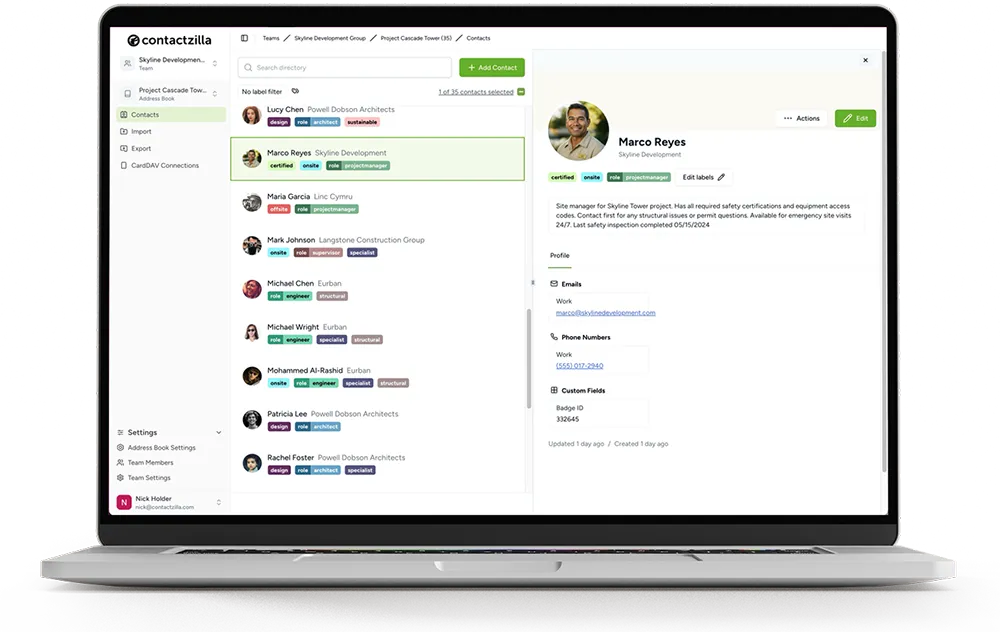
Centralized Contact Data
Keep all your customer information in one secure, easily accessible location.
Search & Filter
Quickly find customer contacts using advanced search, custom filters, and tags.
Smart Labels
Categorize your plumbing contacts with customizable labels like 'Repeat Customers' or 'Suppliers'.
Why Plumbing Pros Choose Contactzilla
Effortless Team Collaboration
Contactzilla makes it easy for your entire plumbing team to work together. Seamlessly share and access customer information, ensuring everyone has the details they need. Invite your team to a shared address book and keep everyone on the same page.
Centralized Management
Say goodbye to juggling countless contacts. Organize your extensive network of clients, suppliers, and partners in one centralized platform. Find the information you need, exactly when you need it.
Cost-Effective Solution
When compared to comprehensive CRM systems, Contactzilla offers a more budget-friendly solution for plumbing teams. Our cost-efficient pricing model ensures that you get all the essential features you need without breaking the bank.
CRM vs Contact Management Software for Plumbing Professionals
When it comes to managing customer relationships in the plumbing industry, you may find yourself considering the differences between contact management software and comprehensive CRM systems.
While CRM software offers a wide array of features, such as job scheduling, invoicing, and marketing automation, these extensive tools can often be unnecessarily complex for plumbing professionals who primarily need a simple, efficient way to manage their customer contacts.
This is where contact management software really shines. By focusing on the essential features that matter most to plumbing professionals, contact management software provides a streamlined solution that empowers you to effectively organize your customer information, track service history, and access critical data without the complexity and steep learning curve of a full-fledged CRM system.
Contact Sharing across Teams with CardDAV
As a service industry business, keeping your customer contact information organized and accessible to your entire team can be a challenge. Contactzilla simplifies this process by allowing you to create and share multiple address books tailored to your specific needs, with granular permission controls to keep your data secure.
Team Collaboration
Invite your team to a shared address book and keep everyone on the same page. As an administrator, you can assign read-only or read-and-write access to specific team members for each address book, giving your dispatch team view-only access while allowing your sales team to update contacts as needed.
Mobile Sync
Connect multiple phones and devices to the same address book effortlessly. Whether your plumbers use iPhones or Android devices, Contactzilla syncs contacts natively through CardDAV so your team always has the latest customer information in the field.
How to Choose the Right CRM for Your Plumbing Business
Key evaluation criteria:
- Determine your core needs — simple contact organization vs. comprehensive CRM functionality
- Assess user-friendliness and the learning curve for your staff
- Check for responsive customer support and helpful resources
- Examine compatibility with your existing email, scheduling, and plumbing-specific tools
- Review pricing structures and the ability to scale as your business expands
- Explore user feedback and leverage trial periods to test the software firsthand
Questions to ask yourself:
- What's the size of your customer database, and how quickly are you acquiring new clients?
- Does your service delivery process involve multiple steps or is it relatively straightforward?
- How detailed are your customer interaction protocols? Is extensive tracking and follow-up necessary?
- Are multiple team members likely to engage with the same customers or contacts?
- Do you intend to enhance your marketing efforts through automation, such as targeted email campaigns?
- To what extent do you rely on in-depth analytics and reporting for strategic decision-making?
- How important is it to have smooth integration with your current digital toolkit, including communication platforms and job scheduling software?
By carefully evaluating these aspects, you'll be better positioned to select a contact management solution that caters to your plumbing company's specific needs, setting the stage for efficient customer relationship management and business growth.
Effortlessly Import Your Customer Contacts
You likely have contacts scattered across various platforms and sources. Contactzilla simplifies this process, offering powerful integrations that make centralizing your customer data a breeze. Whether your contacts are stored in Gmail, Outlook, a spreadsheet (CSV), or a business card scanner app, Contactzilla ensures that all your valuable information is easily accessible and ready to use from the moment you start.
Comparing Costs: Contact Management vs. CRM
See how Contactzilla's streamlined contact management solution stacks up against more extensive CRM systems in terms of cost-effectiveness for plumbing professionals.
| Software | Type | Starting Price |
|---|---|---|
| Contactzilla | Contact Management | $1.79/device/mo |
| Contactboss | Contact Management | $24.99/user/mo |
| Contacts Plus | Contact Management | $9.99/mo |
| Salesforce | CRM | $25/user/mo |
| Zoho CRM | CRM | $14/user/mo |
| Insightly | CRM | $29/user/mo |
Real Success Stories from Our Customers
“Contactzilla has been a game changer for our plumbing clients. Keeping track of customer contacts and service histories across their teams used to be a nightmare. Now everything's in one place and syncs perfectly.”
Jon Davies
Founder at Chatter Communications
“We needed something simple that our technicians could actually use in the field. Contactzilla delivers — the mobile sync means everyone has the latest customer info, and the admin controls give us peace of mind.”
Bruce Roberts
IT Director at J.F. White
“I was skeptical about switching from our old system, but the import was painless and the team adapted quickly. For the price, it's unbeatable — we're saving hundreds compared to our old CRM.”
Courtney Trimble
Office Manager at Greg Wright Law
Simple, Transparent Pricing
Volume pricing that scales with your team. Unlimited users, address books, and contacts.
MDM 1
MDM 2
MDM 3
For 2000+ devices please contact us for enterprise pricing.
Frequently Asked Questions
Is CRM software suitable for plumbing businesses?
Yes, CRM or contact management software is ideal for plumbing businesses. It helps organize customer information, track service history, and streamline communication. While not as complex as a full sales CRM, Contactzilla provides the essential features for managing contacts efficiently.
How much does it cost?
Contact management software costs typically range from $10 to $50 per user monthly. Contactzilla starts at an affordable rate with plans that scale as your team grows.
Can I import my existing contacts?
Absolutely. You can import contacts from Gmail, Outlook, spreadsheets (CSV), or business card scanners. Contactzilla creates a centralized database from all your scattered sources.
Does it work on Android?
Yes! Contactzilla syncs natively with Android contacts apps as well as iPhones. Your entire crew can stay in sync regardless of what device they use.