Best Contact Management Software for Small Business
As a small business owner, you understand the importance of building strong relationships. Manage them effortlessly with Contactzilla.
No credit card required • Cancel anytime
Contact Management Software vs CRM
Do you really need a complex CRM?
The problem with CRMs
For many small businesses, a full-blown Customer Relationship Management (CRM) system is overkill. They are expensive, complicated to set up, and often require hours of training. You end up paying for features you never use.
- ✕Expensive monthly fees per user
- ✕Steep learning curve
- ✕Contacts trapped inside the app
The Contactzilla Way
Contact Management Software (CMS) like Contactzilla focuses on one thing: keeping your contacts organized and accessible. It pushes contact data directly to your phone's address book, so it's there when you need it.
- Simple, affordable pricing
- Zero training required
- Contacts sync to your native phone dialer
Why Small Businesses Choose Contactzilla
Simplicity & Speed
Get set up in minutes. No complex configuration or ongoing maintenance required.
Team Collaboration
Share address books with your team so everyone has the right number, right now.
Data Accuracy
When one person updates a contact, it updates for everyone instantly.
Mobile First
Works natively with iOS and Android contacts apps. No separate app needed to make calls.
Scalability
Start small and grow. Contactzilla handles thousands of contacts without breaking a sweat.
Secure
Keep business data separate from personal contacts. Remove access cleanly when staff leave.
Key Features to Look For
Works with tools you already use
Contact Management Software — Features to Look For
When evaluating contact management software for your small business, select a tool that simplifies and enhances the way you handle your contacts.
Centralized Database
Store and organize all your contact information in one place, accessible to your entire team.
Easy Note & File Sharing
Share notes, files, and documents related to specific contacts so everyone stays informed.
Mobile Access
View and update contact details from your smartphone or tablet, wherever you are.
Cross-Device Sync
Synchronize data across devices and locations so all team members work with accurate, up-to-date contacts.
Intuitive Interface
A simple, clean interface that makes it easy to enter data and find the information you need without training.
Contact Grouping
Categorize contacts into groups for targeted marketing, communication, and workflow management.
Email & Tool Integration
Integrate with email and other business tools to streamline workflows and eliminate manual data entry.
Lead Capture Tools
Capture and track new leads from your website, social media, or other channels to grow your pipeline.
How to Choose the Right Contact Management Software
Selecting the ideal solution hinges on understanding your unique needs and pain points. Start with these considerations.
Key Considerations
- Determine your needs — basic contact management vs. advanced CRM features
- Consider ease of use and training requirements for your team
- Look for responsive customer support and helpful resources
- Evaluate integration capabilities with email, calendar, and other business apps
- Compare pricing plans and scalability as your business grows
- Read reviews and take advantage of free trials to test before buying
Questions to Ask Yourself
- What is the size and growth rate of your customer base?
- Is your sales process straightforward or multi-stage?
- Will multiple team members interact with the same contacts?
- Do you need marketing automation like email campaigns?
- How important are analytics and reporting for your decisions?
- Do you need integration with your existing tools?
By evaluating these considerations, you'll be well-equipped to select a contact management solution that aligns with your specific needs and sets you up for growth.
Organize Contacts the Way That Suits Your Business
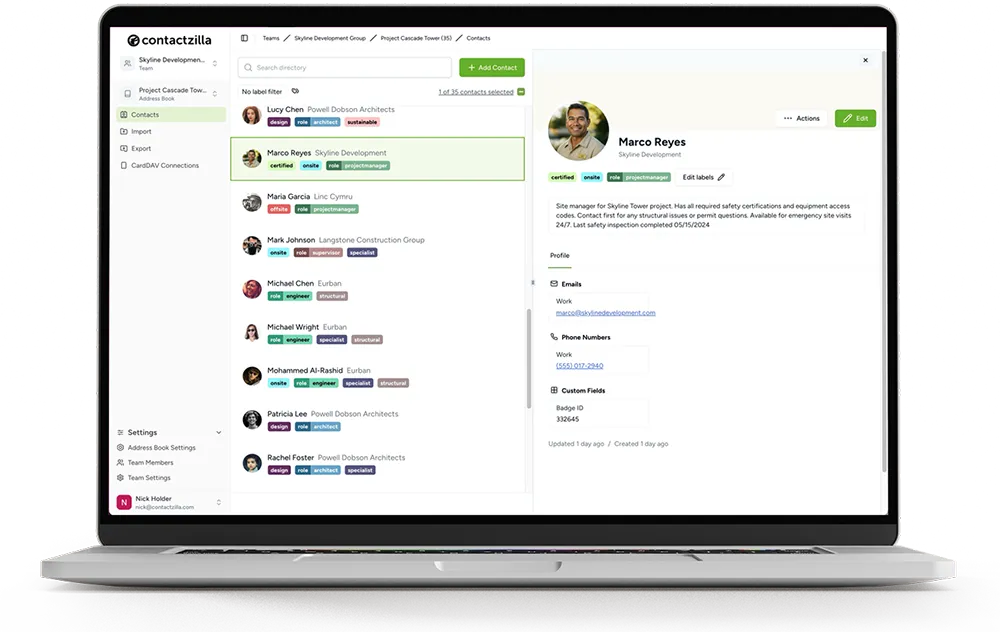
From smart labels that simplify your workflow to customizable fields that store crucial client details, Contactzilla adapts to the way you work.
Smart Labels
Keep your connections in perfect order with labels like "Priority Leads" or "Suppliers" — whatever makes sense for your business.
Custom Fields
Add custom fields to store essential information like client preferences, project specifics, or contract dates — tailored to your needs.
Notes & History
Keep detailed notes and track the history of interactions with each contact to maintain context and continuity in your communications.
Tagging
Tag contacts with keywords for quick reference and searchability. Find exactly who you need in seconds.
Advanced Search
Use advanced search and filter options to quickly locate contacts based on specific criteria like location, label, or custom field.
Contact Grouping
Organize contacts into groups for targeted communication, segmented marketing, and streamlined team workflows.
Contact Sharing Across Devices for Small Business Teams
One of the biggest advantages of Contactzilla is the ability to synchronize your team's contacts across all devices and locations. Every team member gets up-to-date contact information — whether they are customers, suppliers, or partners — eliminating back-and-forth communication and reducing errors.
Team Collaboration
Invite your team to a shared address book and keep everyone on the same page. When a sales rep needs a client's details on the road, or a team member needs to update supplier info during a meeting — Contactzilla keeps everyone in sync instantly.
Mobile Sync
Connect multiple phones and devices to the same address book effortlessly. Contactzilla uses CardDAV to push contacts directly to your phone's native address book — so contacts are available for calls, texts, and email without opening a separate app.
Comparing Costs: Contact Management Software vs. CRM
When evaluating solutions for managing your business contacts, cost has a big impact over time. Here is how popular options compare.
| Software | Type | Starting Price |
|---|---|---|
| Contactzilla | Contact Management | $1.79/device/mo |
| Contactboss | Contact Management | $24.99/user/mo |
| Contacts Plus | Contact Management | $9.99/mo |
| Salesforce | CRM | $25/user/mo |
| Zoho CRM | CRM | $14/user/mo |
| Insightly | CRM | $29/user/mo |
Prices shown are starting tiers. CRM solutions often increase significantly as you add users and features.
Effortlessly Import Your Contacts
A seamless import process ensures all your important information is centralized, accessible, and ready to use from day one. Contactzilla makes getting set up a breeze.
Trusted by Small Businesses
“Contactzilla has been a game changer for our small business. Keeping track of client contacts across our team used to be a nightmare. Now everything's in one place and syncs perfectly.”
Jon Davies
Founder at Chatter Communications
“We needed something simple that our team could actually use. Contactzilla delivers — the mobile sync means everyone has the latest contact info, and the admin controls give us peace of mind.”
Bruce Roberts
IT Director at J.F. White
“I was skeptical about switching from our old system, but the import was painless and the team adapted quickly. For the price, it's unbeatable — we're saving hundreds compared to our old CRM.”
Courtney Trimble
Office Manager at Greg Wright Law
Smooth Transition to Better Contact Management
Switching tools can feel daunting, but Contactzilla makes the transition painless. Import your contacts in minutes, invite your team, and start collaborating right away. Our friendly support team is here to help every step of the way — via chat, email, or phone.
Start Your Free 14-Day TrialNo credit card required. Cancel anytime.
Simple, Transparent Pricing
Volume pricing that scales with your team. Unlimited users, address books, and contacts.
MDM 1
MDM 2
MDM 3
For 2000+ devices please contact us for enterprise pricing.
Frequently Asked Questions
What is the difference between CMS and CRM?
CMS (Contact Management Software) is focused purely on organizing and syncing contact data across devices. CRM (Customer Relationship Management) includes sales pipelines, deal tracking, and marketing automation. If you just need to manage contacts, a CRM is often too complex.
Do I need to install an app on my phone?
No! Contactzilla syncs contacts directly to your phone's native address book. You can view, search, and call contacts using the phone & contacts apps you already use.
Can I manage permissions?
Yes. You can create multiple address books and choose exactly which users or teams have access to them. You can also set permissions to read-only to prevent accidental deletions.