Real Estate Contact Management Software
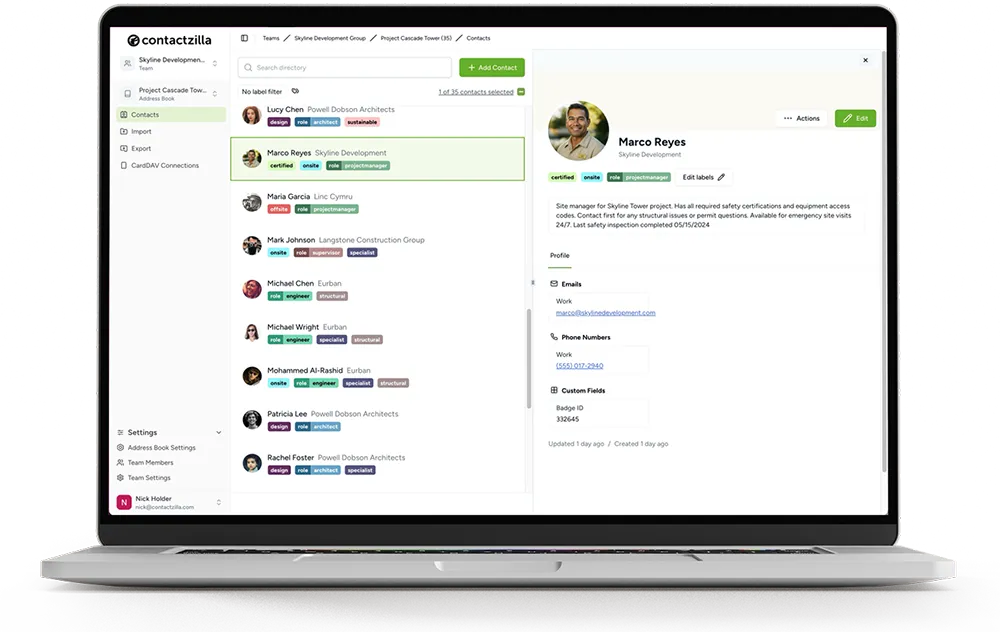
Close more deals by keeping your clients, agents, and vendors in sync. Access every contact from your mobile device, instantly.
No credit card required • Cancel anytime
Why Real Estate Pros Choose Contactzilla
Team Collaboration
Share vendor lists, mortgage brokers, and client contacts with your entire agency or specific teams.
CardDAV Sync
Sync contacts directly to your iPhone or Android. See client names when they call, not just numbers.
Instant Access
Find any contact in seconds. No more digging through emails or spreadsheets to find a number.
Professionalism
Ensure every agent has the correct, up-to-date contact info for partners. Eliminate 'Who's this?' texts.
Custom Fields
Store property preferences, budget, or move-in dates right in the contact notes.
Data Security
Keep your client database secure. Revoke access immediately if an agent leaves the brokerage.
Designed for high-growth agencies
Whether you are a solo agent or a large brokerage, Contactzilla scales with you. Import your existing database from CSV, Google Contacts, or Microsoft 365 and get everyone synced in minutes.
-
Caller ID for every client
Never miss a lead because you didn't recognize the number.
-
Centralized Vendor Lists
Curate a master list of trusted plumbers, electricians, and inspectors for your team.
-
Automated Backups
Your client list is your most valuable asset. We keep it safe.
Elite Agents Team
14 members • 2,450 contacts
Vendor List (Master)
All Staff • 185 contacts
Leads (Warm)
Sales Team • 850 contacts
Why Real Estate Pros Choose Contactzilla
In real estate, teamwork and relationships drive results. Contactzilla gives your agency the tools to stay organized and connected.
Team Collaboration
Easily share and access contact information across your entire agency, ensuring everyone is working towards a common goal and closing more deals together.
Effortless Management
Organize and manage your extensive network of clients, leads, and referrals in one centralized platform. Find the information you need exactly when you need it.
Past Client Relationships
Your past clients are the key to unlocking future success. Maintain and nurture those valuable relationships with organized contact records and interaction notes.
Cost-Effective
Get all the essential contact management features you need without the bloated price tag of a full CRM. Our transparent pricing scales with your team as it grows.
Contact Management Software vs. CRM for Real Estate Professionals
When it comes to managing client relationships in the real estate industry, you may find yourself weighing the options between contact management software and a full CRM system. While CRM software offers a wide range of features including sales pipelines, marketing automation, and email campaigns, these robust tools can often be overwhelming and unnecessarily complex for real estate professionals who primarily need an efficient way to manage their contacts.
This is where contact management software stands out. By focusing on the essential features that matter most to real estate professionals, contact management software provides a streamlined solution that empowers you to effectively organize your contacts, track interactions, and access critical information without the clutter and complexity of a full CRM system.
For most real estate agencies, the core challenge is keeping contact information accurate, accessible, and synchronized across every team member's devices. You need to know who your clients are, how to reach them, and who on your team spoke to them last. A purpose-built contact management tool handles all of this at a fraction of the cost and learning curve of enterprise CRM platforms.
Contact Sharing across Devices with CardDAV
Contactzilla's CardDAV-powered sync makes it effortless for real estate teams to share and access contacts across every device, wherever they are.
Team Collaboration
Create and share one or multiple address books with your team. Invite team members to join shared address books with full control over their access levels. Grant read-only permissions to those who only need to view contact information, or give read-and-write access to those who need to update and modify contacts.
Mobile Sync
Connect multiple phones and devices to the same address book effortlessly. Whether your agents use iPhones, Android phones, or tablets, Contactzilla ensures every device has the latest contact information synced in real-time through the native contacts app.
How to Find the Best Contact Management Software
Choosing the right contact management solution depends on your agency's unique requirements. Here is a practical checklist to guide your decision.
- 1
Identify your specific needs
Do you need basic contact management, or more advanced CRM features like sales pipelines and marketing automation?
- 2
Evaluate ease of use
Consider the training requirements for your team. A clean, intuitive interface minimizes the learning curve and accelerates adoption.
- 3
Check integration capabilities
Assess how well it integrates with email, calendar, and other real estate-specific apps you already use.
- 4
Compare pricing and scalability
Ensure pricing scales reasonably as your team and client base expand. Watch out for per-user costs that balloon at higher tiers.
- 5
Look for reliable support
Seek out customer support and onboarding resources. Responsive help when you need it makes all the difference.
- 6
Try before you commit
Read reviews and take advantage of free trials. Hands-on testing is the best way to confirm the software fits your workflow.
Effortlessly Import Your Real Estate Contacts
Your contacts are scattered across Gmail, Outlook, spreadsheets, and old CRMs. Contactzilla brings them all together. Import from CSV, vCard, Google Contacts, or Microsoft 365 in minutes and get your entire team synced from day one.
Comparing Costs: Contact Management Software vs. CRM
When evaluating solutions for managing your business contacts, it is important to consider the costs involved. Here is how popular options compare.
| Software | Type | Starting Price |
|---|---|---|
| Contactzilla | Contact Management | $1.79/device/mo |
| Contactboss | Contact Management | $24.99/user/mo |
| Contacts Plus | Contact Management | $9.99/user/mo |
| Salesforce | CRM | $25/user/mo |
| Zoho CRM | CRM | $14/user/mo |
| Insightly | CRM | $29/user/mo |
What Our Customers Say
“Contactzilla has been a game changer for our real estate clients. Keeping track of buyer and seller contacts across their teams used to be a nightmare. Now everything's in one place and syncs perfectly.”
Jon Davies
Founder at Chatter Communications
“We needed something simple that our agents could actually use in the field. Contactzilla delivers — the mobile sync means everyone has the latest client info, and the admin controls give us peace of mind.”
Bruce Roberts
IT Director at J.F. White
“I was skeptical about switching from our old system, but the import was painless and the team adapted quickly. For the price, it's unbeatable — we're saving hundreds compared to our old CRM.”
Courtney Trimble
Office Manager at Greg Wright Law
Simple, Transparent Pricing
Volume pricing that scales with your team. Unlimited users, address books, and contacts.
MDM 1
MDM 2
MDM 3
For 2000+ devices please contact us for enterprise pricing.
Frequently Asked Questions
Can I separate personal and business contacts?
Yes. Contactzilla creates a separate group or account on your phone. You can toggle it on or off, ensuring your personal contacts stay private and your business contacts stay professional.
Does it work with existing CRM tools?
We focus on contact syncing. You can export from your CRM and import to Contactzilla to get those contacts onto your phone, or use our integrations to keep them in sync.
What happens if an agent leaves?
You simply remove them from the Contactzilla team. The business contacts will be automatically removed from their device, protecting your client list.