SCEP certificates in MDM: what they are and how enrolment works on iOS and Android

What is a SCEP certificate?
A SCEP certificate is a digital certificate that is automatically issued to a device so it can securely identify itself to systems like Wi-Fi or VPN.
In simple terms, it is a way of giving each device its own secure ID, without needing to set it up manually.
Instead of an administrator creating and installing certificates one by one, the device requests its own certificate and installs it automatically.
This is done using SCEP (Simple Certificate Enrollment Protocol), which is the process that handles the request and delivery.
In more technical terms, the certificate is a standard identity certificate issued by a Certificate Authority (CA), and it is used by the device to prove who it is when connecting to secure services.
In MDM environments, this is commonly used to allow devices to connect to Wi-Fi, VPN, and other systems without entering passwords.
In most environments, the decision to use SCEP comes down to one issue: manual certificate management does not scale.
Without SCEP, certificates have to be created and handled step by step.
That usually means:
- Creating certificates centrally
- Moving them to devices securely
- Installing them correctly
- Keeping track of expiry and replacing them in time
This works for a small number of devices.
It breaks down quickly once you are managing tens, hundreds, or thousands.
In real deployments, the same problems come up repeatedly:
- Devices fail to connect to Wi-Fi because the certificate was never installed
- VPN access stops working after a certificate expires
- Certificates are copied between devices, which weakens security
- IT teams spend time fixing issues that should not require manual work
For example:
- A new employee joins and cannot connect to secure Wi-Fi because their device never received the certificate
- A batch of devices loses VPN access overnight because certificates expired at the same time
- A device is replaced, and access breaks because the certificate was tied to the old device
These are not edge cases. They are common in environments without automated certificate delivery.
How SCEP enrolment works (high-level)
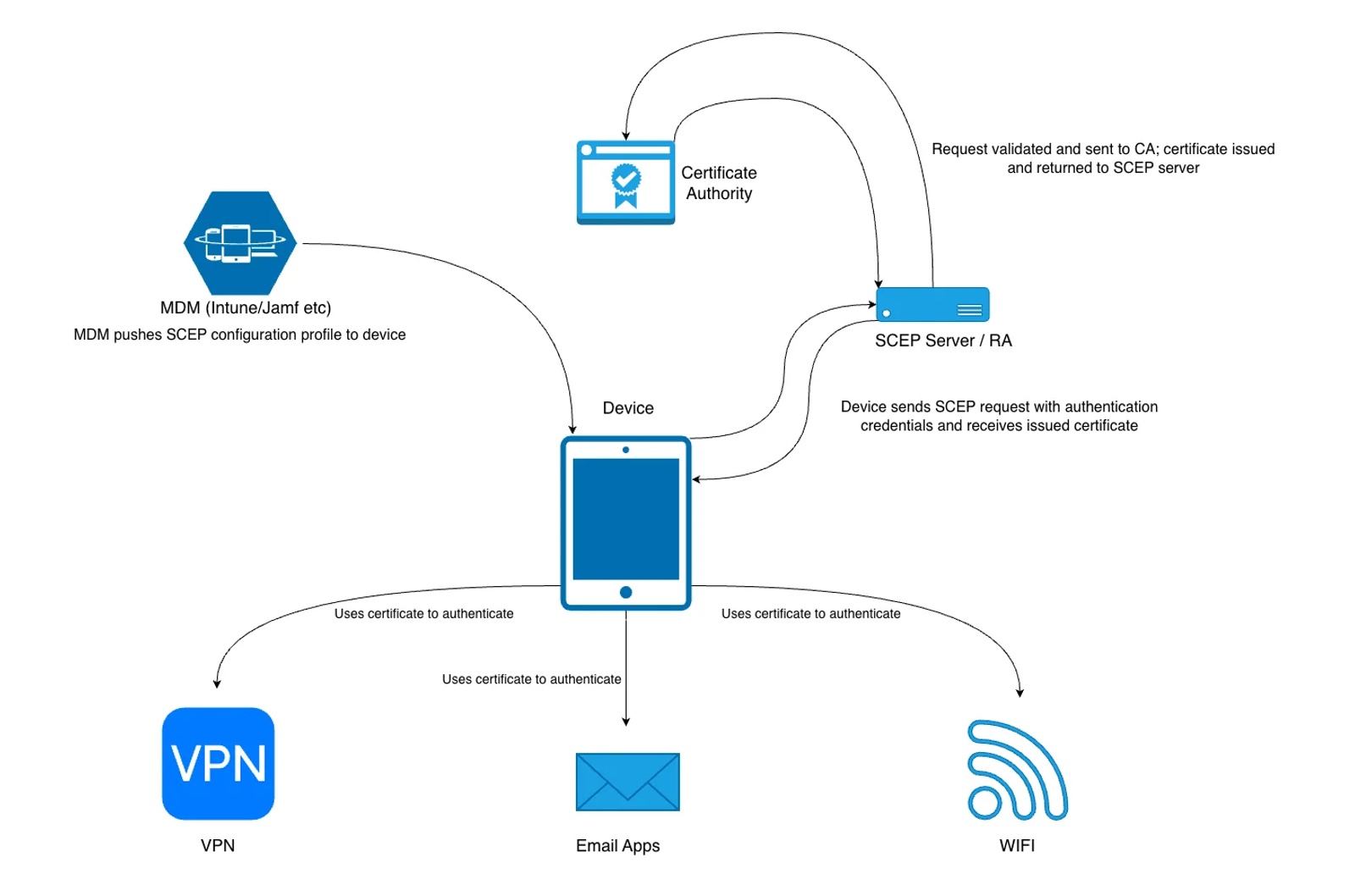
SCEP removes the manual steps by letting the device handle the process itself.
With SCEP in place:
- The device creates its own secure identity
- It requests a certificate automatically
- The certificate is issued and installed without user input
- Renewal happens in the background
From the admin side, this looks like any other MDM configuration.
You define the settings once, assign them to devices, and the process runs automatically.
Where SCEP certificates are used in MDM (Wi-Fi, VPN, email)
SCEP is usually tied directly to services that require device authentication.
The most common examples are:
- Wi-Fi (devices connect without entering a password)
- VPN (devices authenticate automatically)
- Email (access is tied to the device, not just a login)
- Internal systems or Zero Trust access
In each case, the alternative is usually passwords.
That creates problems:
- Passwords are shared or reused
- Users enter them incorrectly
- Access breaks when passwords change
Certificates avoid this by linking access to the device itself.
Once SCEP is set up correctly:
- Devices enrol
- Certificates are issued
- Services work as expected
There is no manual step and no user involvement.
The components involved in SCEP certificate deployment
A typical SCEP deployment in MDM involves four parts:
Certificate Authority (CA)
The system that creates and signs certificates.This is what ultimately confirms a device’s identity.
SCEP server (often NDES in Microsoft environments)
Acts as a middle layer between devices and the CA.It receives certificate requests from devices and forwards them to the CA.
MDM platform
Sends the SCEP configuration to devices.It defines how the device should request and use the certificate.
Device (iOS, Android, macOS)
Creates its own private key, requests a certificate, and installs it automatically.
How SCEP enrolment works in MDM
Step 1: Device is enrolled into MDM
The device is managed and able to receive configuration profiles or policies.
Step 2: MDM pushes a SCEP configuration
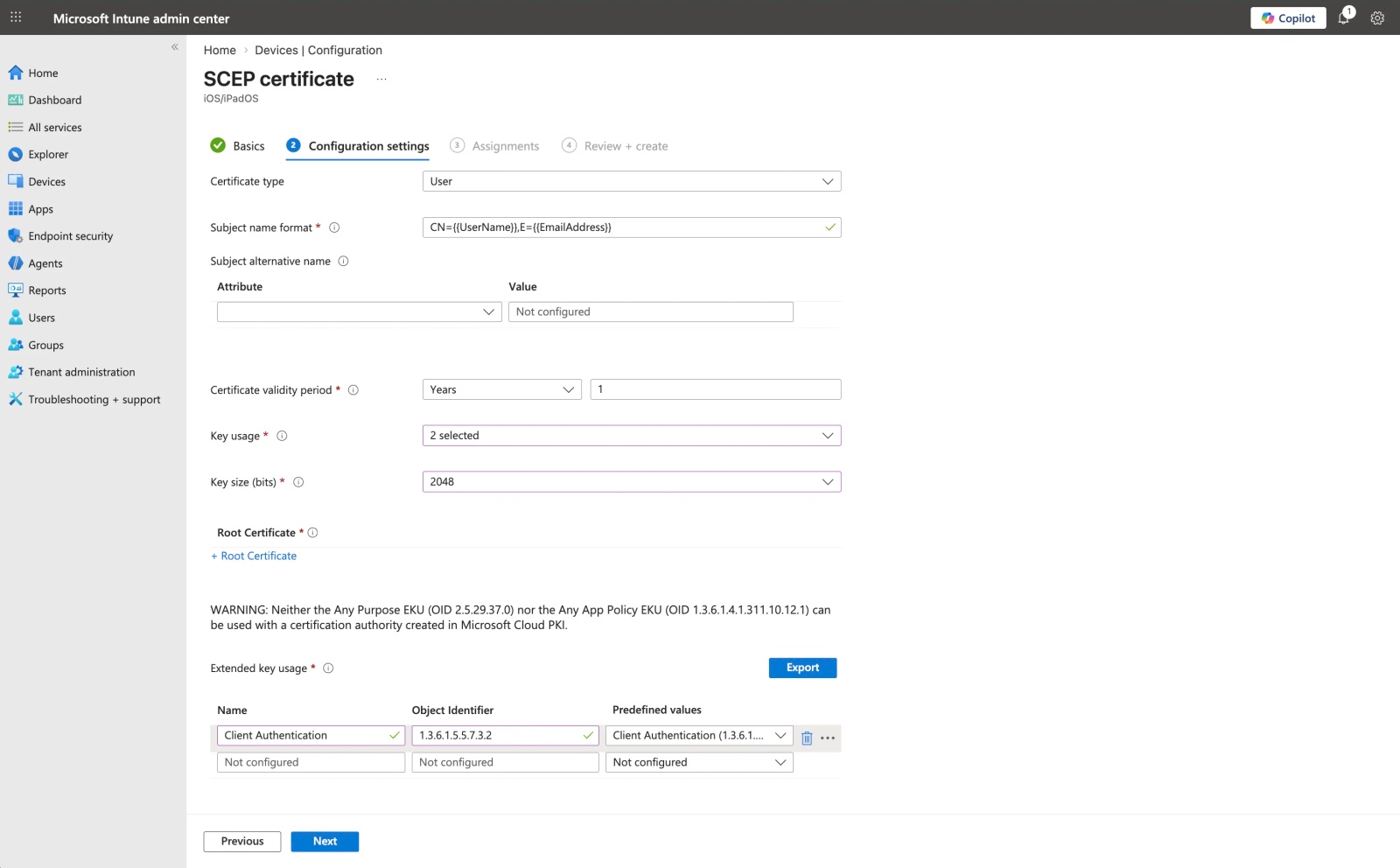
The MDM sends a configuration profile that defines how the certificate should be requested. This typically includes:
- SCEP server URL
- Certificate subject details
- Key size and usage
- Authentication method (for example, a challenge password)
Step 3: Device generates key pair and request
The device:
- Generates a private key (which never leaves the device)
- Creates a certificate request using its public key and identity information
This happens locally on the device.
Step 4: Device requests certificate from SCEP server
The device sends the request to the SCEP server, including authentication credentials (such as the challenge).
The SCEP server:
- Validates the request
- Forwards it to the Certificate Authority
Step 5: Certificate is issued and returned
If the request is valid, the Certificate Authority signs the certificate and returns it to the SCEP server, which passes it back to the device.
Step 6: Device installs and uses the certificate
The device installs the certificate and links it to the private key.
From this point, it can use the certificate to authenticate to services like Wi-Fi, VPN, and email.
What admins configure vs what happens automatically
Admins configure:
- SCEP endpoint
- Certificate fields
- Key settings
- Authentication method
The device handles:
- Key generation
- CSR creation
- Certificate installation
- Renewal
This separation is why SCEP scales well.
iOS and macOS SCEP flow
On Apple devices, SCEP is delivered through configuration profiles.
A profile includes a SCEP payload, which:
- Requests an identity certificate
- Stores it in the device keychain
That certificate can then be referenced by:
- Wi-Fi profiles
- VPN configurations
- Email accounts
The process is silent from the user’s perspective. Once the profile is installed, the device automatically requests and installs the certificate.
Android Enterprise SCEP flow
On Android Enterprise devices, SCEP is delivered through MDM policies and managed configurations.
Certificates are typically installed into:
- A work profile
- Or a fully managed device
The device requests and installs the certificate automatically as part of policy deployment.
The certificate is then used by:
- Managed Wi-Fi configurations
- VPN settings
- Enterprise apps
The key difference from iOS is the separation between work and personal data. Certificates are generally restricted to the managed environment and are not accessible to personal apps.
Tip 💡 Certificates sit in the work profile on Android, so the device ownership model matters. Our guide to BYOD vs COPE explains how the two differ.
Common SCEP certificate use cases in MDM (Wi-Fi, VPN, email, device identity)
These are the most common scenarios where SCEP-issued certificates are used in MDM environments.
Wi-Fi (EAP-TLS)
Devices authenticate to Wi-Fi using certificates instead of shared passwords.
This removes the need to distribute Wi-Fi credentials and prevents users from sharing access. Access is tied to the device, and certificates can be revoked if needed.
VPN authentication
Certificates allow devices to connect to VPNs without entering usernames or passwords.
Authentication happens automatically, which improves reliability and supports Zero Trust approaches where access is based on device identity rather than user credentials.
Email authentication
Some environments use certificates to authenticate access to email services.
This reduces reliance on passwords and ensures that access is tied to a managed device, not just a user account.
Device identity
Certificates provide a consistent way to identify a device.
This allows systems to make access decisions based on the device itself, which is important for enforcing security policies and controlling access to internal resources.
Common SCEP issues and misconceptions
Even in well-configured environments, most SCEP-related problems come down to a few common misunderstandings.
SCEP is not a type of certificate
One of the most common points of confusion is the term “SCEP certificate”.
There is no separate type of certificate.SCEP only describes how the certificate is requested and delivered.
The certificate itself is a standard identity certificate issued by a Certificate Authority.
NDES is not the Certificate Authority
In Microsoft environments, SCEP is often implemented using NDES.
NDES does not issue certificates.It acts as a middle layer that allows devices to request certificates from the Certificate Authority.
Tip 💡 Using Microsoft Intune with NDES? Our guide shows how to sync company contacts to iPhones with Intune once your devices are enrolled.
SCEP does not provide security on its own
SCEP handles the enrolment process, but it is not responsible for securing access by itself.
Security depends on how the system is configured, including:
- The Certificate Authority
- Certificate templates and policies
- Transport security (typically HTTPS)
Common failure points in SCEP deployments
In practice, most SCEP issues are caused by configuration problems rather than the protocol itself.
Typical examples include:
- The device does not trust the Certificate Authority
- Incorrect subject or SAN values in the certificate
- The wrong certificate template is assigned
- Challenge authentication fails
- The device cannot reach the SCEP server
These are the issues that usually need to be checked first when troubleshooting.
Why SCEP matters in real deployments
In real environments, the challenge is not issuing a certificate once—it is managing certificates across hundreds or thousands of devices over time.
Without SCEP, this quickly becomes operational overhead:
- Certificates have to be created and installed manually
- Expiry leads to service outages if not tracked and replaced
- Devices cannot be replaced or re-enrolled cleanly
- Access becomes tied to credentials instead of the device
With SCEP in place, this process becomes predictable:
- Devices request and install certificates automatically
- Renewal happens in the background
- Access is tied to the device identity
- Failed or unmanaged devices can be revoked centrally
This is what allows certificate-based authentication to work at scale in MDM deployments.
Tip 💡 Once devices are managed at scale, you may also want shared contacts on them. Read our guide to deploying contact lists at scale.
Frequently Asked Questions
What is a SCEP certificate?
A SCEP (Simple Certificate Enrollment Protocol) certificate is a digital certificate issued automatically to devices using SCEP. It allows devices to securely authenticate with services like Wi-Fi, VPN, or email without manual certificate installation.
What is SCEP used for?
SCEP is used to automate certificate distribution to devices, typically in MDM environments. It enables secure authentication for network access (Wi-Fi, VPN), device identity, and encrypted communication without requiring user intervention.
How does SCEP work?
SCEP works by allowing a device to request a certificate from a Certificate Authority (CA) via an MDM or SCEP server. The device generates a key pair, submits a request, and receives a signed certificate, which is then used for authentication.
What does SCEP stand for?
SCEP stands for Simple Certificate Enrollment Protocol. It is a protocol designed to simplify the process of issuing and managing digital certificates on devices.
What is a SCEP URL?
A SCEP URL is the endpoint used by devices or MDM systems to request certificates from a SCEP server. It typically includes the server address and parameters needed to initiate certificate enrollment.
What is a SCEP server?
A SCEP server is a service that acts as a bridge between devices and a Certificate Authority. It processes certificate requests and automates certificate issuance for enrolled devices.
Do I need SCEP for MDM?
You don’t strictly need SCEP for MDM, but it is commonly used for secure, scalable deployments. Without SCEP, certificates often need to be installed manually, which doesn’t scale well for large fleets.
How does SCEP work with MDM?
MDM platforms use SCEP to automatically issue certificates to devices during enrollment. The MDM sends configuration profiles containing SCEP settings, allowing devices to request and install certificates without user input.